RR400/420 User Manual - CRISARTECH
Firmware version 190122 - © CRISARTECH 2019 - Page 13 / 29
5.1.2 Left or Right wheel choice
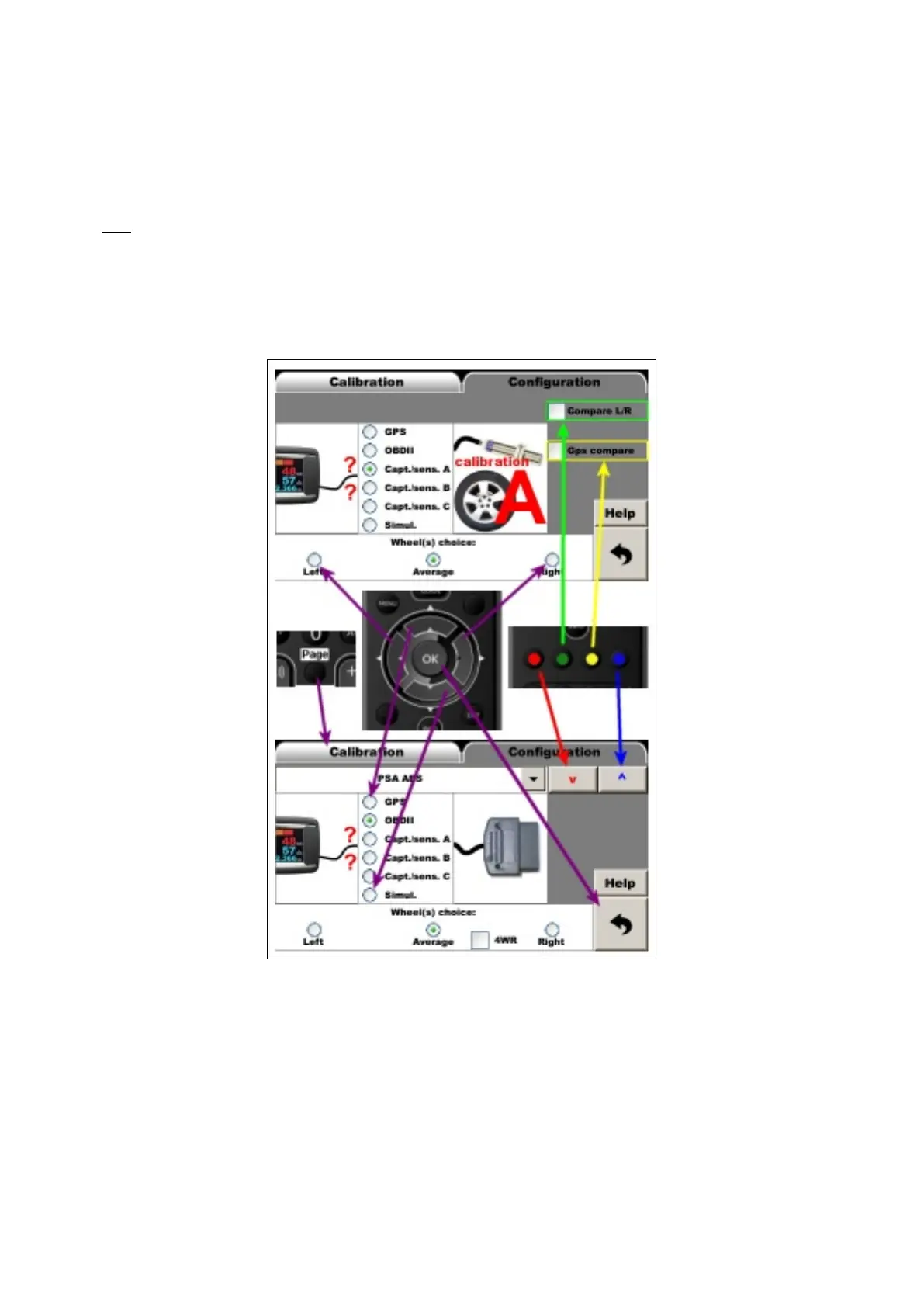
When possible, a panel at the bottom of the screen can then choose whether the distance should be measured on
the right / left / average of the two wheels.
These choices can be "swept" using the left and right arrow keys on the remote control.
Note:
- with“Peugeot/Citroën ABS” OBDII configuration 4WR check box add 2 more wheel inputs (front wheels),
- with the Capteur/sensor configuration, two checkbox add the sensor monitoring function based on the GPS
(Compare GPS), or on left/right wheel sensor comparison (Compare L/R) , see below.
- Then go to the "Calibration" tab (Page key on remote control).
Remote control usage:
5.2 Sensors test
If the system allows it (wheel speed sensor or OBDII in ABS mode), the Detailled distances button displays the
pulses sent by the sensors via the page (the number of counters can be different according to the configuration):


 To Next Page