RR400/420 User Manual - CRISARTECH
Firmware version 190122 - © CRISARTECH 2019 - Page 17 / 29
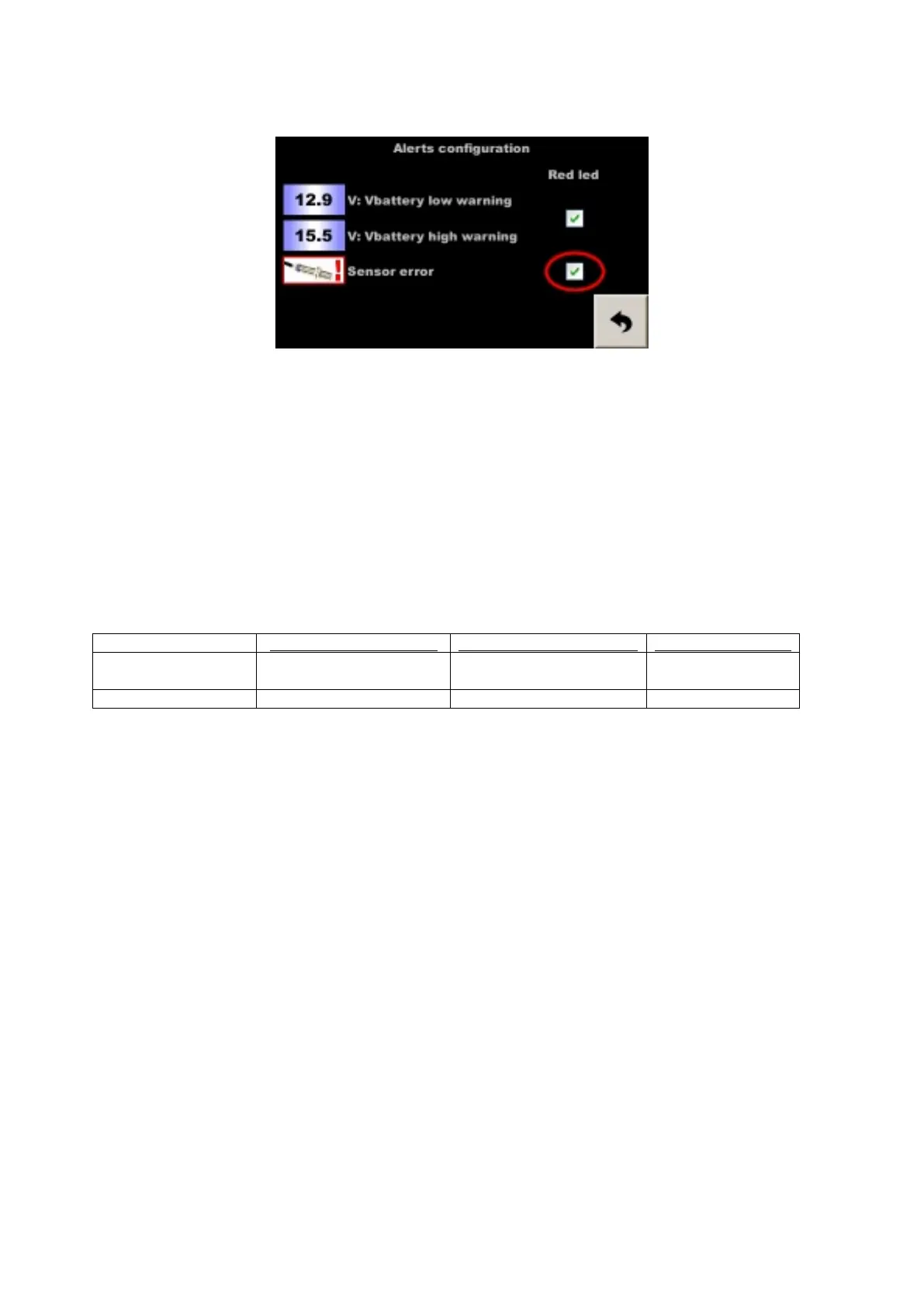
The red LED flashes if the corresponding box is checked in the alert configuration screen:
Menu - Config. equipment - Alerts config.
By removing this popup, we can display the percentages of error, which allows to better understand the problem:
- if a slight difference appears between right and left, following a succession of turns in the same direction, we
can consider that it is a false alarm, but it is necessary to monitor the / the sensors,
- if a slight difference appears after changing tires, you must change the calibration,
- if a difference with GPS appears after having crossed a tunnel, an avalanche barrier, or a very dense forest, it is
normal the GPS lost some meters,
- if a significant difference suddenly appears, a sensor may be faulty, especially not perform “on-the-fly”
correction (+/- 1 or 10 m key) before confirming or reversing this assumption. To do this, go to the
detailed distances page to monitor the distances of each sensor. If the failure of one sensor is confirmed, use
the other or the GPS. The most correct distance will be restored automatically when the faulty sensor is
ignored, because the distances (L wheel, R wheel and GPS) are measured separately, then selected or averaged
to serve Trip1. But during a correction, the three are synchronized, that's why we must not correct “on the fly”
when we have a doubt.
action on the touch screen:
action on the remote control: the test resumes after:
hide popup and display
the percentages of error
maintained push (2 seconds)
INFO key
30 seconds
simply hide popup simple push other key 2 minutes
There are three parameters to fill in:
- measurement distance before comparison (in km), common for both tests,
- maximum error for left / right wheel comparison (in%),
- maximum error for GPS and wheel comparison (in%).
This function can be used in two ways:
- monitoring "health" sensors: put a distance short enough to quickly detect a failure (0.15 km for example) and
a maximum error large enough to avoid false alarms (5% for example),
- calibration error detection (forget calibration change after changing wheels for example): put a distance long
enough to avoid false alarms (0.8 km for example) and a maximum error strict enough to detect small errors (1
% for example).
The given values are indicative and are to be refined before the rally according to the configuration (number of
pulses per revolution for example).
5.8 Battery voltage monitoring
The battery voltage is displayed in the link screen.
In case of low or high battery level, a warning popup is displayed in the main running screens. The ignition
thresholds can be changed in the alerts configuration page and the red led can follow the display of the popup:


 To Next Page