RR400/420 User Manual - CRISARTECH
Firmware version 190122 - © CRISARTECH 2019 - Page 23 / 29
11 MultiSpeeds mode
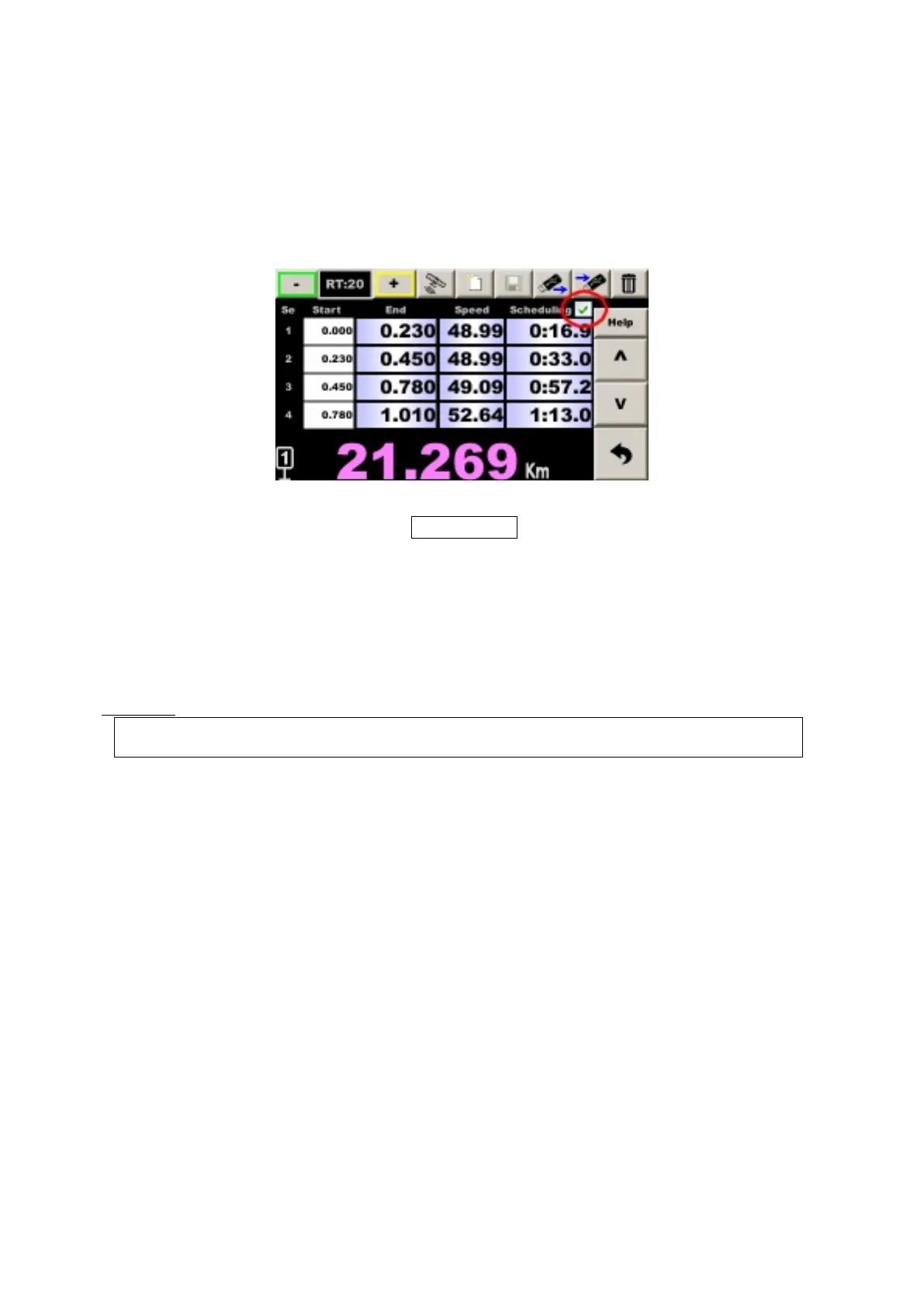
In this case the co-driver must enter distances and times of passage (instead of average speeds). The table can be
given by the organizer in advance or just before the start of the regularity test.
In the classic mode, end of segment timings are given as an indication. In the multi-speeds mode, you can enter
them, but only on the remote control in this version.
Check the box at the top right:
After entering the distance, the cursor automatically switches to the time entry box. You have to enter:
mm:ss.t
- mm: minutes beginning with 0 if less than 10 mn
- ss: seconds
- t: tenth of a second that can be omitted if 0
Once the timing is entered, the timer takes into account the segment, it calculates the average speed and refreshes
the lead / delay, it is not necessary to record with the red key.
It is possible to enter the average speed as the conventional mode if the table mixes speeds and times of passage but
in this case, it is necessary to record with the red key so that the timer calculates the times and updates lead / delay.
In summary
:
distance by blue key or multi-speeds timing: no need to record to take into account
entering or changing average speed: red key record required


 To Next Page