
 Need help?
Do you have a question about the crkd NEO S CK24NS and is the answer not in the manual?
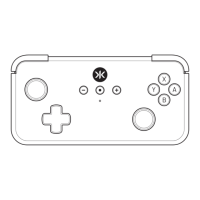
Diagram showing the front layout of the Neo S controller with labeled buttons and components.
Diagram showing the top layout of the Neo S controller with labeled buttons and ports.
Diagram showing the back layout of the Neo S controller with labeled buttons and touchpoints.
Diagram showing the bottom layout of the Neo S controller with labeled ports.
Details on the connection status indications for the Neo S Home (CRKD) button.
Instructions for connecting the Neo S controller to a Nintendo Switch via Bluetooth or USB.
Instructions for connecting the Neo S controller to a PC via Bluetooth (Xinput/Pro Controller) or USB.
Instructions for connecting the Neo S controller to iOS or macOS devices via Bluetooth or USB.
Instructions for connecting the Neo S controller to an Android device via Bluetooth.
Guide on how to seamlessly switch the Neo S between multiple paired devices using button combinations.
Step-by-step guide to program single or series of inputs to the back buttons (S1-S2).
Procedure to reset a specific back button to its default programming.
Procedure to reset all back buttons to their factory default settings.
Procedure to clear all programming and disable the back buttons.
Guidelines for preventing product exterior deterioration, including cleaning instructions.
Information on how to contact customer support for setup and usage questions.
Details of the limited warranty period and coverage for the product.
Information on consumer guarantees and warranty specific to Australia.
 General
| Brand | crkd |
|---|---|
| Model | NEO S CK24NS |
| Category | Controller |
| Language | English |

 To Next Page