2.4 Display options
Tetra 3 provides two additional selectable displays:
Peak display
When Peak mode is selected the instrument shows the highest value
for flammable and toxic gases and the lowest value for oxygen since
the unit was switched on or since the last peak clear.
After 5 seconds the screen will display 'Peak Clear'. If you press the
button within the 10 second countdown, the peak value is cleared. If the
button is not pressed, the display will revert to the stored peak value.
Whilst in Peak mode, new higher gas values are stored. Upon exit of
Peak mode, the stored peak values are not deleted.
This is useful for vertical entry checks where a whole instrument can be
lowered down the shaft rather than just a sampling tube.
TWA display
Shows the 8 hour time weighted average (TWA), for toxic gases,
monitored since last turn on.
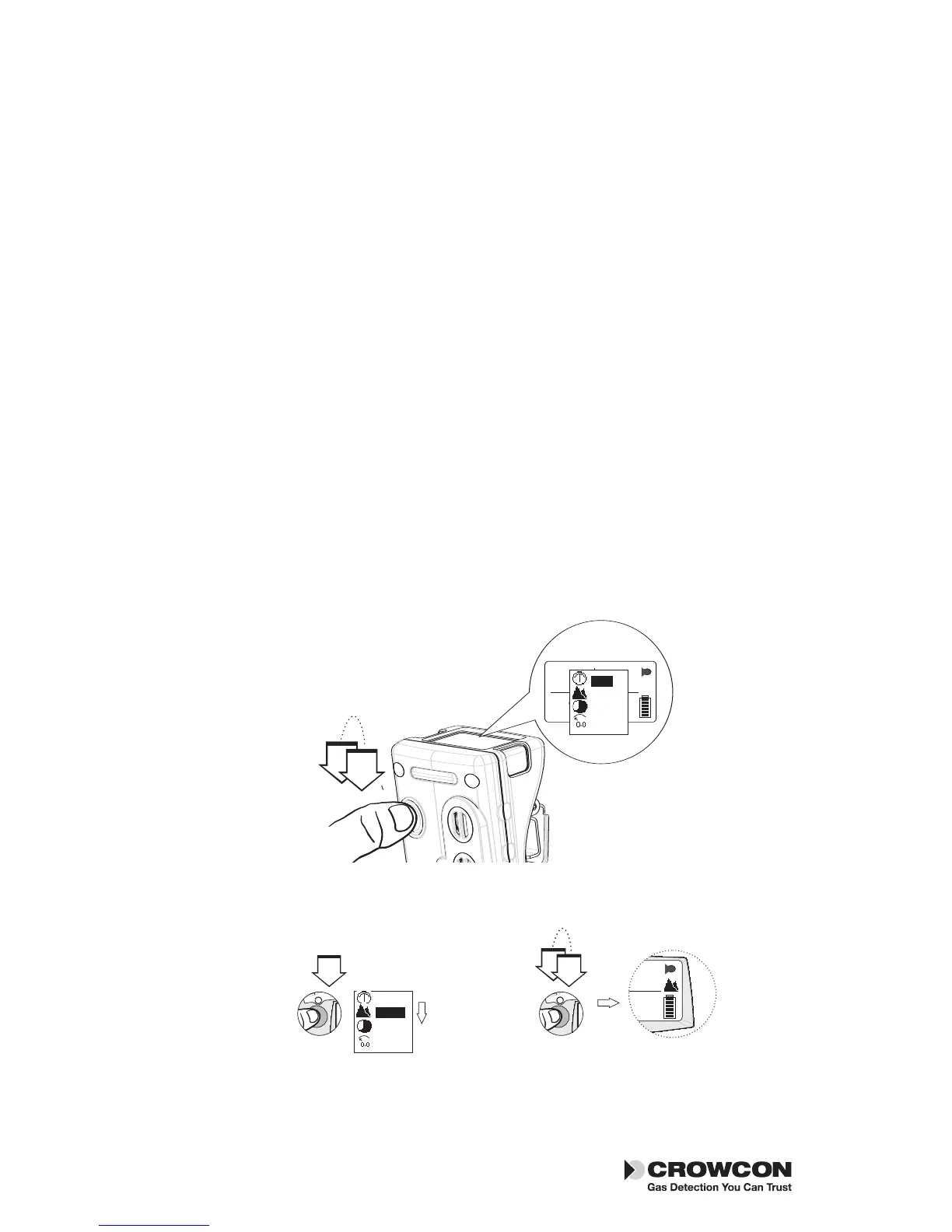
1. To view the additional display option menu, double-click the operator
button.
2. Press the operator button with a single click to scroll through the list.
When your choice is highlighted, double-click the operator button.
The Tetra 3 operator screen will display the peak or TWA icon and the
gas readings recorded.
10
Display options Tetra 3


 To Next Page