100
3) DHW Settings - From the Settings Menu, press the DHW button to change the setpoint temperature when the boiler is
responding to a call for DHW. The “DHW Setpoint” is the setpoint of the boiler supply temperature during a call for DHW.
Control of the potable water temperature is accomplished using the thermostat on the storage type indirect water heater.
4) Manual Input - From the settings menu, press the MANUAL INPUT button to temporarily lock the boiler into either high or
lowre(Figure12.5).Thismenuisnormallyusedduringtheperformanceofcombustiontests.Restoreautomaticoperation
by pressing the AUTO FIRE Button. If AUTO FIRE is not pressed, the boiler will remain in manual input until one the fol-
lowing occurs:
• 12 minutes and 45 seconds passes with no touch screen activity
• The user returns to the Home Screen
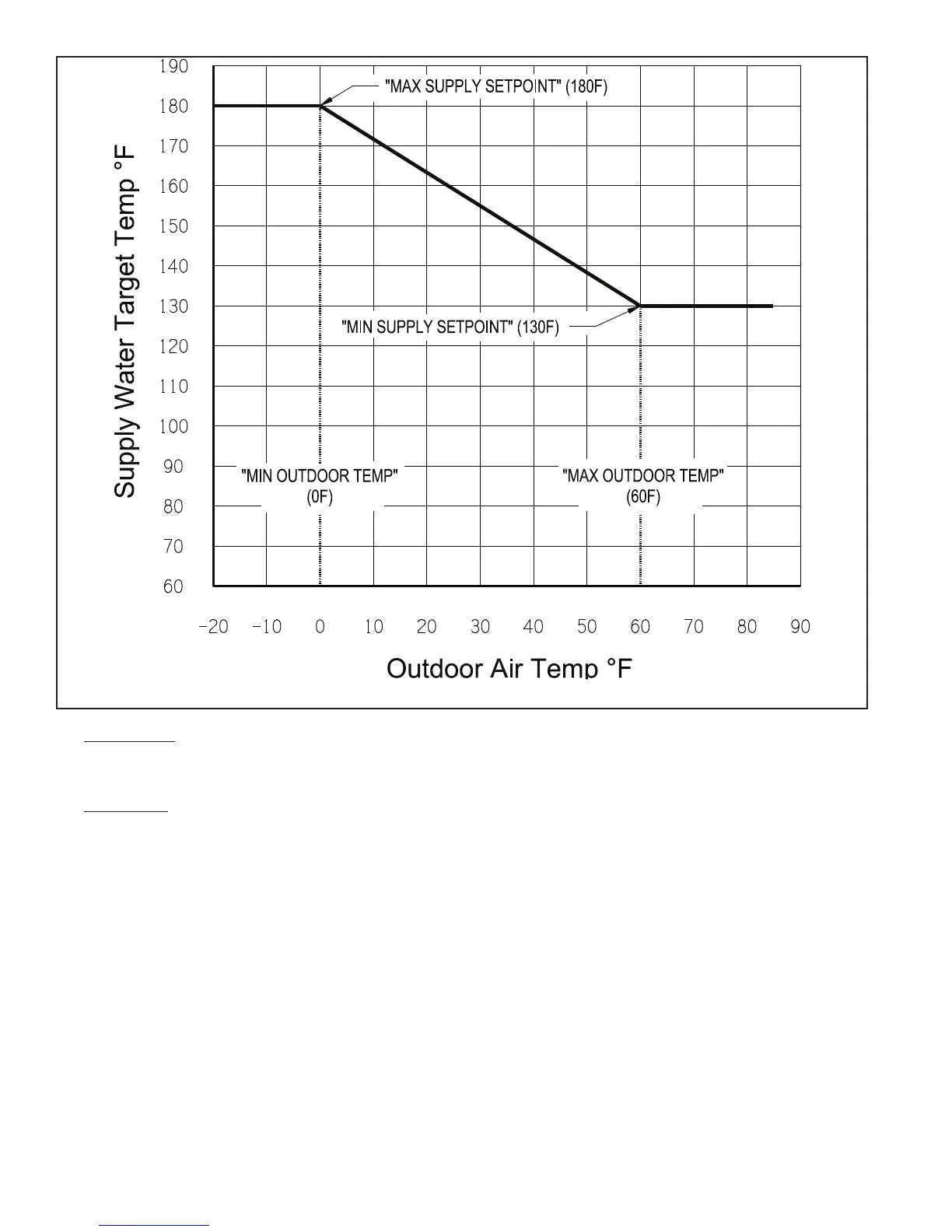
FIGURE 12.6: OUTDOOR RESET CURVE (DEFAULT SETTINGS SHOWN)




 To Next Page