.
12
.
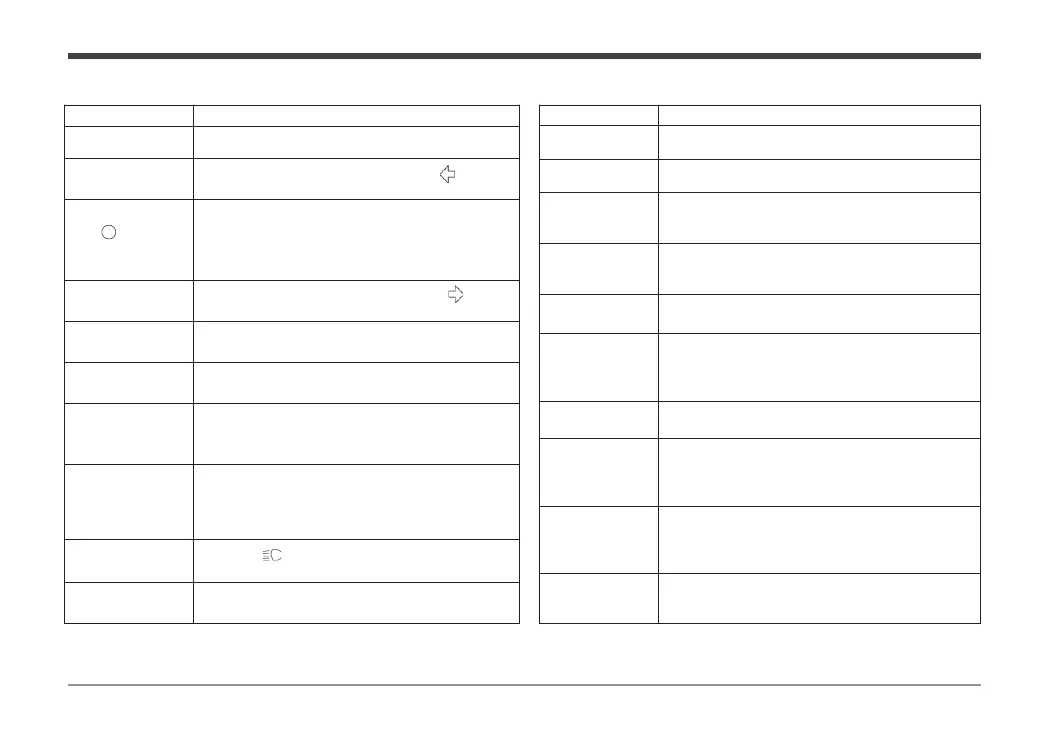
Instruction to User
Name Functional Description
When starting, the ABS fault light is on and it will be
off if the speed is above 20km / h.
The actual bus current of the controller is
When the indicator light is on, the vehicle cannot be
started. Press
the P mode key of the handle switch to
release it before starting the vehicle.
Display the driving mode of the vehicle, including
ECO, COMFORT, SPORT
It is used to display the current battery capacity of
the electric vehicle.
The indicator light is on when the vehicle is
connected with a Bluetooth signal.
positioning system signal display. GPRS mobile app
system signal display
When the vehicle speed is ≥ 1, this sign is
displayed
TRIP is the display of subtotal mileage, and the
subtotal mileage can be cleared.
accumulated mileage generated by the vehicle
during driving.
It will display the fault code and fault code
information. If it is displayed, please visit
company's special maintenance service center for
troubleshooting.
Prompt for faults of motor, controller, beam steering
handle, battery, etc
.
Name Functional Description
Displays the running speed of the vehicle.
When the left turn indicator is on, “
After the electric vehicle is powered on, the
Ready light will be on when there is no fault
in the self
test, and it will be off when there is
fault.
When the right turn indicator is on,“
5. Cruise control
indication
When the indicator light is on, the cruise
control function is on.
6. Vehicle locking
indication
When the indicator light is on, the vehicle is
locked, and do not ride the locked vehicle.
When the indicator light flashes, it indicates
that the electric quantity is low, please charge
it as soon as possible.
the MODE key > 2s to reset
ress the MODE + SELECT key to
odometer in Inch or Metric Mode.
When using the high beam, the high light
indicator “
10. Motor over
temperature fault
When the light is on, it indicates the motor
over temperature fault state.


 To Next Page