.
13
.
Instruction to User
6
7
2
5
3
4
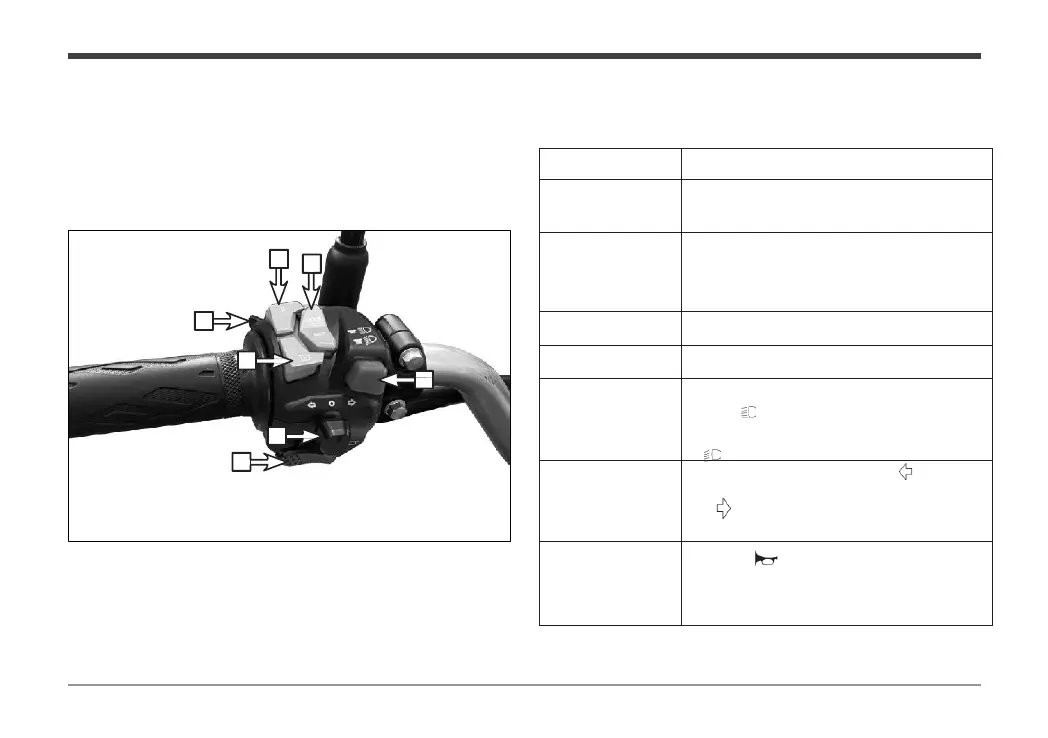
Name Direction for Use
To flash your high beams at night when passing
another vehicle, press this “PASS” switch.
To activate cruise control, press this button while
driving at a steady speed and do not touch the
throttle. Cruise control will turn off when you
brake.
Press the reverse button and then twist the
throttle to make the vehicle go backwards.
The operation method is the same as the
corresponding function key of the instrument.
the lighting switch button is pressed to
”, the high beam lamp is turned
the lighting switch button is pressed to
”position, the low beam lamp is turned
Push the turn signal button to the “ ” position to
signal a left turn. Push the turn signal button to
the “ ” position to signal a right turn.
Press the “ ” button to sound the horn.
Left handle switch
The main functions of the left handle switch are as follows:
1


 To Next Page