.
14
.
Instruction to User
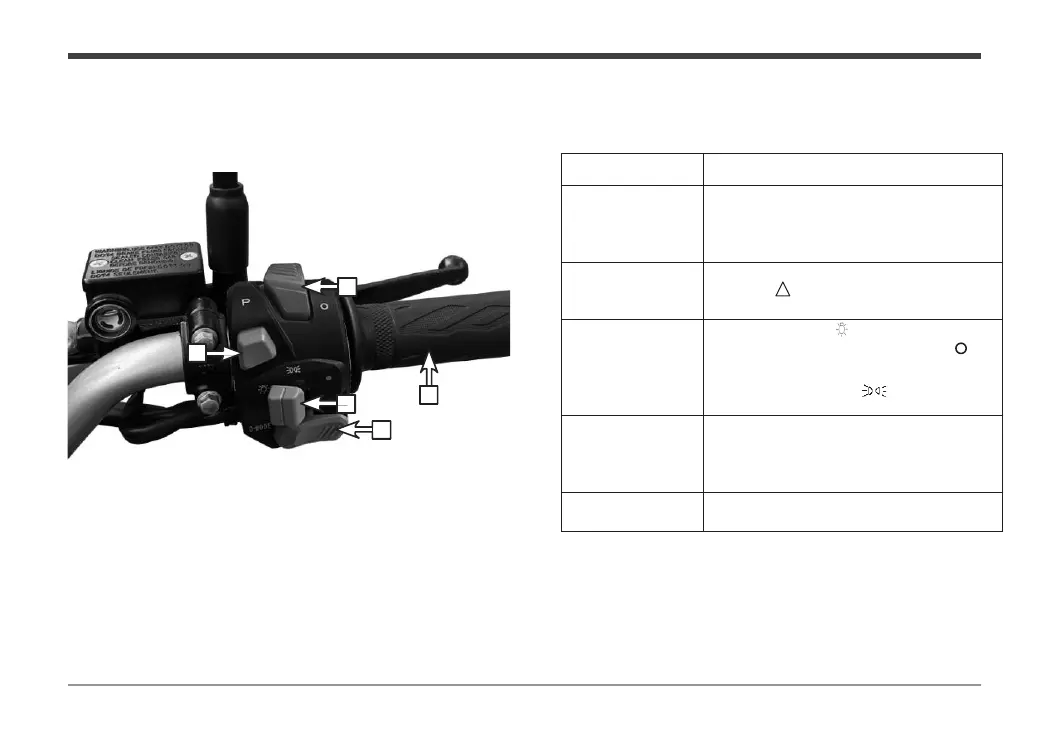
Right handle switch
The main functions of the right handle switch are as follows:
When the vehicle is parked, the indicator
light on the instrument is on; When the
user presses this key, the indicator light
will be off and the vehicle can be started.
When the switch is pulled to the
position
“ ”, the left and right turn
signals flash simultaneously.
Pull the switch to the position, and the
headlamp is on; Pull the switch to "
position, the position light is on; Pull the
switch to the position "
electric vehicle lighting system.
You can change the driving mode as
needed while riding the vehicle. The
dashboard will show you the current
mode.
control handle to control
the running speed of the electric vehicle.


 To Next Page