CSI-1 Instruction Manual10
Programming Instructions
Programming OPEN and CLOSE Limits
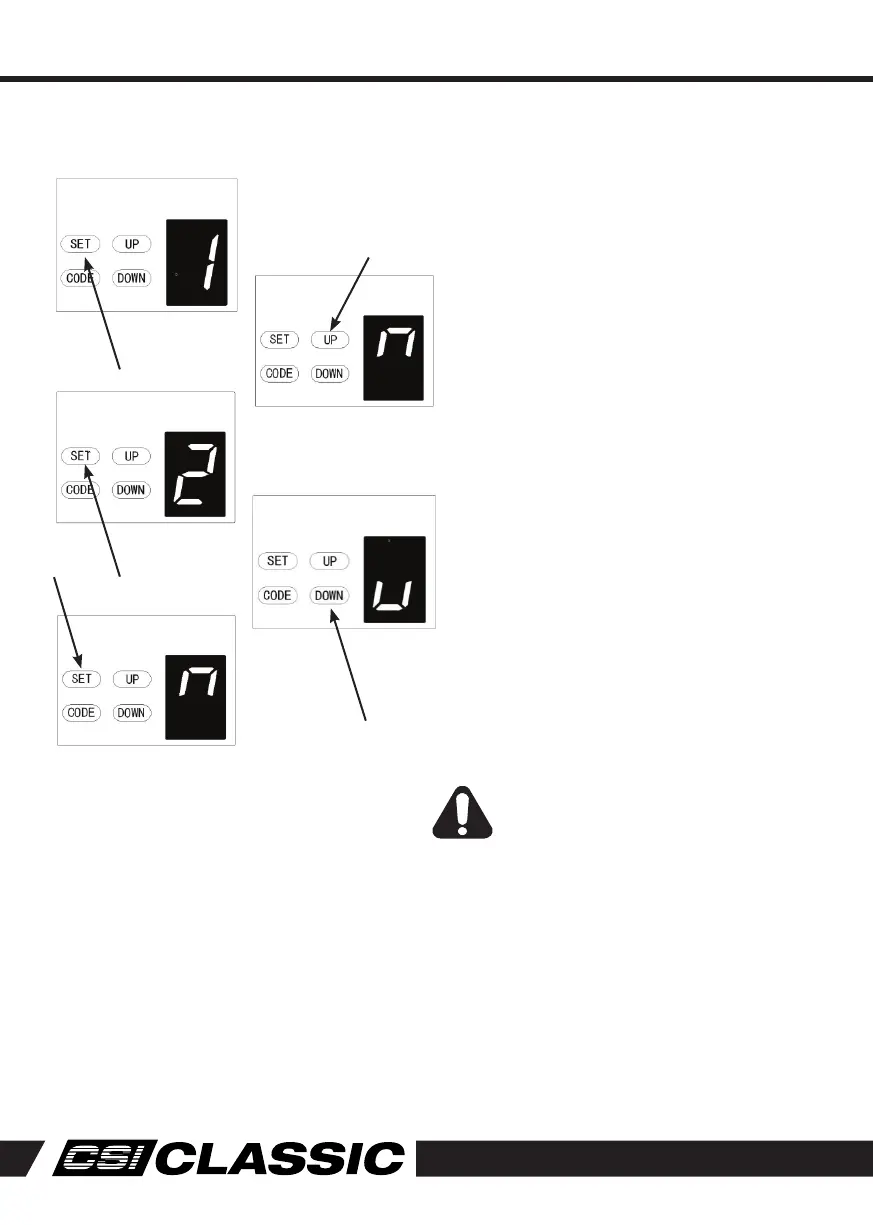
1. Press and hold SET Button until 1 appears
on the display then release the button.
The door opener is now in Programming
Mode.
2. Press and hold the UP until the door reaches
the desired open position.
NOTE: Fine adjustments can be made by
toggling UP & DOWN buttons
3. Now press the SET button to confirm the
postiion. The display will now indicate the
number 2.
4. Next press and hold the DOWN button until
the door reached the desired close position.
For fine adjustments toggle UP & DOWN
buttons.
5. Now press and hold the DOWN button until
the door reaches the desired close position.
For fine adjustments toggle UP & DOWN
buttons.
6. Now press the SET button to confirm the
close position.
WARNING: The door will now cycle
open and close to set the travel limits
and force sensitivity adjustments.
The door is now set for normal
operation.



 To Next Page