11CSI-1 Instruction Manual
Programming Instructions
Programming Hand Transmitters
NOTE: Hand transmitters that are supplied with
the door opener are pre-programmed.
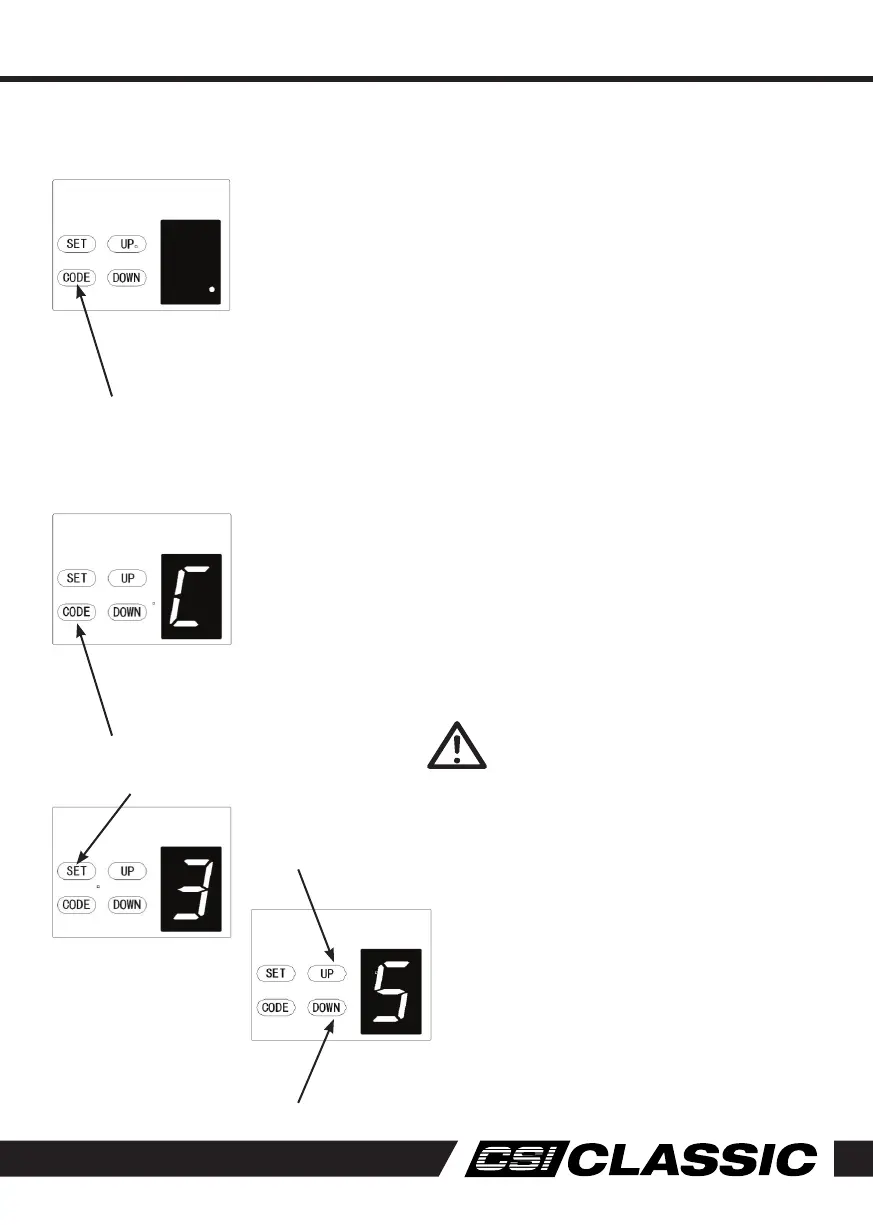
1. Press the CODE button. A dot will be
indicated in the corner of the display.
2. Now press the button on the hand transmitter
you want to use, pause for 2 seconds,
then press the same button on the hand
transmitter again for 2 seconds.
The dot on the display will flash to confirm the
code, then turn off. Repeat the process for
additional remotes that need to be stored.
Deleting Stored Hand Transmitters
1. Press and hold CODE button until a C is
indicated on the display. All stored remotes
will be deleted.
Obstruction Force Adjustment
CAUTION: The obstruction force
adjustment is set automatically
during programming. Normally no
adjustment is necessary.
1. Press and hold the SET button until 3
appears on the display the release the
button.
The unit is now in force adjustment mode.
2. Press the UP button to increase the force
setting or the DOWN button to decrease the
force setting.
The minimum force is 1 and it can be adjusted
upward.
3. Press SET to confirm your setting.
NOTE: The force is set on 3 as standard in
factory.
Increase force
Decrease force



 To Next Page