16
Riva
17
Share, inspire, have fun!
With CTOUCH by your side.
ctouch.eu
CONNECTING TO WIRED INTERNET
Plug the LAN-cable into the LAN-port on the bottom or side of the CTOUCH display, to connect to
the internet.
FIRST TIME INSTALLATION
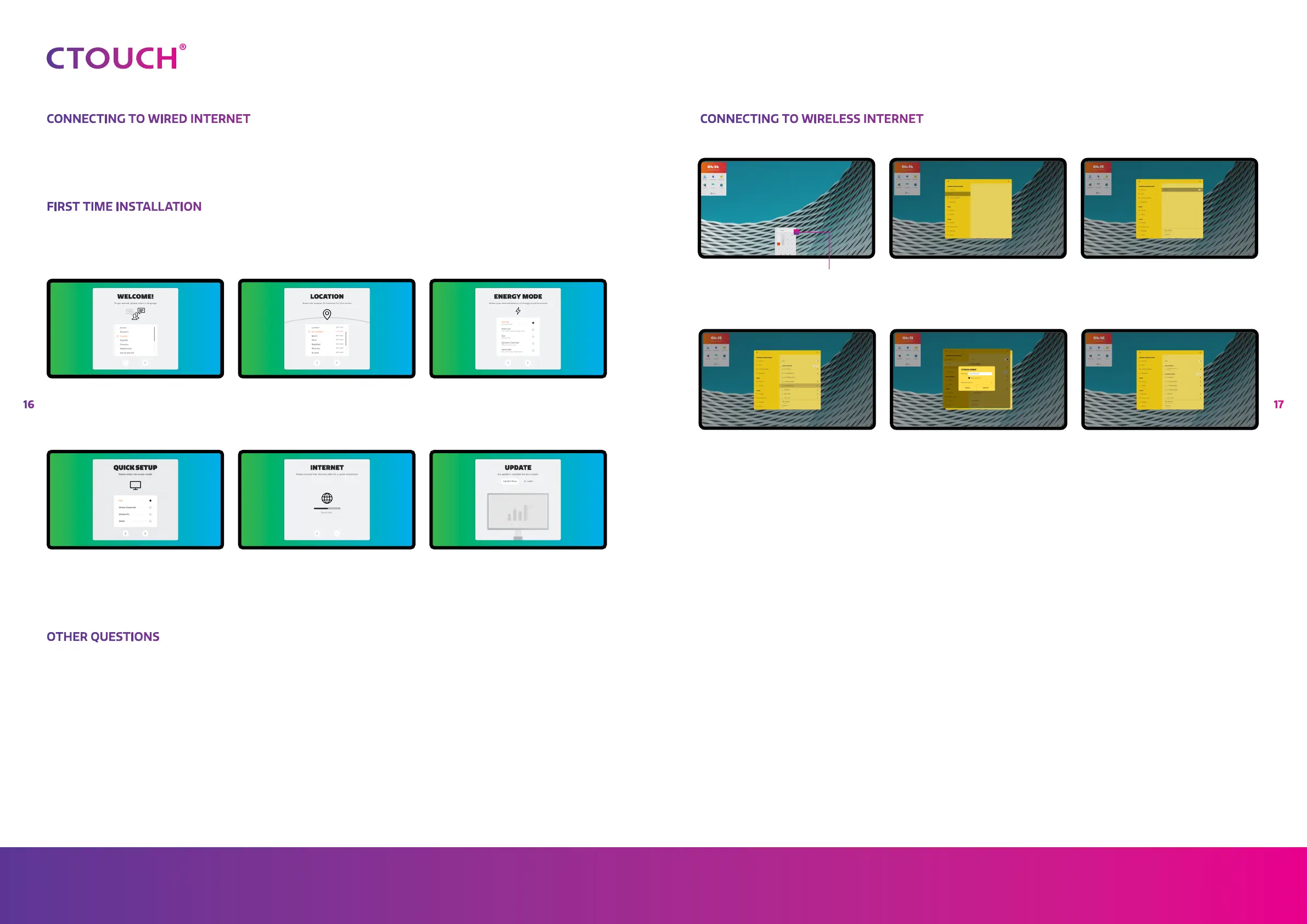
When turning on the CTOUCH display for the first time, the below shown installation menu pages
will appear on the screen.
OTHER QUESTIONS
Press the CTOUCH home button and then press on the 'I"-icon to open the onboard manual.
Or visit support.ctouch.eu.
Select the desired menu language. Press
START to go to the next page.
Select the model you have (depending on
the BRIX module that is delivered with the
display).
Select your location and press NEXT to
go to the next page.
Follow the steps on the screen to connect
your display to the internet.
Select your required Energy Mode and
press NEXT.
The display will check if there is an update
available. After this step the installation is
finished.
CONNECTING TO WIRELESS INTERNET
Click on the Setting Menu icon in the Float
bar
Select the requested Wi-Fi
network
Click on Wi-Fi
Fill in the password and select
‘connect’
Turn the Wi-Fi on by touching the
on/off button on the right upper
side
The connection is set if you see
‘connected’ underneath the connected
network


 To Next Page