©2020 Cyber Power Systems (USA), Inc. All rights reserved. All other trademarks are the property of their respective owners.
15
ELECTRICAL INSTALLATION CONT.
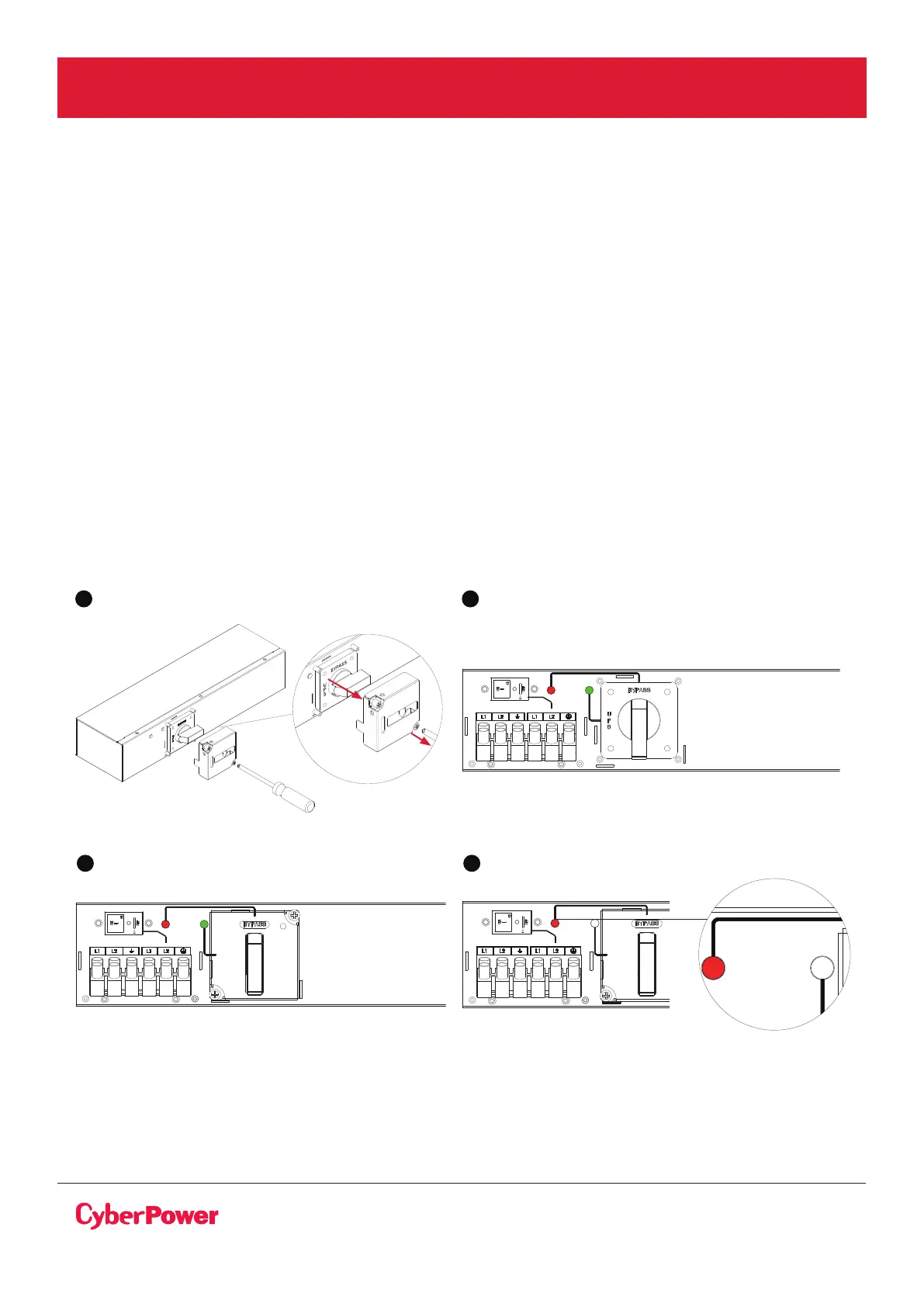
1. Release two screws by screw driver and open the Cover of MBP switch, UPS will be automatically
turning to “Bypass mode”.
2. Verify that the UPS is on Bypass mode by checking UPS display panel (refer to the UPS user manual).
3. Set the MBP manual Bypass switch to “Bypass” position, indicating that the load is supplied
directly by Normal AC source (Utility) power.
4. Replace the Cover of MBP switch and tighten 2 screws by screw driver.
5. Press the UPS “ON/OFF” power button for 3 seconds to turn off UPS and make sure UPS is turned
in to standby mode and green light of the MBP goes Off.
4 5
FROM UPS OUTPUT
63A / 250V~
TO UPS NORMAL AC SOURCE
to switch
Bypass
Normal
MAINTENANCE
BYPASS SWITCH
UPS INPUT SWITCH
UPS
OK
FROM UPS OUTPUT
63A / 250V~
TO UPS NORMAL AC SOURCE
to switch
Bypass
Normal
MAINTENANCE
BYPASS SWITCH
UPS INPUT SWITCH
UPS
OK
FROM UPS OUTPUT
63A / 250V~
to switch
Bypass
Normal
UPS INPUT SWITCH
UPS
OK
FROM UPS OUTPUT
63A / 250V~
TO UPS NORMAL AC SOURCE
to switch
Bypass
Normal
UPS INPUT SWITCH
UPS
OK
UPS REPLACEMENT WITH MBP63A2 AND MBP DETECTION CABLE
For UPS removal, follow the MANDATORY steps below:
1 3



 To Next Page