365
25
58.I0
WATTS
3
D
General Computer Operation
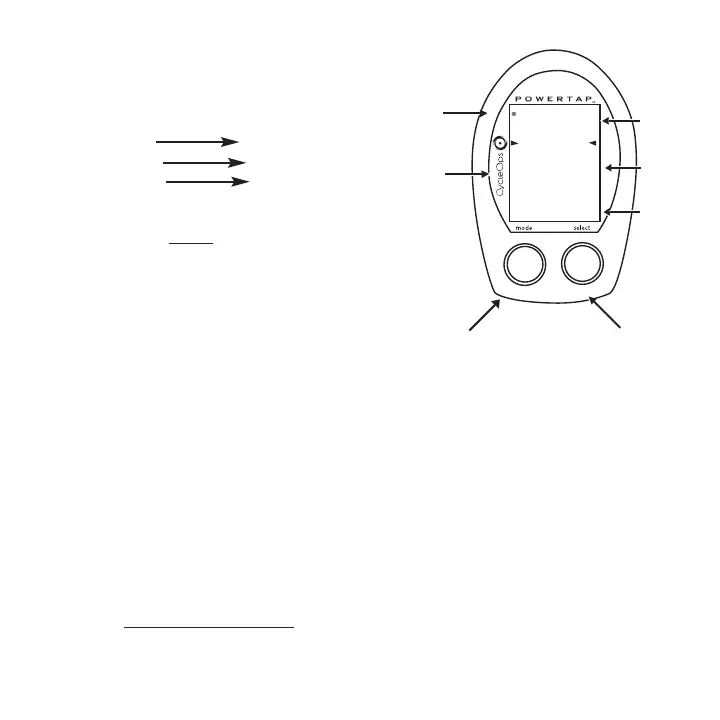
DISPLAY LEVELS
The computer has three (3) main display levels:
Top Power
Middle Speed
Bottom Multi-Function
NOTE: These locations only apply to trip and
interval modes and do not apply to Cycle Computer
or Heart Rate Monitor Function
. See COMPUTER SETUP 4
to customize display options. (SLC+, SL+ and Pro+ only)
DISPLAY MODES
The computer has two (2) main modes of operation:
1) Trip
2) Interval
Hold [MODE] to toggle between display modes.
BUTTONS
There are two (2) buttons on the computer:
1) [Mode]
2) [Select]
NOTE: [BRACKETED] words indicate buttons.
There are four (4) types of button presses:
1) Press
[MODE] or [SELECT] - a single press and release of either [MODE] or [SELECT].
Used for entering different modes and navigating functionality.
11
TRANS.
ICON
INTERVAL
DISPLAY
MODE (LEFT)
POWER
DISPLAY
SPEED
DISPLAY
MULTI -
FUNCTION
DISPLAY
BOTH
SELECT (RIGHT)
Changes active
mode
Find hub
Clear data
Enter setup
Select function


 To Next Page