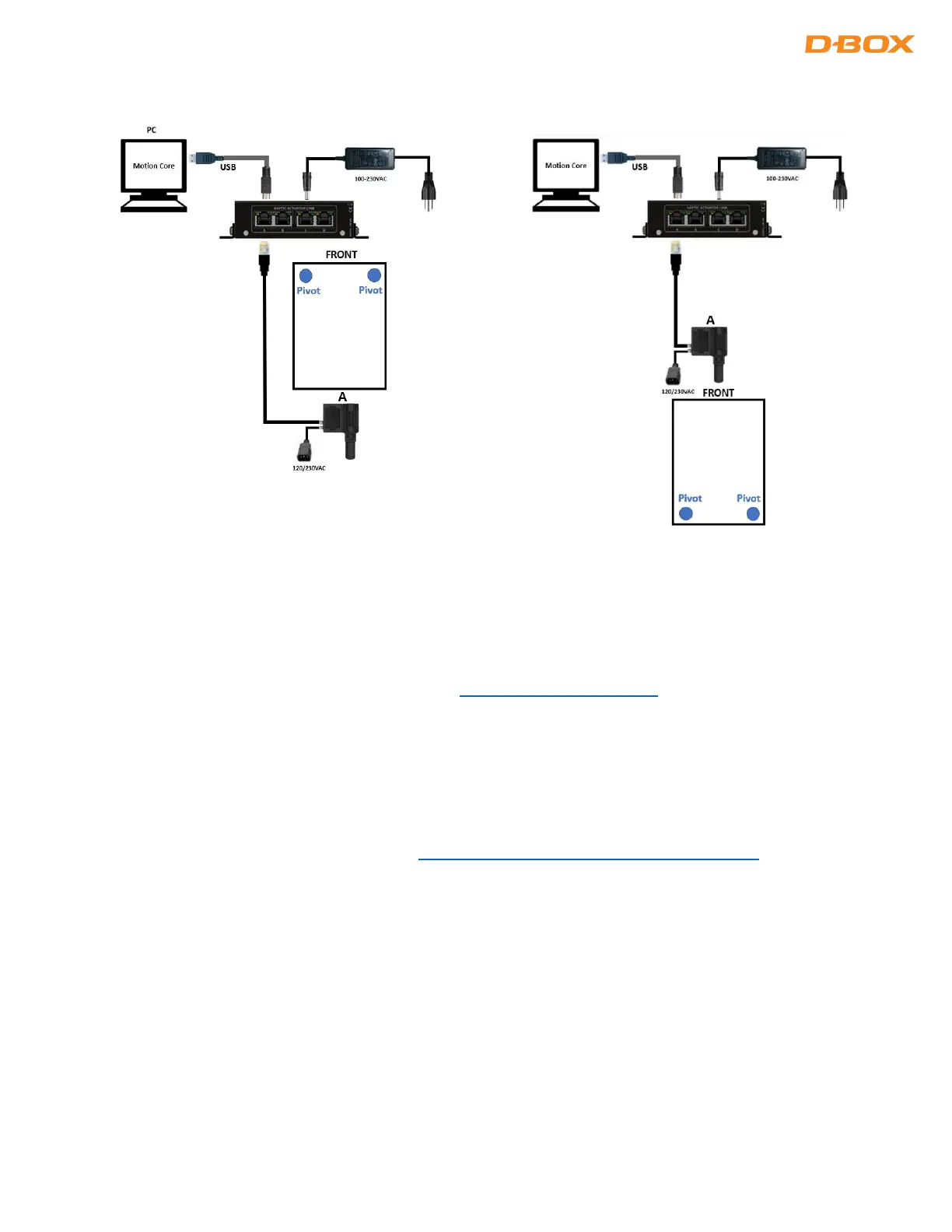
6.5 1-Actuator Configurations
7. CREATE YOUR D-BOX CONNECT ACCOUNT
Create your D-BOX Connect account. This is mandatory to install and update haptic codes for D-BOX Coded
Games and have access to haptic codes for D-BOX Coded Movies.
Here is the link to access the D-BOX Connect website: https://connect.d-box.com/
Follow onscreen instructions.
8. SOFTWARE INSTALLATION
There are two (2) D-BOX software packages to be installed on your computer: D-BOX Motion Core and System
Configurator (section 8.2). Both are available at: https://www.d-box.com/en/software-downloads
8.1 D-BOX Motion Core
D-BOX Motion Core: The D-BOX Motion Core Includes the system’s driver in addition to a complete
software suite including the following software and utilities:
• D-BOX Control Panel
• D-BOX Game Center
• D-BOX Adaptive Gaming Configurator
• D-BOX HaptiSync app
• D-BOX System Monitor
• D-BOX Stimuli Presenter


 To Next Page