2. INSTALLATION GUIDELINES
When integrating your D-BOX G5 Haptic System, please comply with the following guidelines. This will help you to
keep your product healthy and optimize its service lifetime! If you must deviate from the guidelines, please contact
us to make sure you are still using the system as prescribed.
2.1 Minimum Spacing Between Actuators
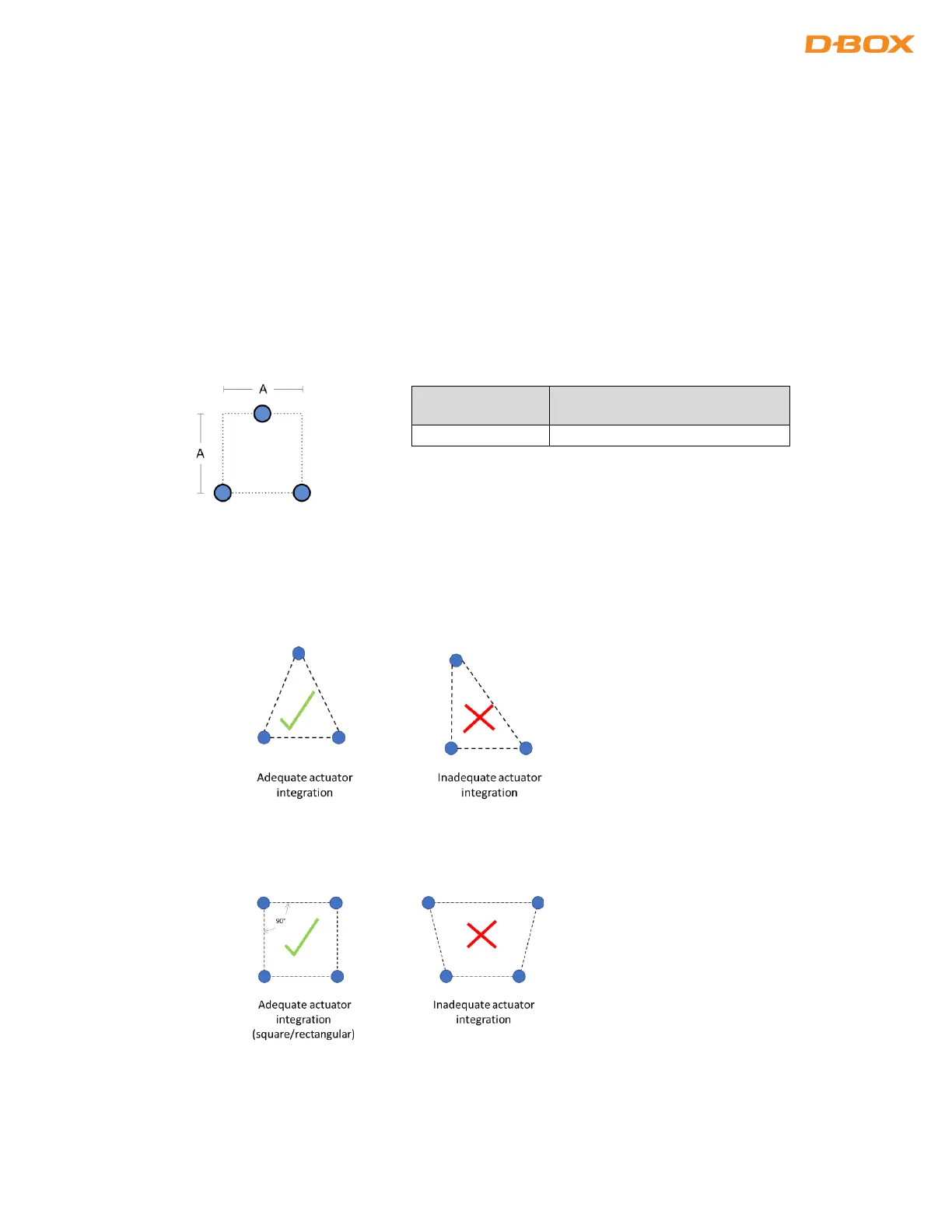
Respect the minimum spacing between actuators for adequate movement of the platform. Measure the distance
from a square surface enclosing all actuators (see example below). Respecting the spacing guidelines ensures
proper interaction of the Haptic System with the actuator endings, and proper lateral force transfer:
2.2 Haptic Actuator Alignment
When using 2 haptic actuators + pivot or, 3 haptic actuators, install them per an isosceles triangle pattern:
When using 4 haptic actuators, install them per a square or rectangular pattern:


 To Next Page