24D-Link DAP-1530 User Manual
Section 3 - Conguration
Conguration
Home
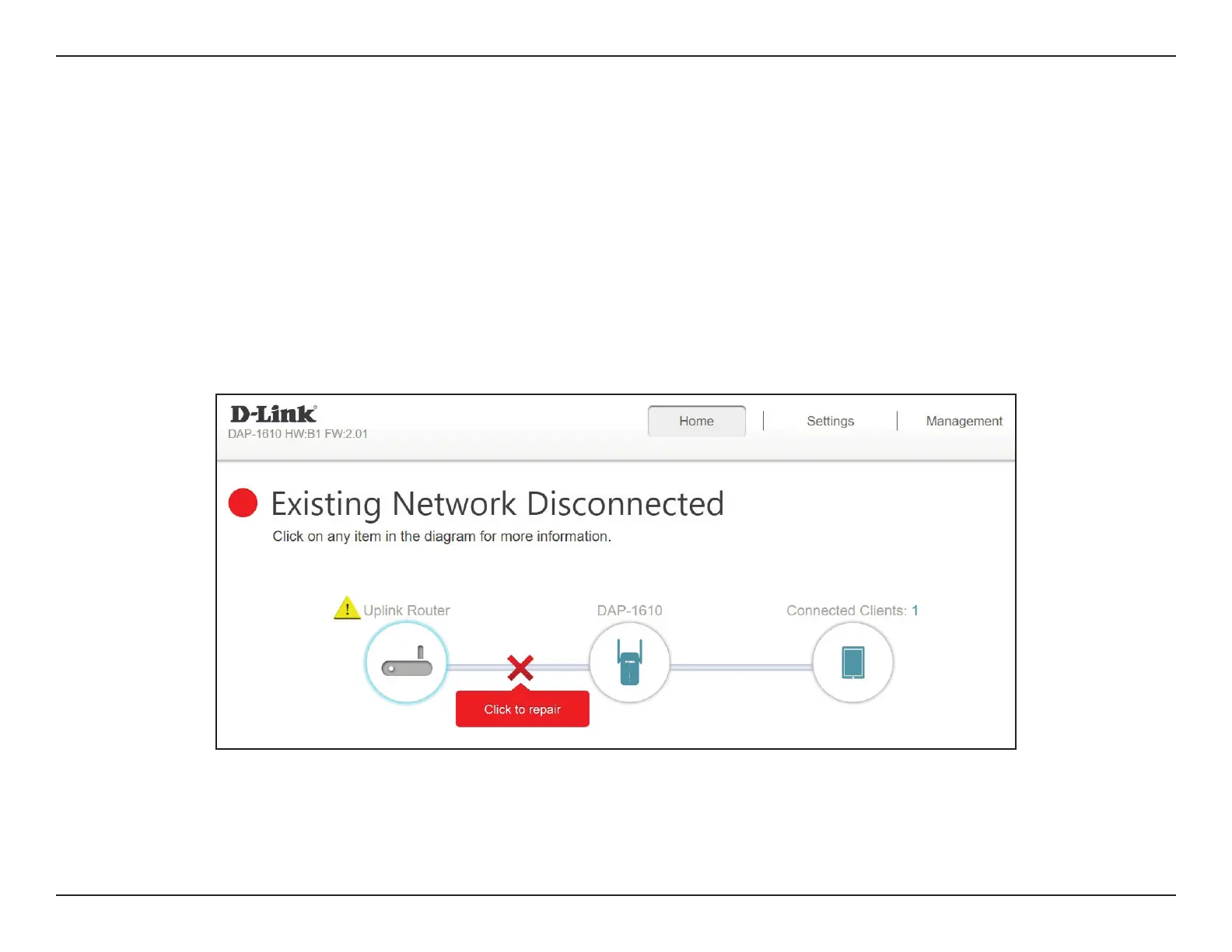
The home screen gives a summary of the current status of devices connected to the DAP-1530. A green check between the device
and the uplink router indicates that there is an active connection. A red cross indicates that there is no connection present, or there
is a connection error. If there’s no active uplink connection, click on the Click to Repair button to start the setup wizard.
Note: If the DAP-1530 is connected to a Wi-Fi Mesh supported router, then the home screen will only show the Firmware Upgrade
function. Other functions for the DAP-1530 can be congured from the router’s conguration page. For more details, refer to “Home
- Connected to a Wi-Fi Mesh Router” on page 27.
Uplink Router This icon shows the status of the Internet connection to the uplink router. It is grey if the DAP-1530 is not connected
to an uplink router. Once connected, click on it to see its connection details.
DAP-1530 Click on this icon to see details of the uplink network the DAP-1530 is connected to or connect to another uplink router.
Connected Clients Click on the Connected Clients icon to see client details.



 To Next Page