xStack
®
DGS-3200 Series Layer 2 Gigabit Ethernet Managed Switch
49
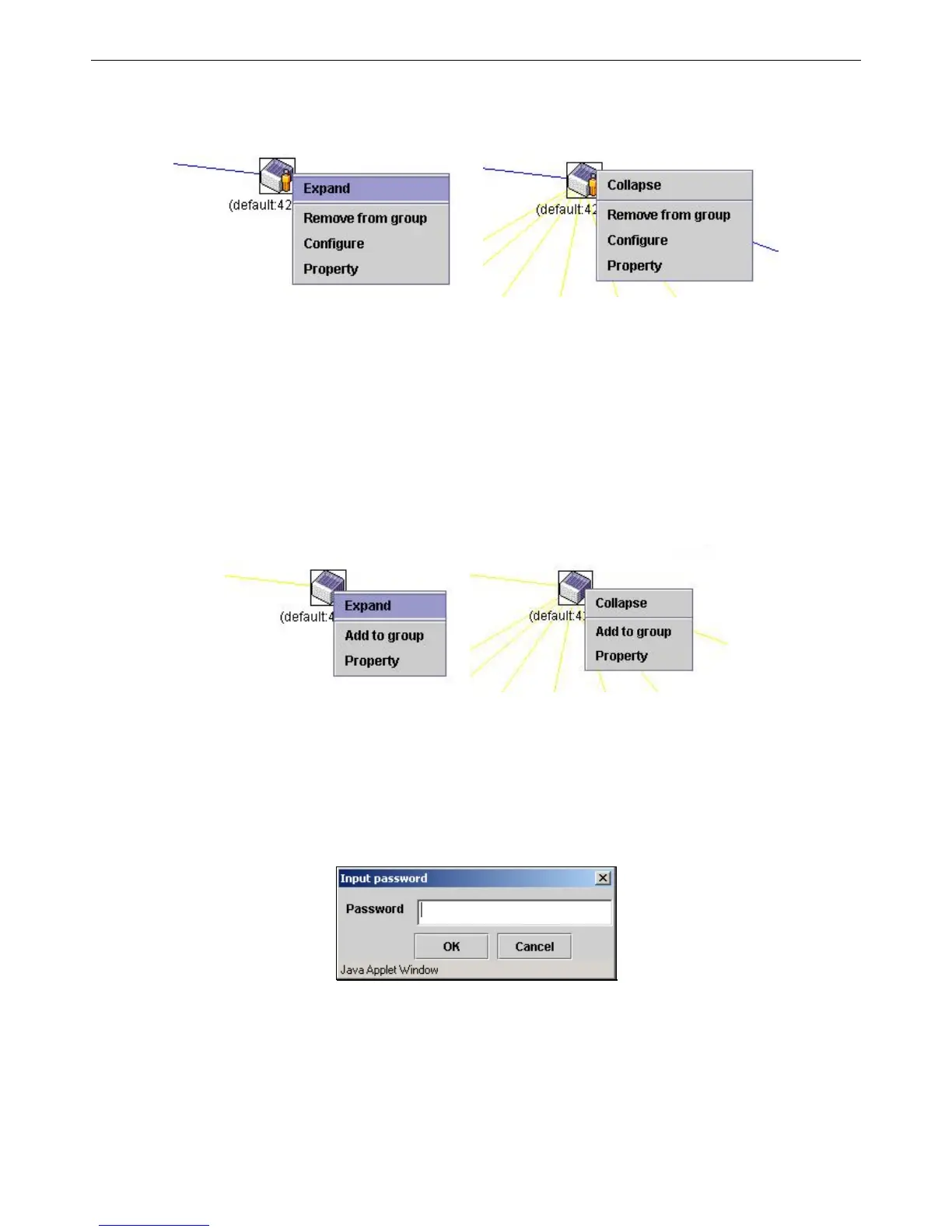
Member Switch Icon
Figure 2 - 57. Right-Clicking a Member icon
The following options may appear for the user to configure:
• Collapse – To collapse the group that will be represented by a single icon.
• Expand – To expand the SIM group, in detail.
• Remove from group – Remove a member from a group.
• Configure – Launch the web management to configure the Switch.
• Property – To pop up a window to display the device information.
Candidate Switch Icon
Figure 2 - 58. Right-Clicking a Candidate icon
The following options may appear for the user to configure:
• Collapse – To collapse the group that will be represented by a single icon.
• Expand – To expand the SIM group, in detail.
• Add to group – Add a candidate to a group. Clicking this option will reveal the following dialog box for the user to enter a
password for authentication from the Candidate Switch before being added to the SIM group. Click OK to enter the
password or Cancel to exit the dialog box.
Figure 2 - 59. Input password dialog box
• Property – To pop up a window to display the device information.







 To Next Page