xStack
®
DGS-3200 Series Layer 2 Gigabit Ethernet Managed Switch
81
STP Bridge Global Settings
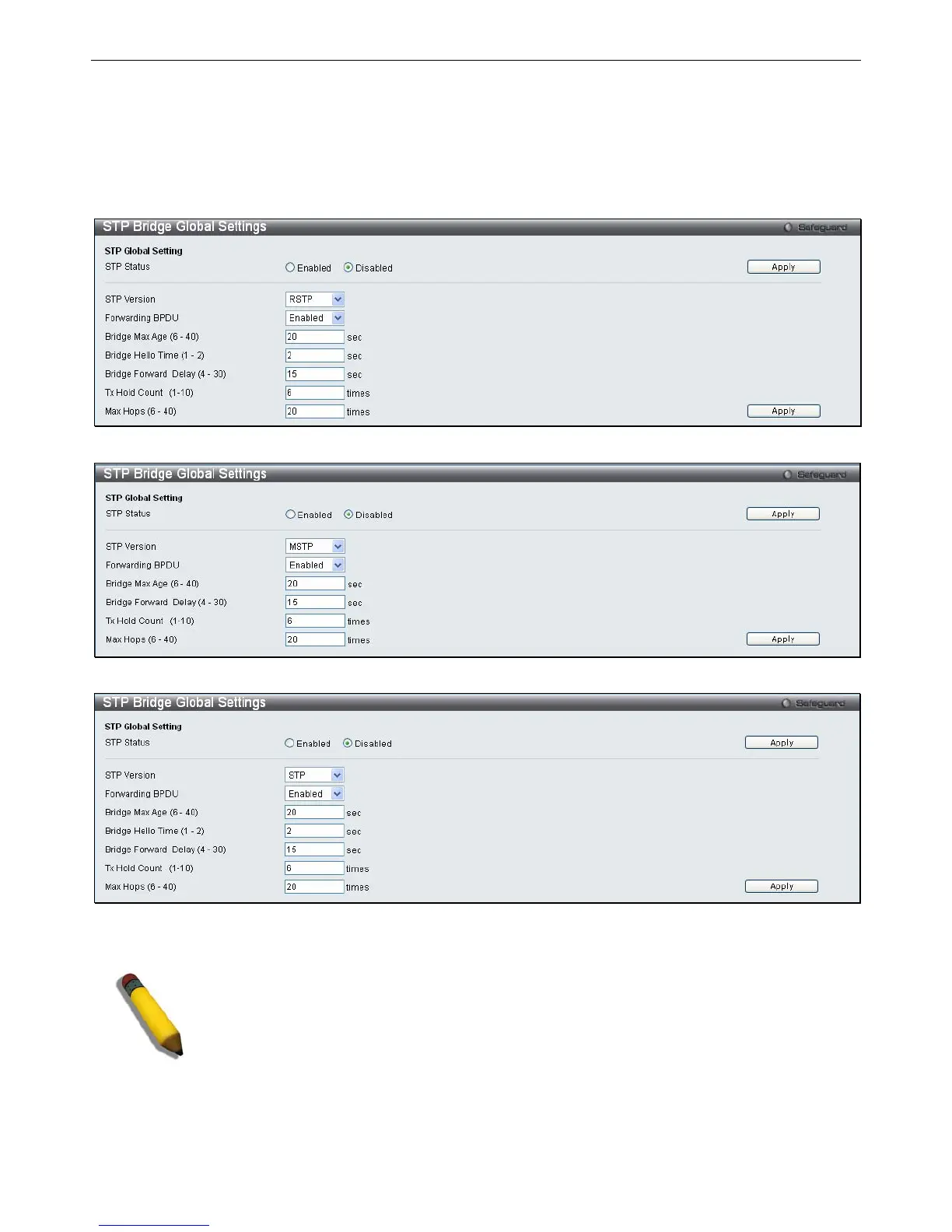
Use the STP Status radio buttons to enable or disable STP globally, and use the STP Version drop-down menu to choose the STP
method.
To view the following windows, click L2 Features > Spanning Tree > STP Bridge Global Settings:
Figure 3 - 32. STP Bridge Global Settings window – RSTP (default)
Figure 3 - 33. STP Bridge Global Settings window – MSTP
Figure 3 - 34. STP Bridge Global Settings window – STP Compatible
See the table below for descriptions of the STP versions and corresponding setting options.
NOTE: The Bridge Hello Time cannot be longer than the Bridge Max Age. Otherwise, a
configuration error will occur. Observe the following formulas when setting the above
parameters:
Bridge Max Age <= 2 x (Bridge Forward Delay - 1 second)
Bridge Max Age > 2 x (Bridge Hello Time + 1 second)
Configure the following parameters for STP:







 To Next Page