DIR-853 AC1300 MU-MIMO Wi-Fi Gigabit Router
with 3G/LTE Support and USB Port 3.0
User Manual
Configuring via Web-based Interface
2.
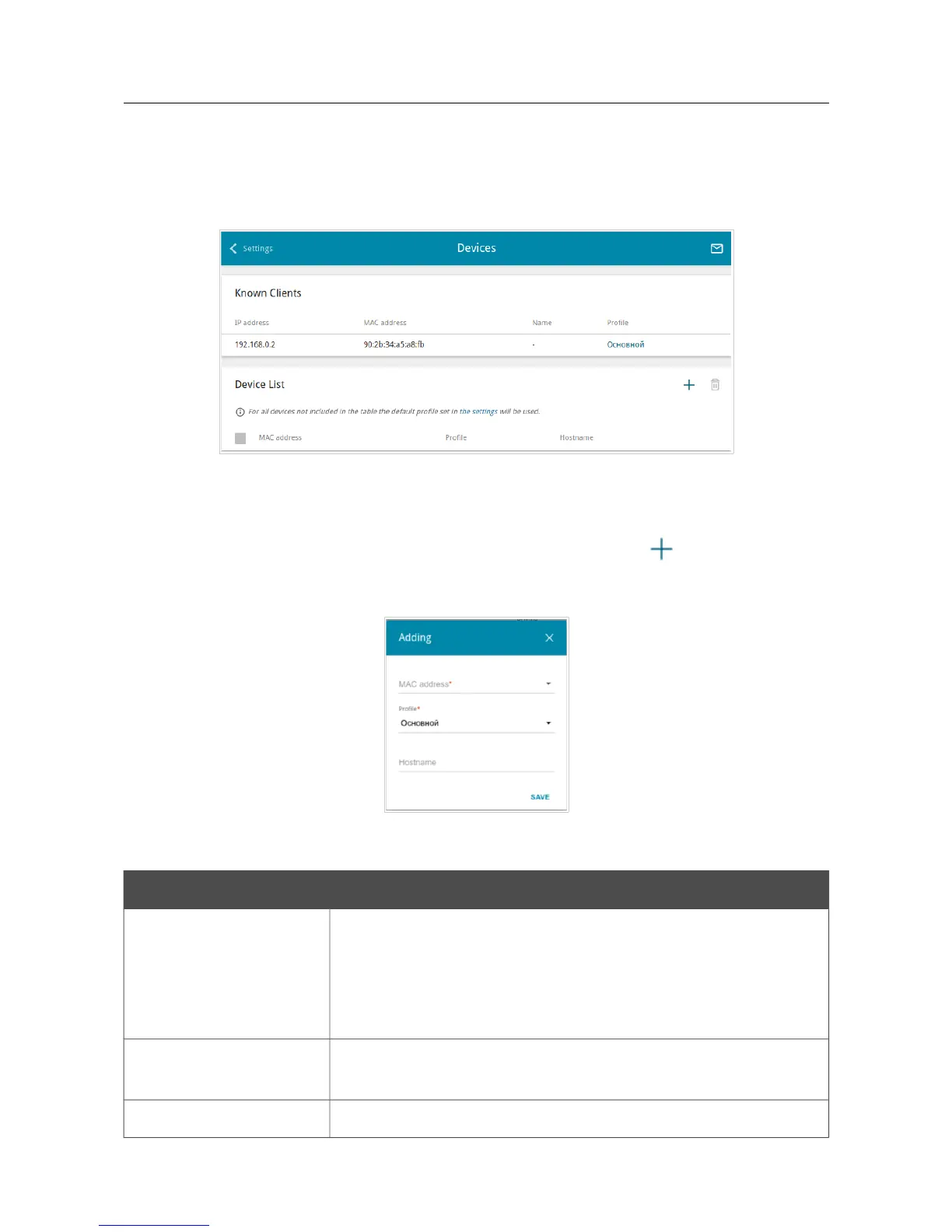
On the SkyDNS / Devices page, you can assign a specific filtering profile to a device connected
to the router's network.
Figure 177. The SkyDNS / Devices page.
In the Known Clients section, the devices connected to the local network of the router at the
moment and their relevant filtering profile are displayed.
To assign a specific filtering profile for a device, click the ADD button ( ) in the Device List
section or left-click the name of the filtering profile in the line of the device for which a profile
should be assigned in the Known Clients section.
Figure 178. The SkyDNS / Devices page. The window for adding a rule.
In the opened window, specify the following parameters:
Parameter Description
MAC address
The MAC address of a device from the router's LAN to which the
specified filtering profile will be applied. You can enter the MAC
address of a device connected to the router's LAN at the moment. To
do this, select the relevant device from the drop-down list (the field
will be filled in automatically).
Profile
Select the filtering profile which will be used for the device with the
specified MAC address from the drop-down list.
Hostname
Enter a name for the rule for easier identification. Optional.
Page 222 of 228



 To Next Page