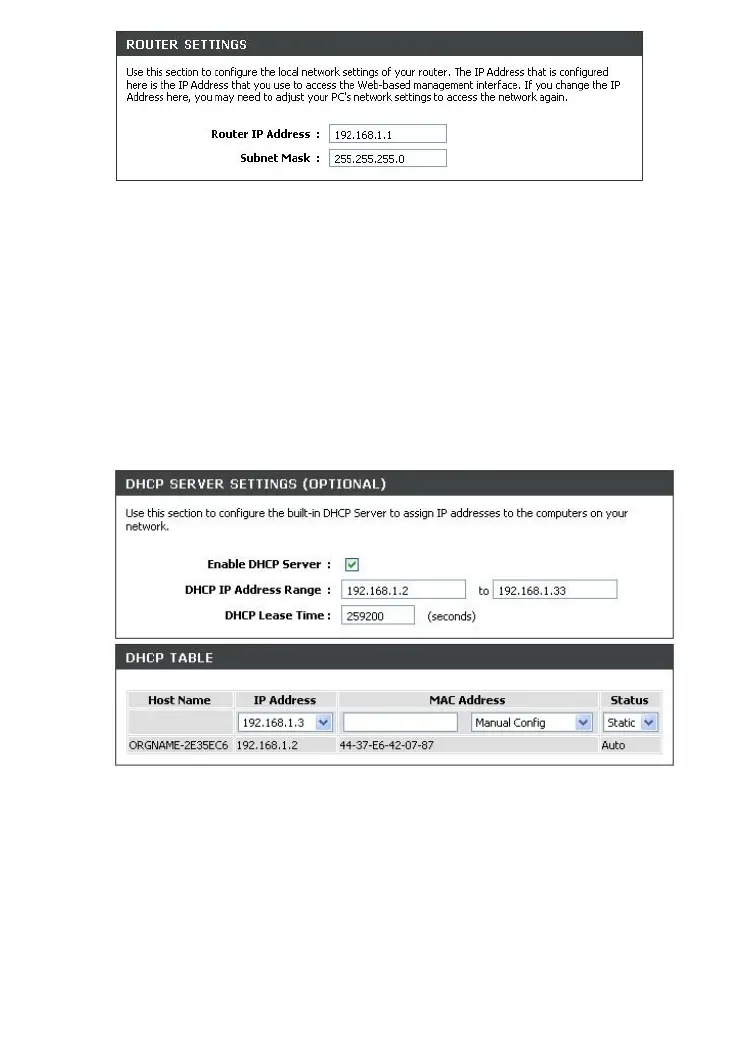
2. By default, the DHCP server of the router is enabled. If you want
to manually assign IP addresses to devices of your LAN, disable
the DHCP server (deselect Enable DHCP Server).
2 ﺽﺮﻓ ﺶﻴﭘ ﺭﻮﻃ ﻪﺑ . DHCP server ﻱﺎﻬﺳﺭﺩﺁ ﻢﻴﻈﻨﺗ ﻪﺑ ﺯﺎﻴﻧ ﺮﮔﺍ . ﺖﺳﺍ ﻝﺎﻌﻓ ﺮﺗﻭﺭ ﻱﻭﺭ ﺮﺑ
IP ، ﺪﻳﺭﺍﺩ ﻚﻴﺗﺎﻣﻮﺗﺍ ﺮﻴﻏ ﺕﺭﻮﺻ ﻪﺑ ﺩﻮﺧ ﻪﻜﺒﺷ DHCP server . ﺪﻴﻨﻛ ﻝﺎﻌﻓ ﺮﻴﻏ ﺍﺭ
)Enable DHCP Server . ( ﺪﻳﺭﻭﺁ ﺭﺩ ، ﻩﺪﺷ ﺏﺎﺨﺘﻧﺍ ﺖﻟﺎﺣ ﺯﺍ ﺍﺭ
3. After specifying the DHCP server settings, click the Save
Settings button.
3 ﻱﺎﻫﺮﺘﻣﺍﺭﺎﭘ ﻢﻴﻈﻨﺗ ﺯﺍ ﺲﭘ . DHCP server ﻱﻭﺭﺮﺑ ، Save Settings . ﺪﻴﻨﻛ ﻚﻴﻠﻛ
18



 To Next Page
 Loading...












