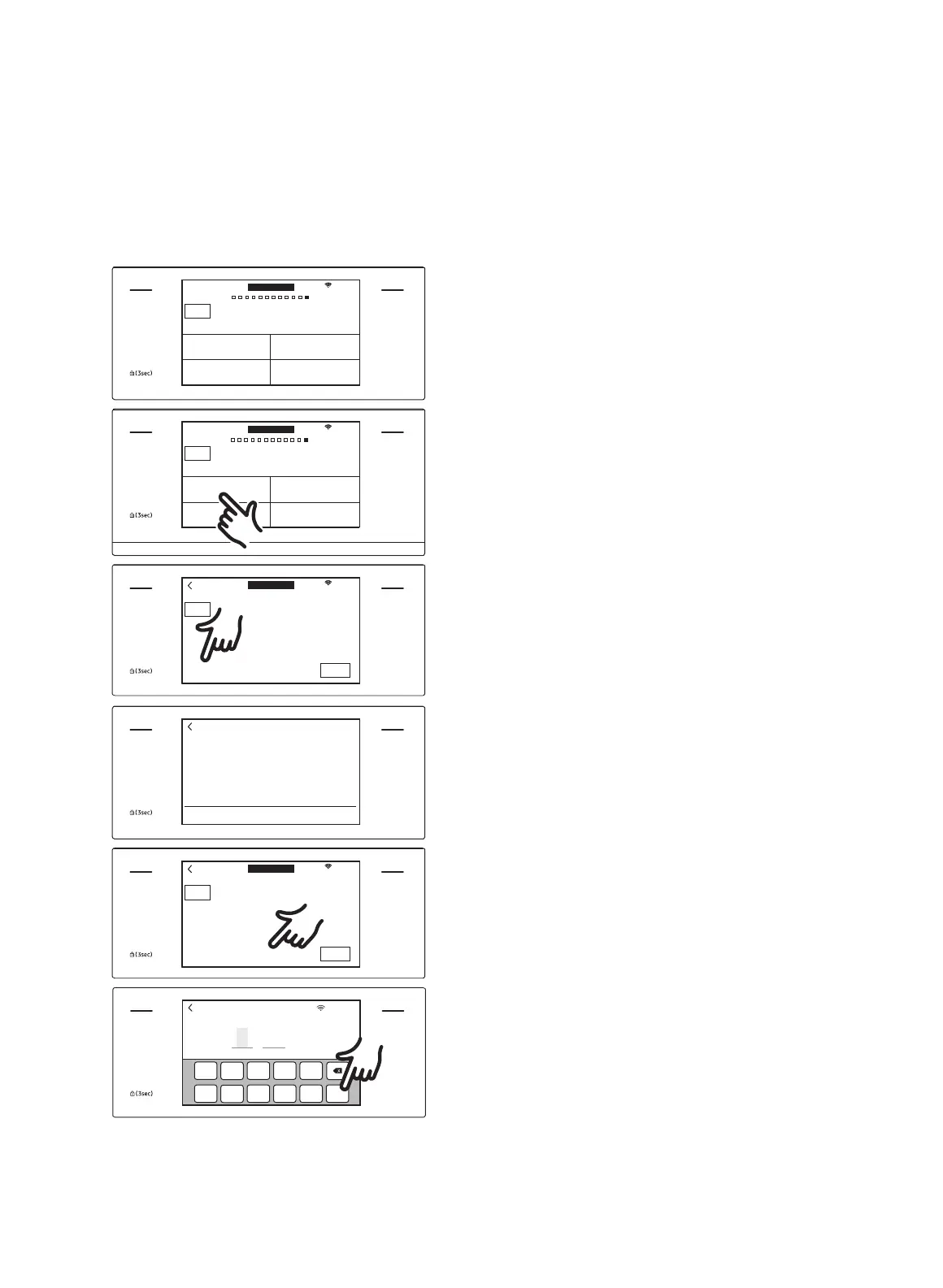
How to run a self-cleaning cycle
MICROWAVE
PAUSE/OFF
TIMER
SETTINGS
LOWER OVEN
OFF
LIGHT
OPEN/CLOSE
RESERVOIR
4:35 PM
OVEN
MODE
Clean
Self clean GreenClean™
Descale Draining
LOWER
Oven cleaning
1. Tap LOWER OVEN and swipe the
screen to Clean. The display will show
4 cleaning selections.
MICROWAVE
PAUSE/OFF
TIMER
SETTINGS
LOWER OVEN
OFF
LIGHT
OPEN/CLOSE
RESERVOIR
4:35 PM
OVEN
MODE
Clean
Self clean GreenClean™
Descale Draining
LOWER
Oven cleaning
2. Tap Self Clean.
MICROWAVE
PAUSE/OFF
TIMER
SETTINGS
LOWER OVEN
OFF
LIGHT
OPEN/CLOSE
RESERVOIR
4:35 PM
OVEN
MODE
Self clean
Oven cleaning
START
Clean Time Delay Start
3hr 00min 4:35PM
LOWER
3. Tap Clean Time.
MICROWAVE
PAUSE/OFF
TIMER
SETTINGS
LOWER OVEN
OFF
LIGHT
OPEN/CLOSE
RESERVOIR
02
03 hr
05
CANCEL OK
4. Slide the screen to set the clean time.
You can choose 2 hours, 3 hours, or 5
hours. (The default is 3h).
5. Tap .
MICROWAVE
PAUSE/OFF
TIMER
SETTINGS
LOWER OVEN
OFF
LIGHT
OPEN/CLOSE
RESERVOIR
4:35 PM
OVEN
MODE
Self clean
Oven cleaning
START
Clean Time Delay Start
3hr 00min 4:35PM
LOWER
6. If you do not want to use the Delay
Start feature, go to Step 8. Otherwise,
tap Delay Start, and then go to Step 7.
MICROWAVE
PAUSE/OFF
TIMER
SETTINGS
LOWER OVEN
OFF
LIGHT
OPEN/CLOSE
RESERVOIR
4:35 PM
OK
0
6 7 8
9
1 2 3 4 5
4
: 35
M
PM
Set start time
End at 07:35 AM
7. Set the time you want self-cleaning to
start, and then tap OK.
72 English


 To Next Page