37
Deluxe Features
Use and Care Manual
Dehydrate
Dehydration is the process of preserving food by removing water. If you would like to dehydrate fruits,
vegetables, or meats, your oven is equipped with special settings to allow you to do so easily.
• Before you turn on the oven, position the racks at the levels you need them.
• Place the food you want to dehydrate into
the oven.
• If you have a
double oven
, press the
UPPER ON/OFF or LOWER ON/OFF key
to select the oven you want to use.
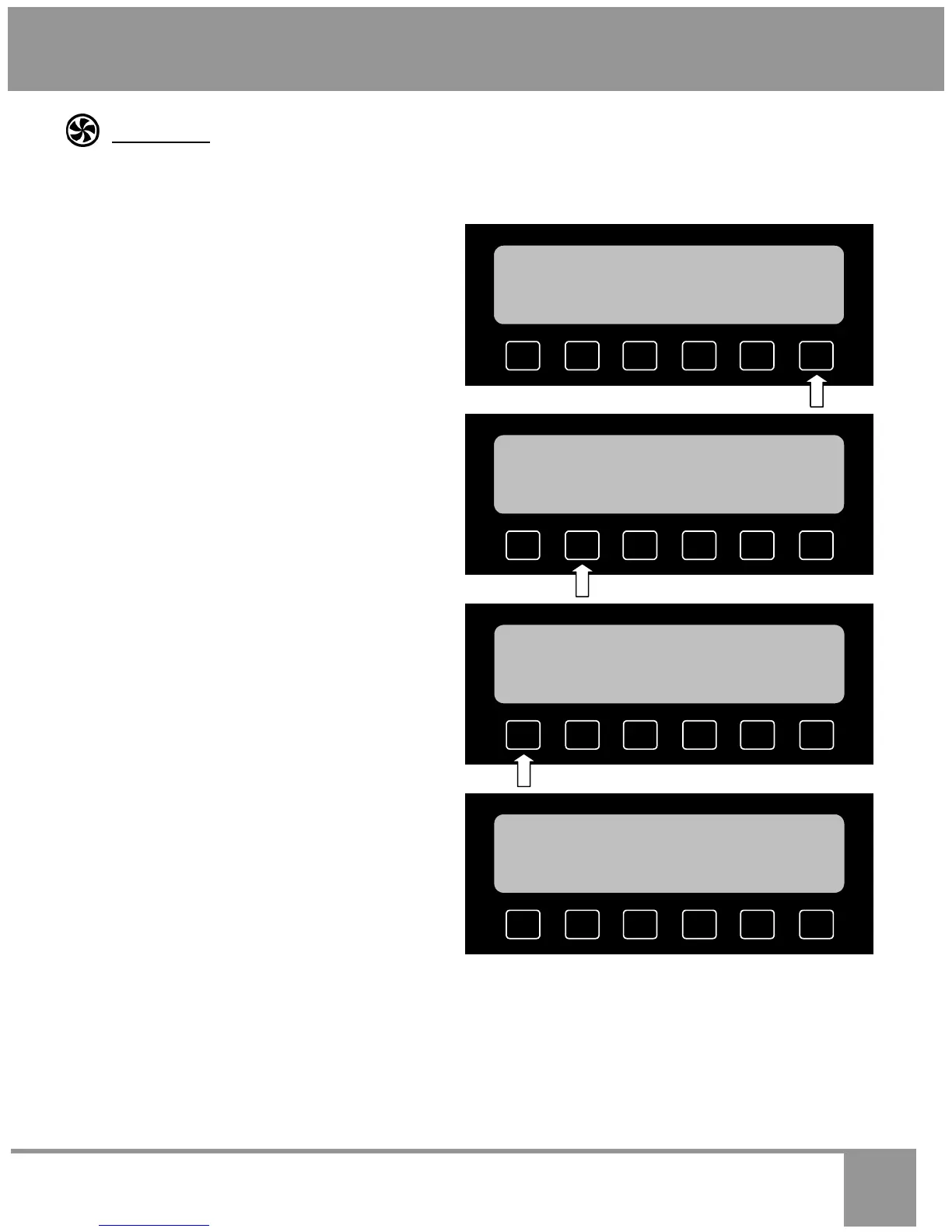
• From the main menu, press MORE.
• Press DEHYDRATE.
• Select the type of food you are dehydrating.
For example: press FRUITS. The oven will
set itself to the best combination of settings
for that type of food.
• You will see the preset (jump-in) tempera-
ture appear on the display (100°F for fruits,
125°F for veggies, or 150°F for meats). To
dehydrate at that temperature, simply press
START. If you want to dehydrate at a differ-
ent temperature, enter the temperature on
the number keypad (for example: to dehy-
drate at 165°F, press 1, then press 6, then
press 5), then press START.
DEFROST
PROOF
DEHYDRATE
SABBATH
SELF
CLEAN
MORE
12:25
PM
S
UPPE
MEATS
VEGGIES FRUITS
12:25 PM
S UPPER
SELECT A DEHYDRATING MODE
SAVE
DELA
OPTIONS
HELP
12:25 PM
S UPPER
100
°F
FRUITS
DEHYDRATE
PRESS START
DDITIONAL
SETTINGS
BROILING
ROASTING
BAKING
SAVED
GUIDE
MORE
12:25
PM
S
UPPE


 To Next Page