User Manual AX32
Doc no. AX32-8002-A-4 Rev. date 140124 Page 20 of 31
Network fundamentals
The following is a basic introduction to networks and how to set them up in relation to the AX32. Covering
the entire subject of “network” would require several hundred pages so we will focus on the “need-to-
know” parts of it.
What is a network?
A network allows multiple devices, such as PC’s, printers and many others to communicate with each other.
As opposed to traditional audio signals such as AES and MADI, which are point-to-point connections, a
network allows any device on the network to communicate with any other device on the network.
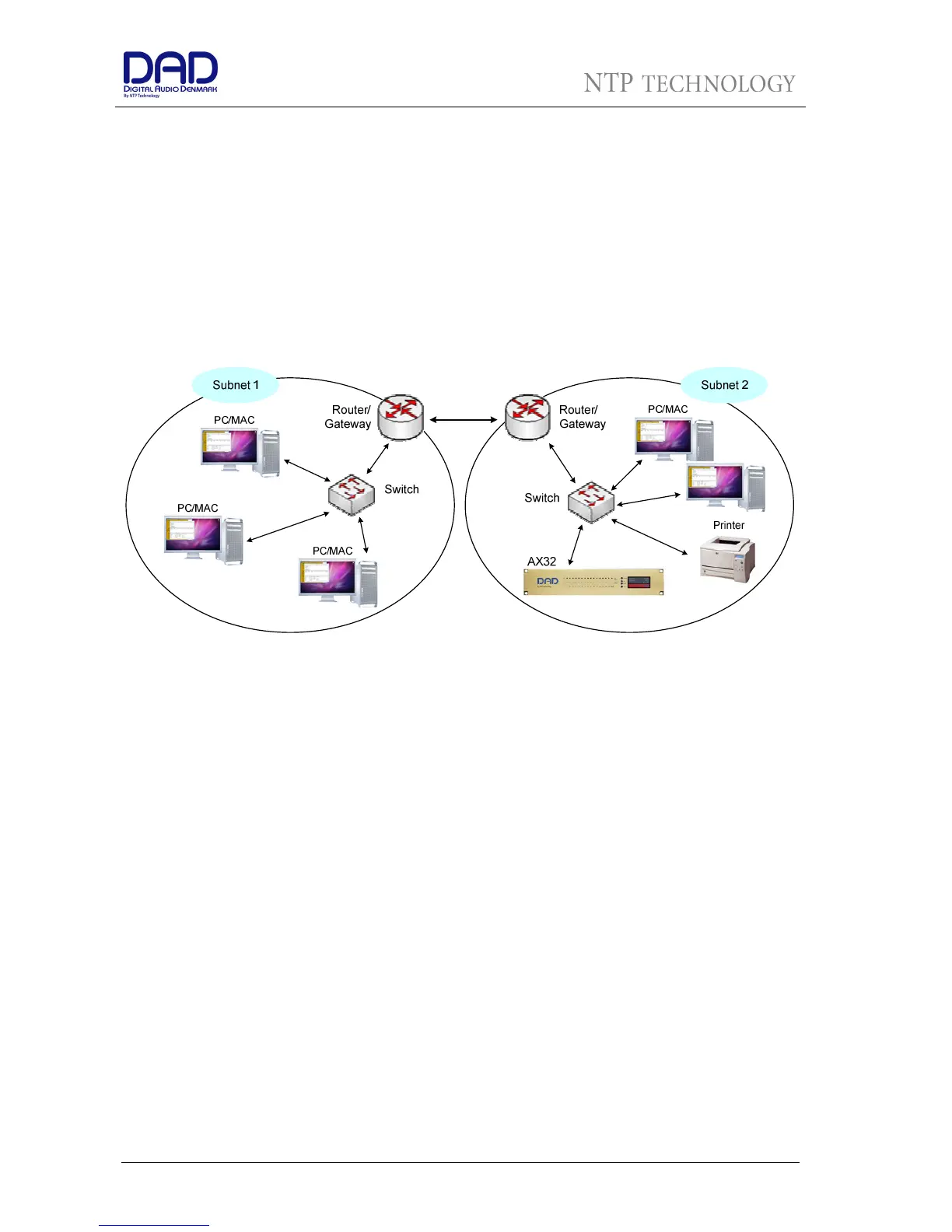
A network consists of one or more subnets. A subnet is typically a local network in building. A subnet can
operate as a closed network with no external connections or it can be connected to the Internet.
There are different types of devices in a network, e.g. PC’s, printers, AX32’s, switches and routers.
The physical connection
The devices in a network can be connected through a wide range of media. The most common for local
connections is the UTP (Unshielded Twisted Pair) cable. This is also referred to as CAT5, CAT5e or CAT6.
There are also other “CAT”-types, but the 3 mentioned here are the most common. The UTP cables are
normally terminated in an RJ-45 connector.
Other types of media can be fiber cables, wireless (Wi-Fi), coaxial cables and even power cables.
As the AX32 and most computers have an RJ45 connector for use with UTP cables, we will focus on this
type of interface.
When using UTP cables, it is possible to use different bit rates, typically 10 Mbit/s, 100 Mbit/s or 1000 Mbit/s
(1 Gb/s). The network interface on the AX32 and on most computers today support 1 Gb/s. It is therefore
important that the cabling supports this bit rate to ensure a stable connection. Cat5 cables do NOT support
gigabit transmission, so never use this type of cable. CAT5e and CAT6 cables both support 1 Gb/s, so make
sure to use either of these two types. The CAT-type is usually printed on the cable, so it is easy to identify.
CAT5e and CAT6 cables contain 4 twisted pairs, so a total of 8 wires. In order to achieve gigabit
transmission, all four pairs must be used. If only 2 pairs are used, the cable can only support 100 Mbit/s
transmission. If you look closely at the RJ45 connector on a network cable, you can easily see whether 2 or
4 pairs are used.
Twisted pair cable like CAT5e and CAT6 comes in two main varieties, solid and stranded. Solid CAT5 cable
supports longer length runs and works best in fixed wiring configurations like office buildings. Stranded


 To Next Page