User Manual AX32
Doc no. AX32-8002-A-4 Rev. date 140124 Page 29 of 31
Appendix A,
guide to establish connection to a Pro Tools Pre
This Appendix describes how to connect AX32 to Pro Tools to control the microphone preamps from within
the Pro Tools environment (Mac)
1. Preparation
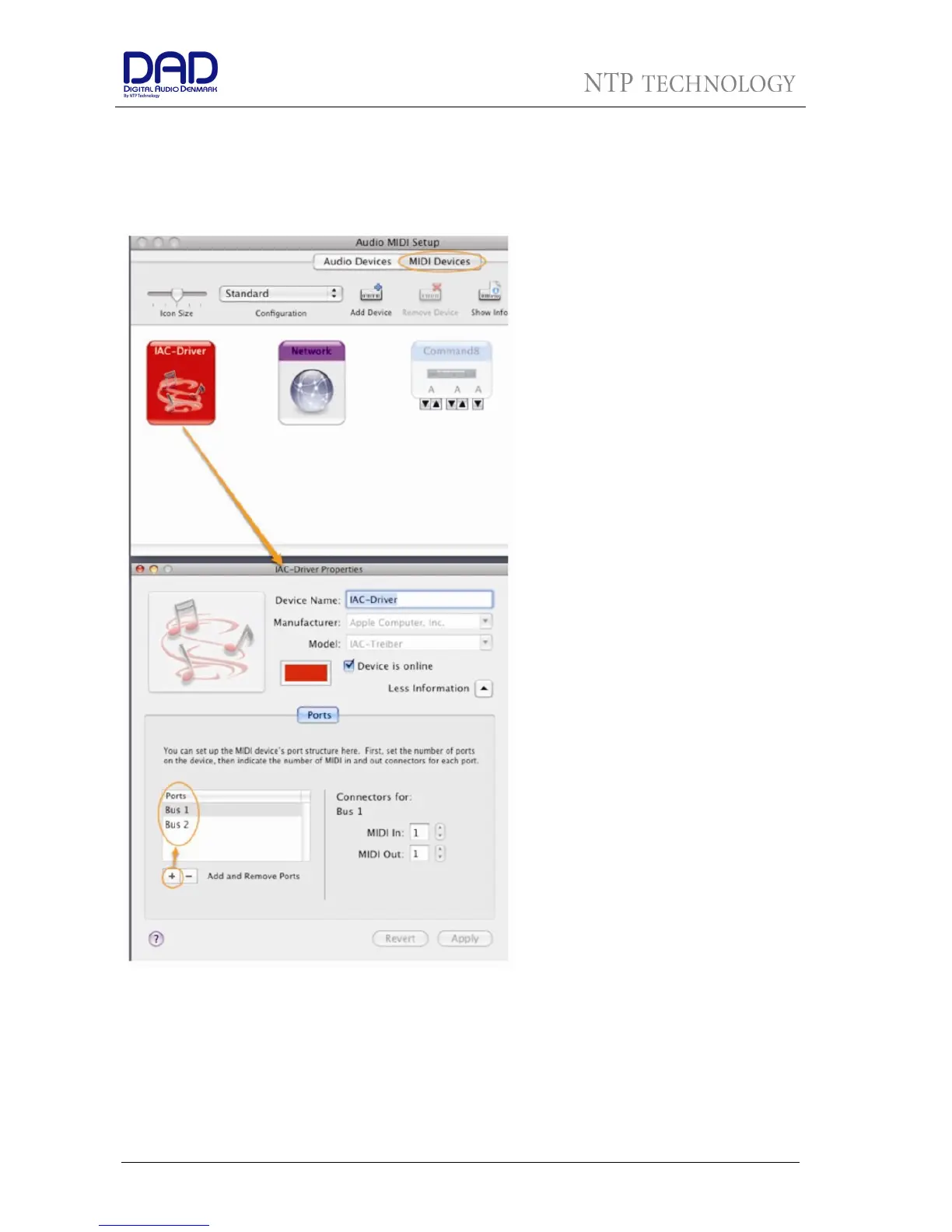
In the beginning you need to create
two busses in the Audio-MIDI Setup’s
IAC Driver.
To access Audio-Midi-Setup you can
either go in the Finder to
Applications>Utilities>Audio Midi Setup,
or you go in Pro Tools to
Setup>MIDI>MIDI Studio.
Once opened you have to click the
MIDI-Devices tab. In this field you will
find an icon named IAC-Driver. Double
click and click More Information if
needed. Now you should see the Ports
panel. Add two new busses as in the
picture. They both need just 1 MIDI In
and 1 MIDI Out.
After doing so, Save and quit Audio-
MIDI-Setup.


 To Next Page