2. Settings in DADman
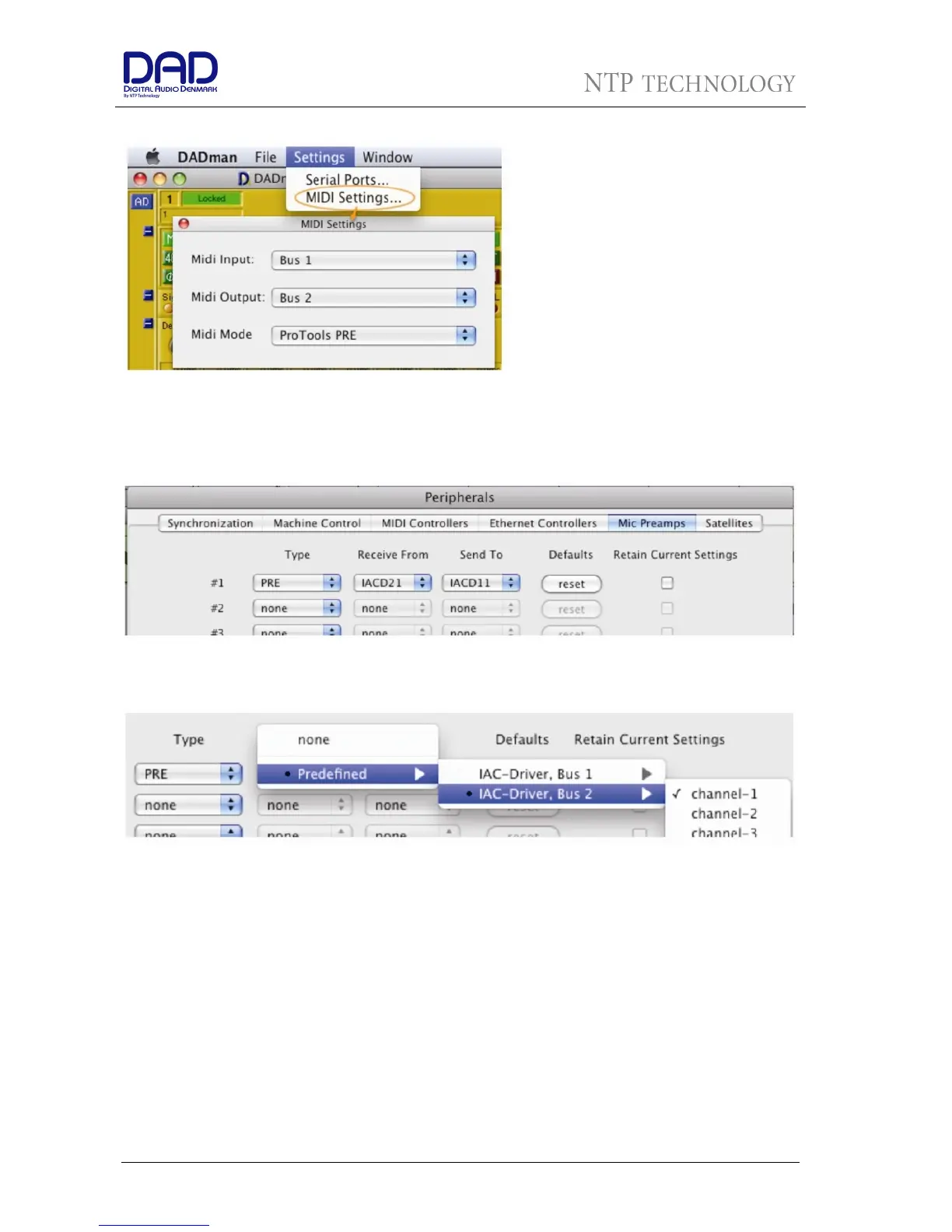
Now launch DADman SW, go to
Settings>MIDI Settings. In the little window
choose Bus 1 as MIDI Input and Bus 2 as
MIDI Output. MIDI Mode needs to be set to
ProTools PRE. Click the little red button in
the top right corner to close the window.
Leave DADman running
3. Settings in Pro Tools
In Pro Tools you go to Setup>Peripherals and click the Mic Preamps tab.
As Type you choose PRE from the popup menu for as many AX24s as connected.
For the first 8 channels that the AX32 will Receive needs to be set to Predefined>IAC-Driver, Bus
2>Channel-1. Continue for all other 8 channel groups of the AX32s with Predefined>IAC-Driver, Bus
2>Channel-2 and so on.
The Pre MIDI channels will correspond to 8 per 8 channel consecutive as they are listed in the DADman
view. This actually covers any AX24 or AX32 input channel sequence. Set up in DADman.


 To Next Page