3
TV AND A
TV AND A
V
V
RCA JACK A
RCA JACK A
V (BACK)
V (BACK)
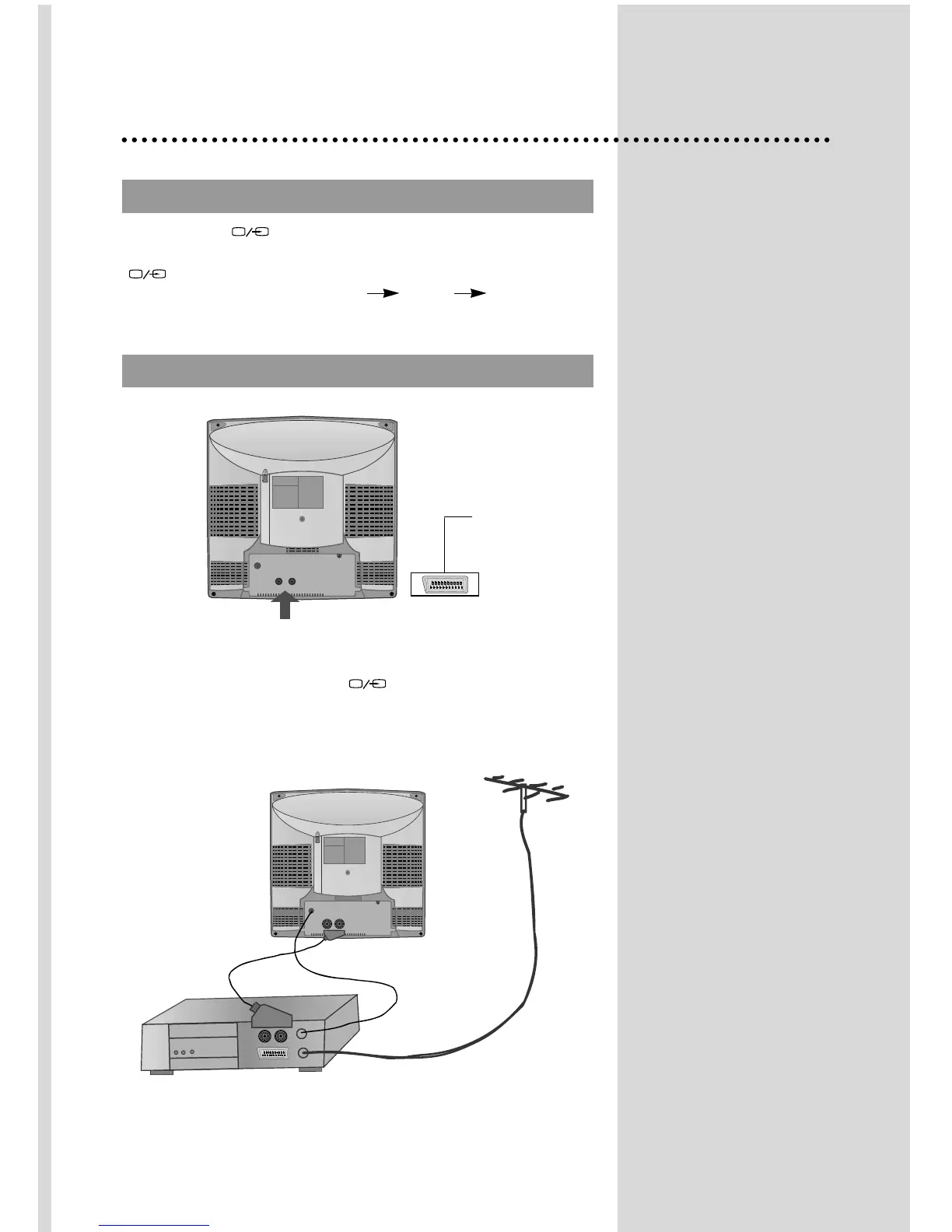
Connecting external equipment
Use the TV/AV( ) button on the remote control or on the front of
the set to select one of the three options. Whenever the TV/AV
( ) button is pressed, the on-screen display will be changed as
shown: AV( S-VHS is Russia only ) GAME TV
If you push the PR UP/DOWN buttons in AV mode, the on-screen
display will be changed TV mode.
This is used to connect a VCR, a Camcorder, a S-VHS VCR, a PERI-TV decoder
or a video game console.
In most cases, the set changes automatically to AV when the VCR connected is in
display mode. If not, press the TV/AV
()
button on the remote control unit
or on the front of the set.
You must turn the external equipment off or press the TV/AV button to return to
the TV mode.
SCART (OPTION)


 To Next Page