Main
Sub
Sub
Sub
Sub
Sub
Main
Main
Main
<Using ‘Position’ button>
< Using
„ PR ” and „ VOL ”
buttons
>
Pip Size
Adjusting the size of the
sub-picture with
“ VOL ”
buttons.
Alpha Blend
The adjustment of alpha
blend allows the sub-picture
to be translucent.
The translucent rate is
controlled with
“ VOL ”
buttons.
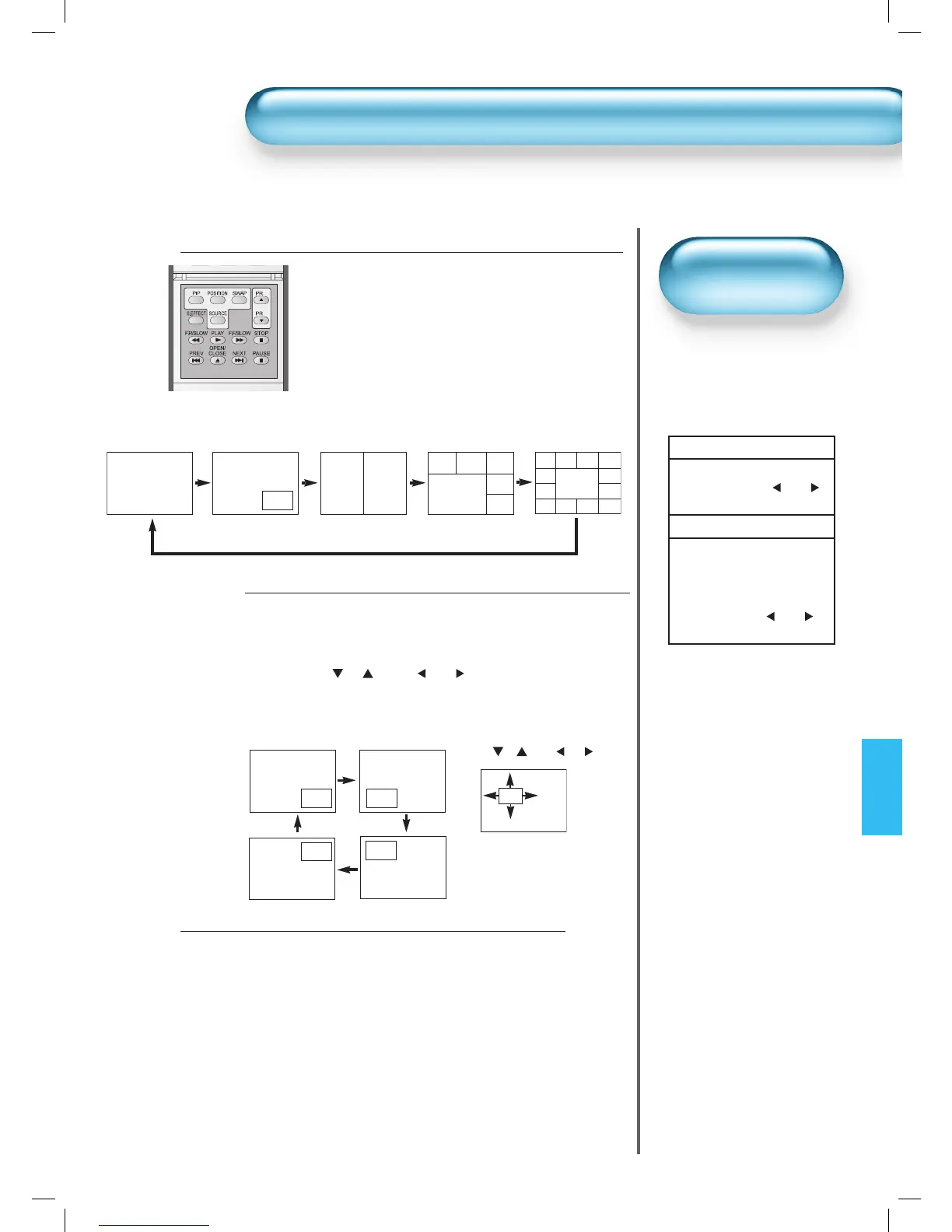
• PIP (Picture-in-Picture) and P-by-P(Picture-by-Picture) modes allow users to watch two pictures simultaneously.
POP mode is used in searching memorized 5 or 12 channels.
51
Watching Two Pictures Simultaneously
Engaging PIP mode
• Press the ‘PIP’ button once on the remote control to
engage the Picture-in-Picture mode.
• By pressing the button repeatedly, it will show the
following cycle.
• If switched to P-by-P (Picture-by-Picture) mode, the
screen will be split in half. The screen on the left side
is the main picture, and the sub-picture will be on the
right of the screen.
1
• Size and Alpha Blend of the
subpicture can be adjusted
on Screen Menu of OSD.
• These fuctions are availible
only in PIP Mode.
Screen Adjustment
of the Sub-picture
Position of the Sub-picture
• When PIP mode is engaged, the sub-picture can be displayed in
one of the four corners by using ‚POSITION’ button.
• Whenever pressing the button, the sub-picture will be cycling in
the following order.
Also, using “
PR ” and “ VOL ” button, the sub-picture
can be moved to any position you want.
2
Swap the pictures
• In order to swap between the main picture and sub-
picture, press the ‘SWAP’ button.
• However, at POP5 and POP12, the pictures are not
swapped. Main picture will change to the active sub-
picture.
• Also, only TV channels are available for the sub-pictures of
POP5 and POP12.
The sub-pictures search channels continuously until POP
mode is exited.
3
POP5
P-by-P
PIP
Main
Sub
Sub1
Main
Main
Sub2 Sub3
Sub4
Sub5
POP12
Sub1 Sub2
Sub9
Sub10
Sub11
Sub12
Sub3
Sub8
Sub4
Sub5
Sub6
Sub7
Main Main
Sub

 To Next Page
 Loading...