ISM (Image Sticking Minimisation)
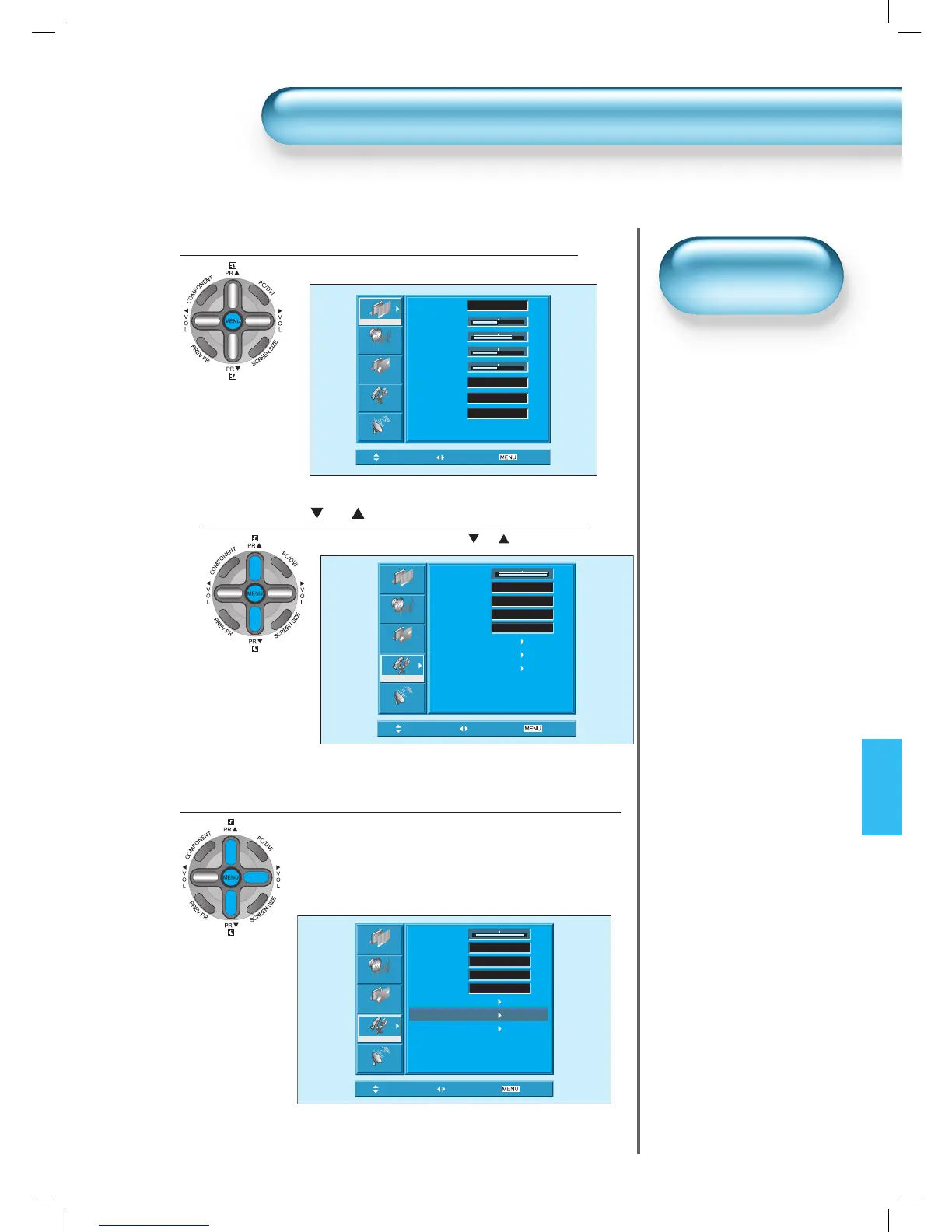
Press the MENU Button.
• The MENU screen will be displayed as below.
1
Press the “ PR ”Button.
• Select [Features] by the “ PR ” button.
2
Select ISM.
• Enter the sub menu by using the “VOL►” button.
• Select the [ISM] by pressing the “▼PR▲” button.
• Press of the “VOL►” button while you are in the ISM.
3
Picture
Sound
Screen
Feature
Install
Background 10
Language English
Child Lock Off
MGDI Off
Auto Power Off
Time Setting
ISM
Initialize
Move Select
Exit
• Image Burn Minimisation
• Displaying a still image
for a long time causes
part image sticking on
the screen.
• The ISM function
minimises this effect.
ISM
Picture
Sound
Screen
Feature
Install
Mode Normal
Brightness 32
Contrast 48
Sharpness 32
Color 32
Colour Temp. Normal
N.R. On
CTI On
Move Select
Exit
Picture
Sound
Screen
Feature
Install
Background 10
Language English
Child Lock Off
MGDI On
Auto Power Off
Time Setting
ISM
Initialize
Move Select
Exit

 To Next Page
 Loading...