11
PREPARATIONS BEFORE OPERATION
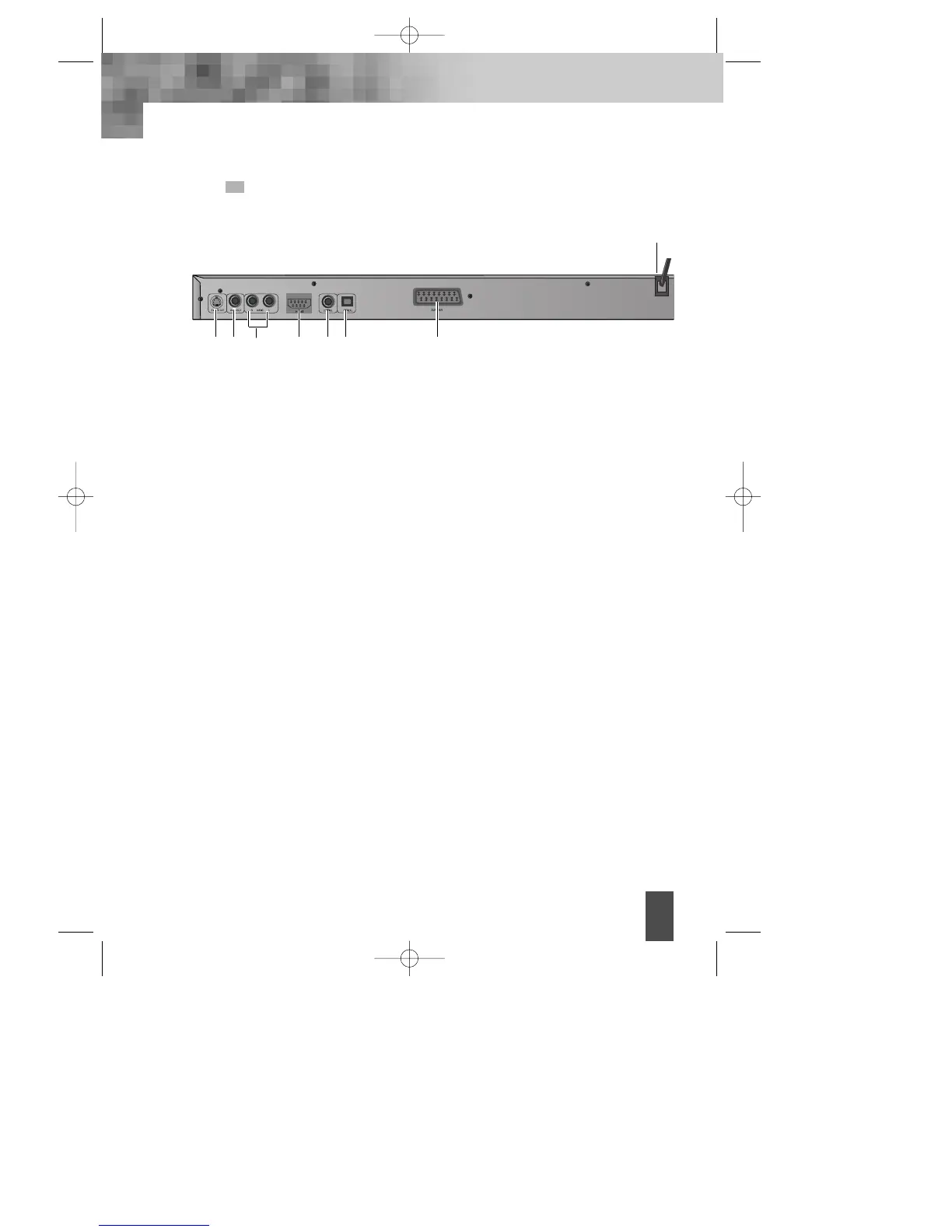
REAR PANEL
! S-VIDEO OUTPUT
Connects to TV or monitor equipped with S-VIDEO input. In order to achieve a sharper
and cleaner picture than when connected via VIDEO OUT (composite video).
@ VIDEO OUT
Connects composite video signal to input AV or PHONO sockets of TV or monitor to
achieve high fidelity colour reproduction.
# AUDIO OUT (L/R TRACK)
Two phono sockets for analogue 2 Channel audio in order to a TV or stereo amplifier.
$ HDMI
Audio/Video High definition multimedia digital output terminal.
% DIGITAL AUDIO COAXIAL OUT
Connects digital audio under play mode into an AV amplifier or a receiver equipped with
digital audio decoder for you to enjoy the theatre-quality sound in your home.
^ DIGITAL AUDIO OPTICAL OUT
Connects digital audio under play mode into an AV amplifier or a receiver equipped with
digital audio decoder for you to enjoy the theatre-quality sound in your home.
& EURO AV JACK
If VIDEO OUT phono is not utilized, the SCART socket can be used to connect to a TV set,
monitor or VCR.
* POWER SUPPLY SOCKET WIRE
Creates POWER between wall outlet and the unit.
#
$ % ^ &
! @
*
DV- 2500H English for agon 2006.10.25 11:6 PM ˘`11



 To Next Page