7.USAGE OF THE OPERATION BUTTONS
18
USAGE
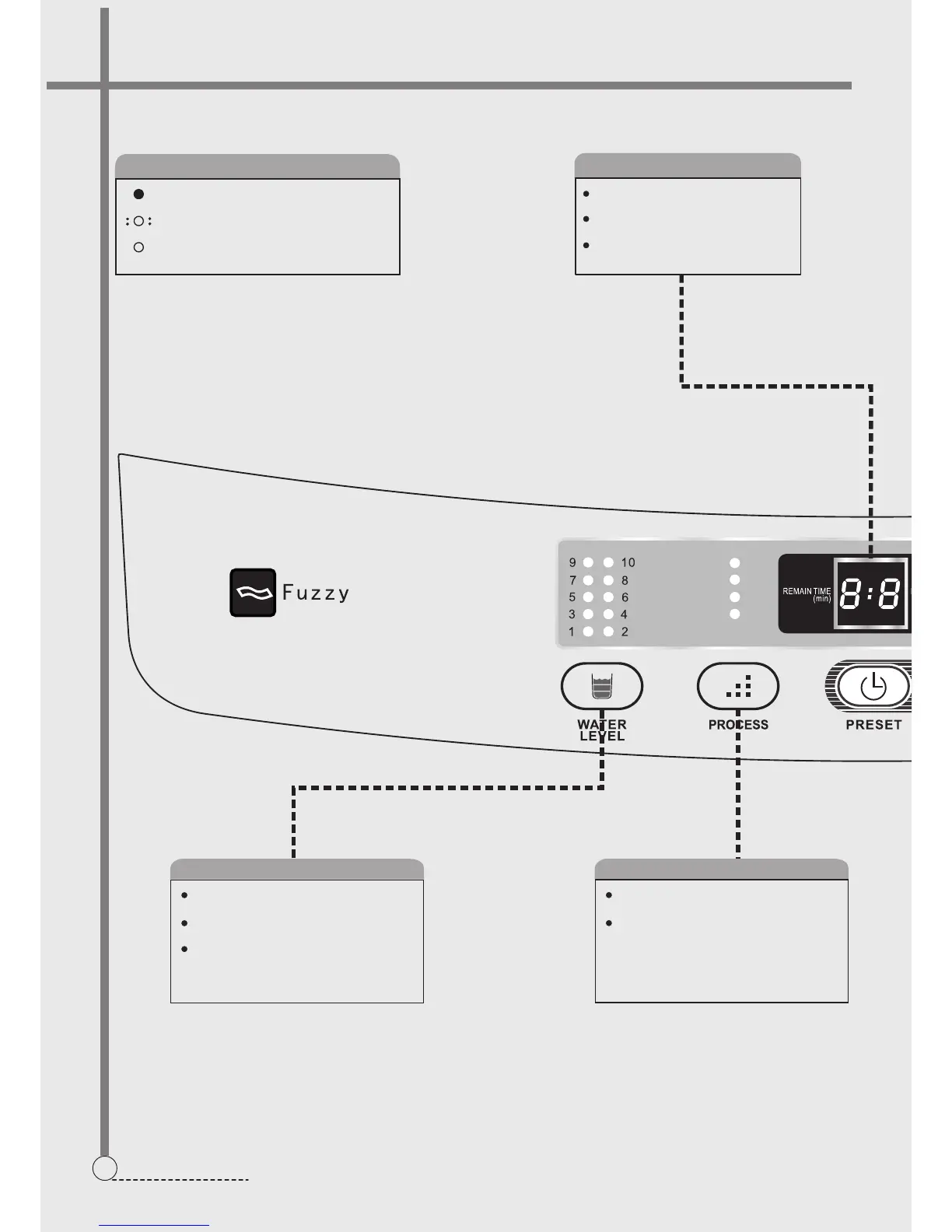
Select suitable water level according to the
quantity of the laundries
"Water level"button
When select
selected.
"speedy",water level can’t be
A long press on this button will re-supply the
water till let hand go or the water level reaches
the warning level.
Press this button can select one of the process
“soak”,”wash”,”rinse”or”spin”.
“Process"button
When select
program “wash”,”rinse”or “spin”. Customer
can’t select.
"speedy",Washer sets its own
Indicator mode and meaning
The indicator is off,indicating that the program
or mode is not selected
The indicator is flashing,indicating the running
program
The indicator is on,indicating the program or
mode selected and about to run
During operating of program,it displays
the remained time(minute)
During the preset program,it displays the
remained reserve time(hour)
In abnormal cases,it displays the symbol
of the abnormal phenomenon
Digital tube
COLD/WARM
HOT WATER
S O A K
W A S H
R I N S E
S P I N
S P E E D Y
G E N T L E
N O R M A L
H E A V Y
COLD
WARM
HOT
TUB SELF-CLEAN
AIR DRY
WATER SAVING
FINE PURIFICTION
60- 6069


 To Next Page