EasyManua.ls Logo

Daikin 910193131 - User Manual

Daikin 910193131
36 pages
Print Icon
To Next Page IconTo Next Page
Loading...
Auto
Changeover
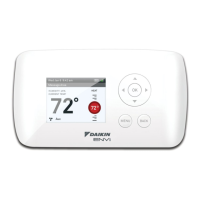
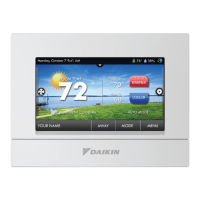
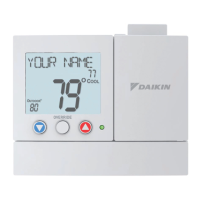
Programmable Thermostat
7-Day, 5-2-Day, or 5-1-1- Day Programmable
Configurable for Multiple Systems
Large Display with Backlight
Selectable Fahrenheit or Celsius
Icon Indicator Lights
Relay Outputs – Minimum Voltage Drop in Thermostat
WSHP Alarm Indicator
Remote Sensor Compatible
Ideally Suited for:
– Residential (New Construction/Replacement)
– Light Commercial
Works with two-transformer systems
AUTO
SCHEDULE
COOL
FAN
COOL
MODE
PM
OFF
Wed
Installation, Operation
and Application Guide

Questions and Answers

  • P
    Peter NelsonAug 15, 2025
    What to do if my Daikin Thermostat is not displaying the correct room temperature?
    • B
      Brandon RosalesAug 15, 2025
      You can calibrate the Daikin Thermostat. If a remote sensor is being used, check the S1 and SC terminal connections.
  • D
    Daniel GreerAug 18, 2025
    What to do if my Daikin 910193131 Thermostat is not following the program?
    • M
      Mrs. Kristin HollandAug 18, 2025
      To solve the problem, verify that the schedule is on, check the time (AM/PM), and check if the thermostat is in program override.
  • C
    cellisAug 21, 2025
    How to fix Daikin 910193131 if heat or cool is not coming on?
    • P
      parksandrewAug 21, 2025
      Verify that the wiring is correct. Gently pull on each wire to ensure there is a good connection at the terminal block.
  • T
    Troy ReyesAug 25, 2025
    What does 'LOCK' on my Daikin 910193131 Thermostat mean?
    • R
      Ray FischerAug 25, 2025
      The 'LOCK' display indicates that the button lockout function on your Daikin Thermostat is activated.
  • C
    Chelsea CookAug 27, 2025
    What to do if my Daikin 910193131 has no display?
    • B
      Benjamin StricklandAug 27, 2025
      Check for 24 VAC at the thermostat. The display will be blank when 24 VAC is not present.
  • E
    erin56Aug 30, 2025
    What to do if my Daikin 910193131 turns on and off too frequently?
    • L
      Lori JonesAug 30, 2025
      Adjust the temperature differential in the Configuration Mode Setting.
  • P
    Philip MooreSep 2, 2025
    How to fix Daikin Thermostat with no outputs activate upon power-up?
    • J
      Justin LopezSep 2, 2025
      Upon power-up, the thermostat will not activate outputs for four minutes. To bypass this output lockout, change the setpoint temperature in heat or cool mode on the thermostat by the temperature differential.
  • S
    Steven ParkerSep 5, 2025
    Why does my Daikin 910193131 program schedule activate at the wrong time?
    • M
      Melanie HarperSep 5, 2025
      Check the time (AM/PM) set on the thermostat.
  • K
    Kimberly NelsonSep 8, 2025
    Why does my Daikin 910193131 Thermostat show 'on' instead of the room temperature?
    • J
      Jimmy HendersonSep 8, 2025
      Check for a bad connection at the S1 and SC terminals, if used.
  • N
    Nicolas RoseSep 12, 2025
    Why Daikin 910193131 has no response with first button press?
    • W
      William LarsonSep 12, 2025
      Press the button to activate the touch icons.

Summary

Thermostat Overview and Controls

Thermostat Controls and Specifications

Describes thermostat interface, package contents, and technical specs.

Operational Modes and Icon Functions

Mode of Operation

Explains how the thermostat functions in different heating and cooling modes.

Icon Functions

Explains the meaning of various icons displayed on the thermostat interface.

Installation and Wiring

Thermostat Installation Steps

Provides step-by-step instructions for installing the thermostat.

Terminal Designators and Wiring Diagrams

Explains terminal functions and illustrates wiring for various models.

Remote Sensor Installation

Guides on installing and configuring an optional remote temperature sensor.

Configuration and Settings

Thermostat Locking and Configuration Access

Covers protecting settings, locking, and changing lock codes.

Advanced Configuration Settings

Details setup options like temperature scale, differentials, delays, and sensors.

Setting Time, Date, and Program Schedule

Instructions for setting clock, date, and programming schedules.

Connectivity, Testing, and Troubleshooting

Wi-Fi Setup and App Integration

Guides on connecting to Wi-Fi, the app, and router.

Testing Thermostat Functions

Procedures to test heating, cooling, and fan operations.

Troubleshooting Common Issues

Provides solutions for common symptoms and alarm conditions.

Safety and Warranty

Important Safety Information

Provides critical safety warnings for installation and use of the thermostat.

Five-Year Limited Warranty

Outlines the terms and conditions of the product warranty.

Daikin 910193131 Specifications

General IconGeneral
BrandDaikin
Model910193131
CategoryThermostat
LanguageEnglish

Related product manuals