Field Settings SiUS181305E
101 Test Operation and Field Settings
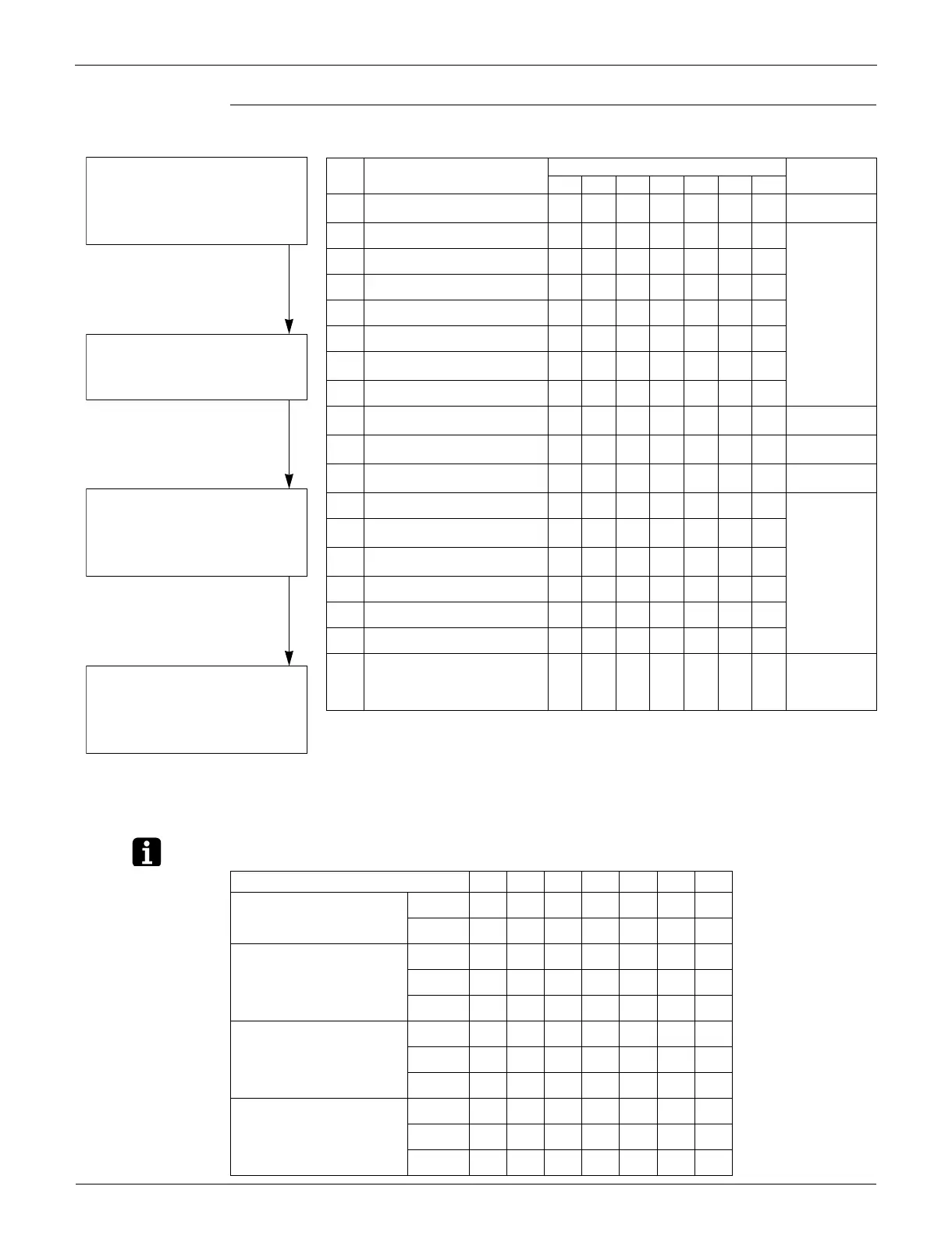
Monitor Mode
The numbers in the No. column represent the number of times to press the SET
(BS2) button.
Note: Various Settings
No. Check item
LED display
Data display
H1P H2P H3P H4P H5P H6P H7P
0 Various setting
lhhhhhh
See the note
below.
1 Cool / heat unified address
lhhhhhk
Lower 6 digits
2 Low noise / demand address
lhhhhkh
3 Not used
lhhhhkk
4 AIRNET address
lhhhkhh
5 Number of connected indoor units
lhhhkhk
7
Number of connected zone units
(excluding outdoor and BS unit)
lhhhkkk
8 Number of outdoor units
lhhkhhh
11
Number of zone units (excluding
outdoor and BS unit)
lhhkhkk
Lower 6 digits
12 Number of terminal blocks
lhhkkhh
Lower 4 digits:
upper
13 Number of terminal blocks
lhhkkhk
Lower 4 digits:
lower
14 Contents of malfunction (the latest)
lhhkkkh
Error code table
Refer to page
139 ~ 142.
15
Contents of malfunction
(1 cycle before)
lhhkkkk
16
Contents of malfunction
(2 cycle before)
lhkhhhh
20 Contents of retry (the latest)
lhkhkhh
21 Contents of retry (1 cycle before)
lhkhkhk
22 Contents of retry (2 cycle before)
lhkhkkh
25
Normal judgment of outdoor units
PCB
lhkkhhk
Lower 2 digits:
kh
Abnormal
hk Normal
hh
Undetermined
<Selection of check item>
<Confirmation on check item>
Press the MODE (BS1) button and
enter the monitor mode.
Press the SET (BS2) button and
select a check item according to the
LED pattern.
Press the RETURN (BS3) button to
display different data of check item.
Press the RETURN (BS3) button
and return to the initial status of
monitor mode.
∗ If you become unsure of how to
proceed, press the MODE (BS1)
button and return to the setting
mode 1.
H1P H2P H3P H4P H5P H6P H7P
Emergency operation /
backup operation setting
ON
lhhkhhh
OFF
lhhhhhh
Defrost select setting Short
lhhhkhh
Medium
lhhhlhh
Long
lhhhhhh
Te setting H
lhhhhkh
M
lhhhhlh
L
lhhhhhh
Tc setting H
lhhhhhk
M
lhhhhhl
L
lhhhhhh





 To Next Page