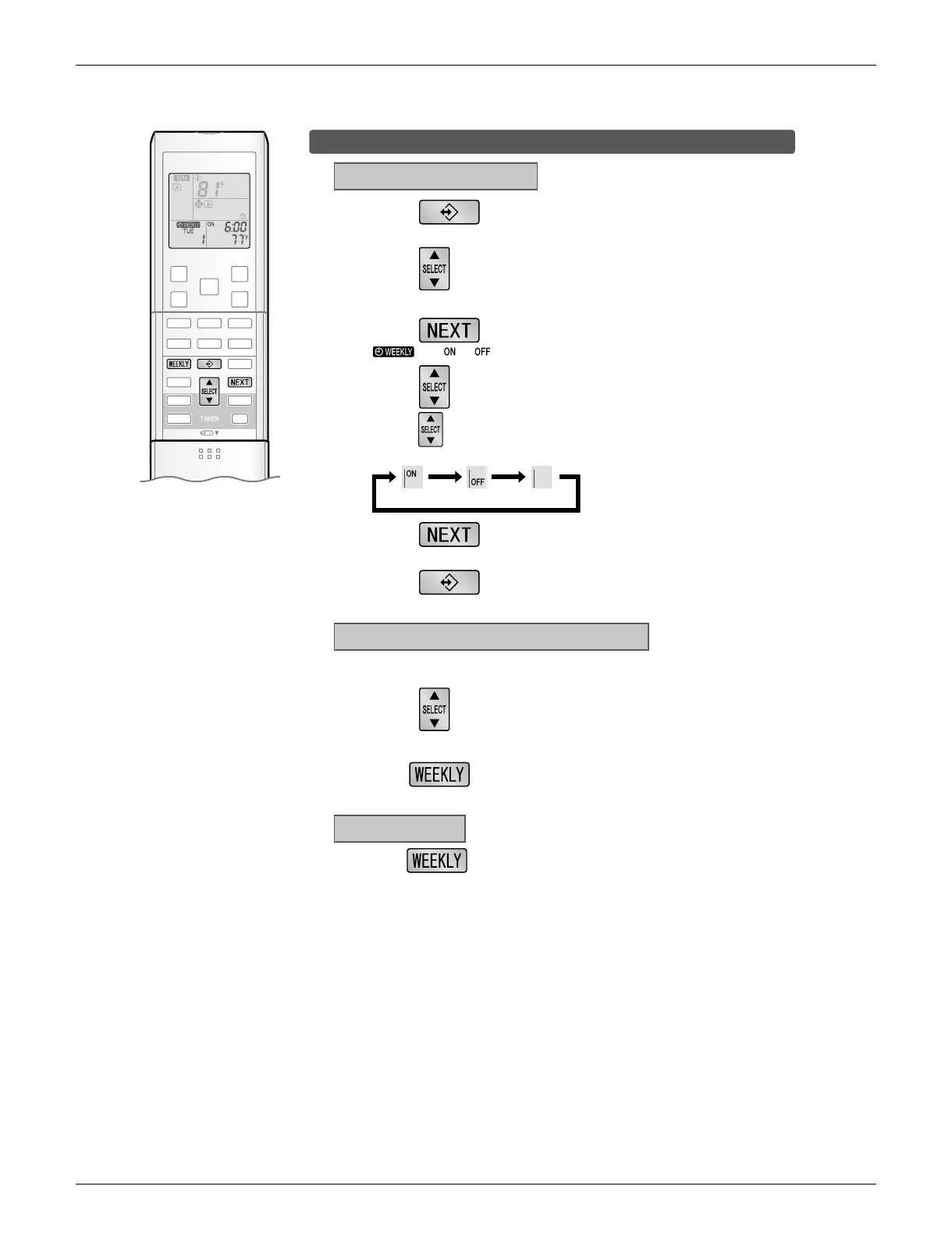
To delete reservations
The individual reservation
1.
Press .
• The day of the week and the reservation number will be displayed.
3.
Press .
• and or blink.
4.
Press and select blank.
• Pressing changes ON/OFF TIMER mode.
• The reservation has no setting when selecting blank.
ON TIMER OFF TIMER blank
5.
Press .
• The selected reservation will be deleted.
6.
Press .
• If there are still other reservations, WEEKLY TIMER operation will be activated.
The reservations for each day of the week
2.
Hold for 5 seconds.
• The reservation of the selected day of the week will be deleted.
All reservations
Hold for 5 seconds while normal display.
2.
Press to select the day of the week and
the reservation number to be deleted.
• This function can be used for deleting reservations for each day of the week.
• It can be used while confirming or setting reservations.
1.
Press to select the day of the week to be
deleted.
•
Be sure to direct the remote controller toward the indoor unit and check for a receiving tone.
• This operation is not effective on the setting display of WEEKLY TIMER.
• All reservations will be deleted.






 To Next Page