EDUS39-605 Control Devices
Controls 27
Changing the Fan Direction and Fan Strength
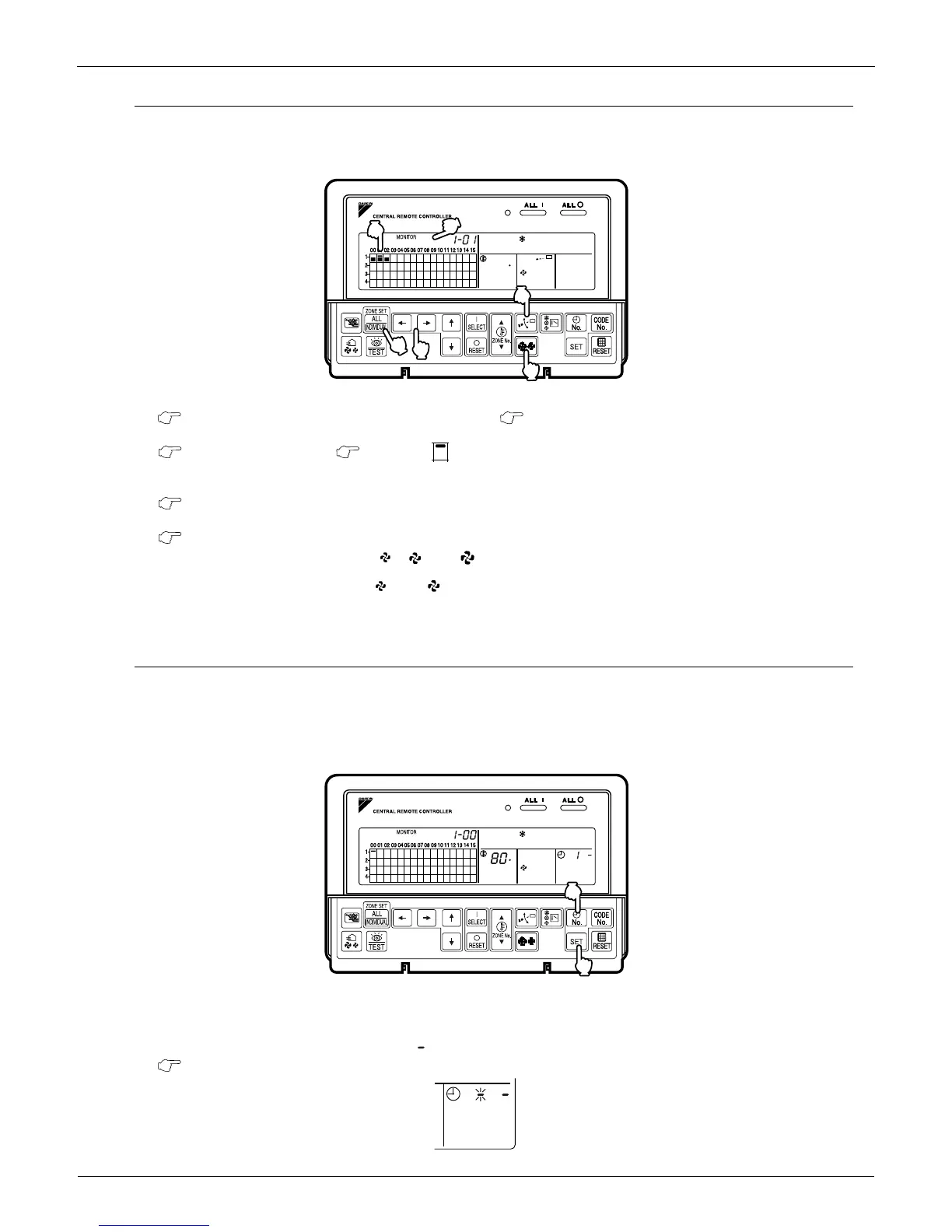
Changing the fan direction and strength is accessed from the following screen: .
Registration
1. Press the ALL/INDIVIDUAL button to enter the individual screen.
The unit opens the individual screen automatically if nothing is done for one minute.
2. Using the arrow keys, move the to select the units to fan direction adjustment or fan strength
adjustment.
Keeping the button pressed down advances options rapidly.
3. Press the FAN DIRECTION ADJUSTMENT button.
This sets FIXED or SWING fan direction.
Press the FAN STRENGTH ADJUSTMENT button.
Pressing this button scrolls through , and .
Depending on the indoor unit, only and may be available.
The functions included in the indoor units may vary. Pressing a button for an unavailable function prompts NOT
AVAILABLE to display.
Timer Number Setting
Only when used with the schedule timer
Using this together with the schedule timer makes it possible to set on/off function four times a day.
Two settings of ON/OFF are possible to one Schedule Timer and two Schedule Timers can be registered into a Central
Remote Controller.
Registration
1. Pressing the TIMER No. button causes the number set for timer number 1 to blink.
If no timer setting has been made a dash [ ] is displayed. Select the desired timer number by pressing the
TIMER No.” button.


 To Next Page