BRC1E52A7 Operation manual
4PW71265-1 – 10.2011
14
2
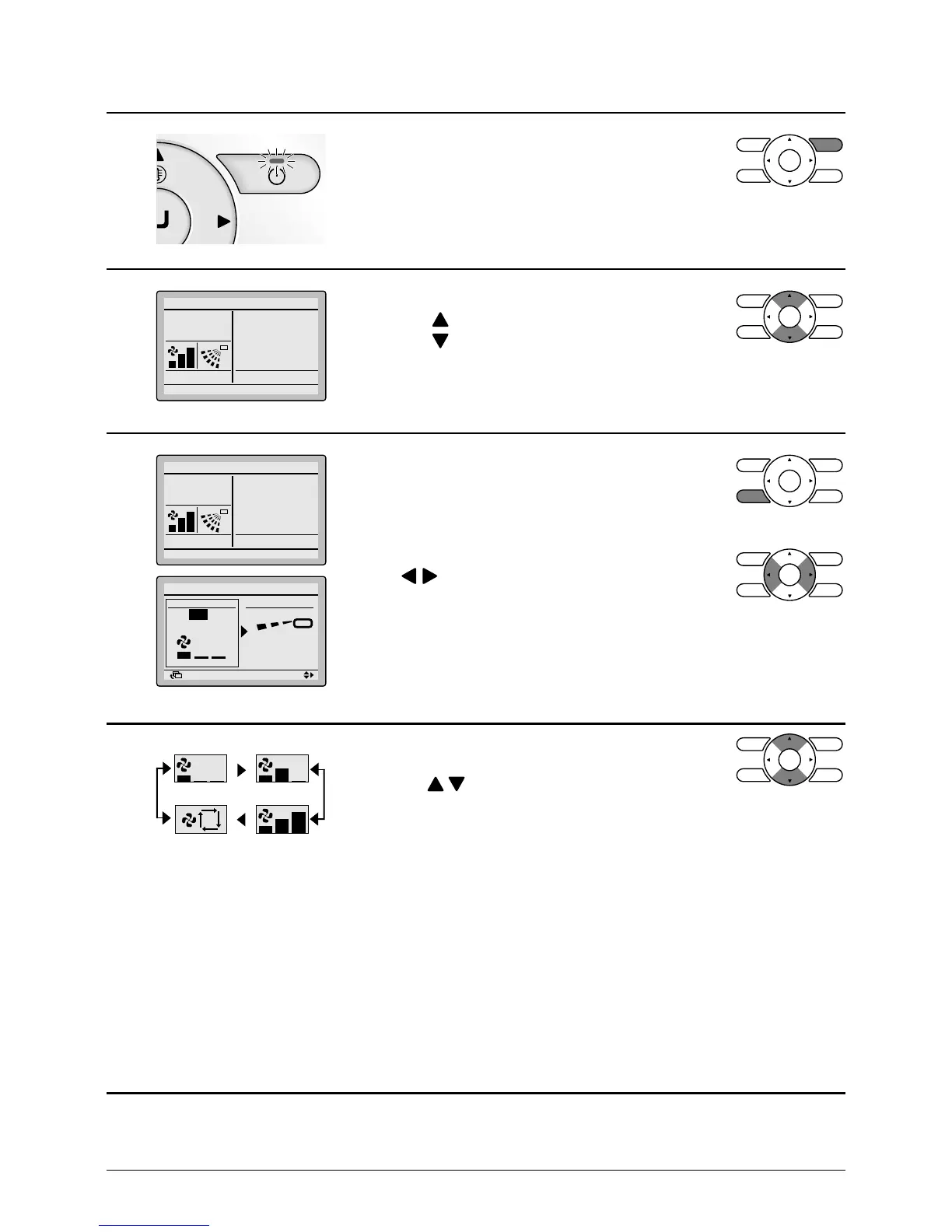
• Press On/Off button.
The Operation lamp (green) will be lit and the
system will start operating.
3
Cool
Set to
Cool
28°C
• The set temperature will increase by
1°C when button is pressed and decrease by
1°C when button is pressed.
* No temperature settings are possible while in fan mode.
4
Cool
Set to
Cool
28°C
Return Setting
Return Setting
Position 0
Low
Air Volume/direction
Air Volume Direction
• To make Air Volume and/or airow direction
control, press Fan speed/airow direction setting
control button.
• To select Air Volume or airow direction setting,
press buttons.
5
High
Auto
A
• With Air Volume setting selected, select the
desired fan speed from Low, Medium, High or Auto
using the buttons.
* Two fan speed adjustment levels Low, High may
be available depending on the type of indoor unit.
* The system may be in automatic fan speed
control for mechanical protection purposes.
* The system may be in automatic fan speed
control according to the room temperature.
The fan may stop operating, which, however, is
not a failure.
* The completion of Air Volume selection may take
time, which, however, is not a failure.
* In auto mode setting, the fan speed setting is
adjusted automatically according to setpoint and
indoor temperature. In case Fan only the fan
speed setting is high.



 To Next Page