Operation manual BRC1E52A7
41
4PW71265-1 – 10.2011
Setpoint Auto Reset
1
Return Setting
Energy Saving Options 2/2
Energy Saving List
Setpoint range set
Set back condition
Sensing Sensor (low)
Sensing Sensor (stop)
Setpoint Auto Reset
1/2
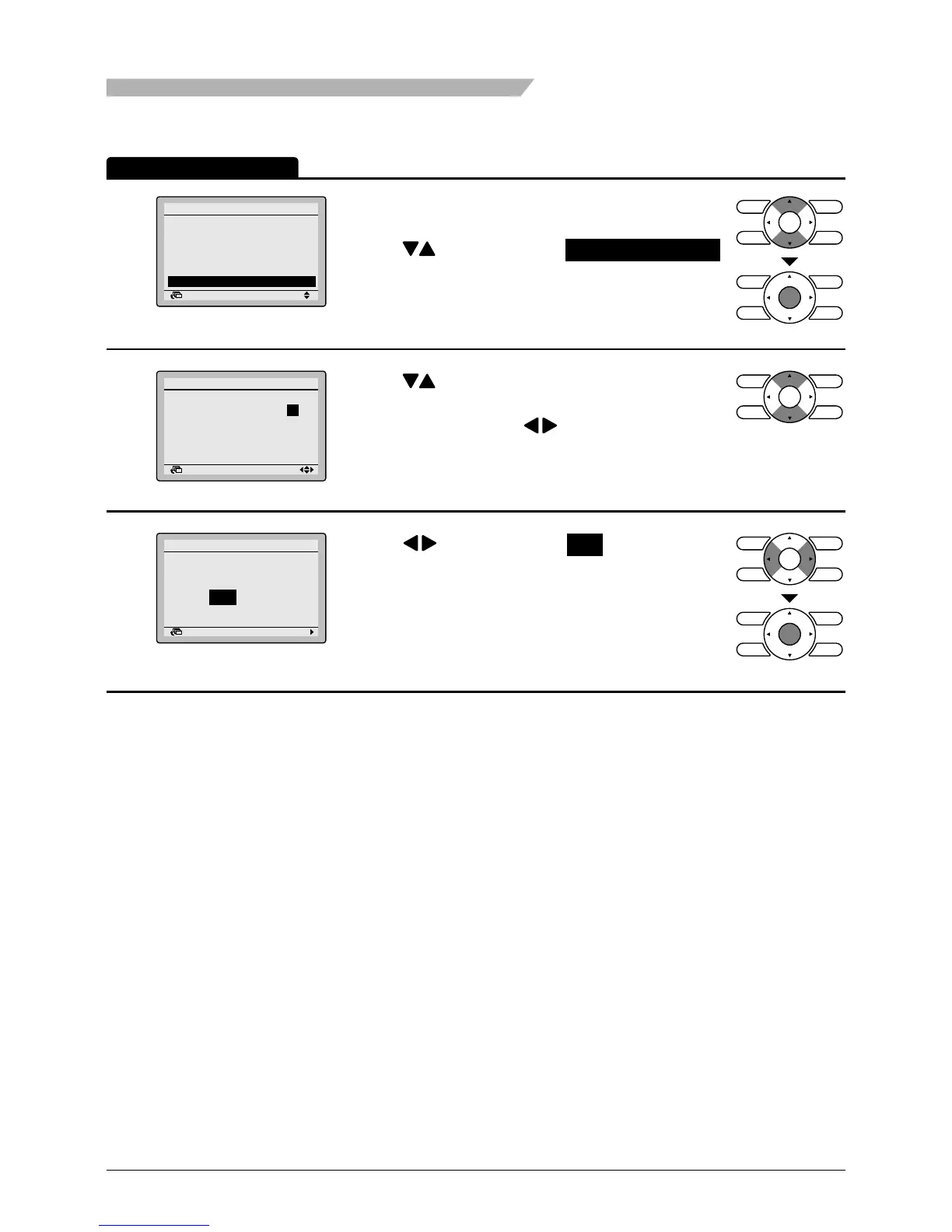
• Bring up the Energy Saving Options settings
screen (see page 36).
• Press buttons to select Setpoint Auto Reset
on the Energy Saving Options settings screen.
Press Menu/Enter button to display the Setpoint
Auto Reset settings screen.
2
Return Setting
Setpoint Auto Reset
Cool
Set temp.:
Set time: 60 min
Heat
Set temp.: 20°C
Set time: 90 min
2/2
28 °C
• Press buttons to set preset temperature and
timing for the auto reset of the setpoint.
• Move the cursor using buttons.
Press Menu/Enter button after selecting the item.
The conrmation screen will appear.
3
Setting
Save the settings?
Setpoint Auto Reset
Yes No
Return
• Press buttons to select Yes on the
conrmation screen.
Pressing Menu/Enter button conrms the settings
and takes you back to the basic screen.
Operation Method
Menu Manipulation



 To Next Page