BRC1E53 Installer reference guide
4P419250-1
–
2015.10
24
Conrmation of registered details
10. Conrmation of registered details
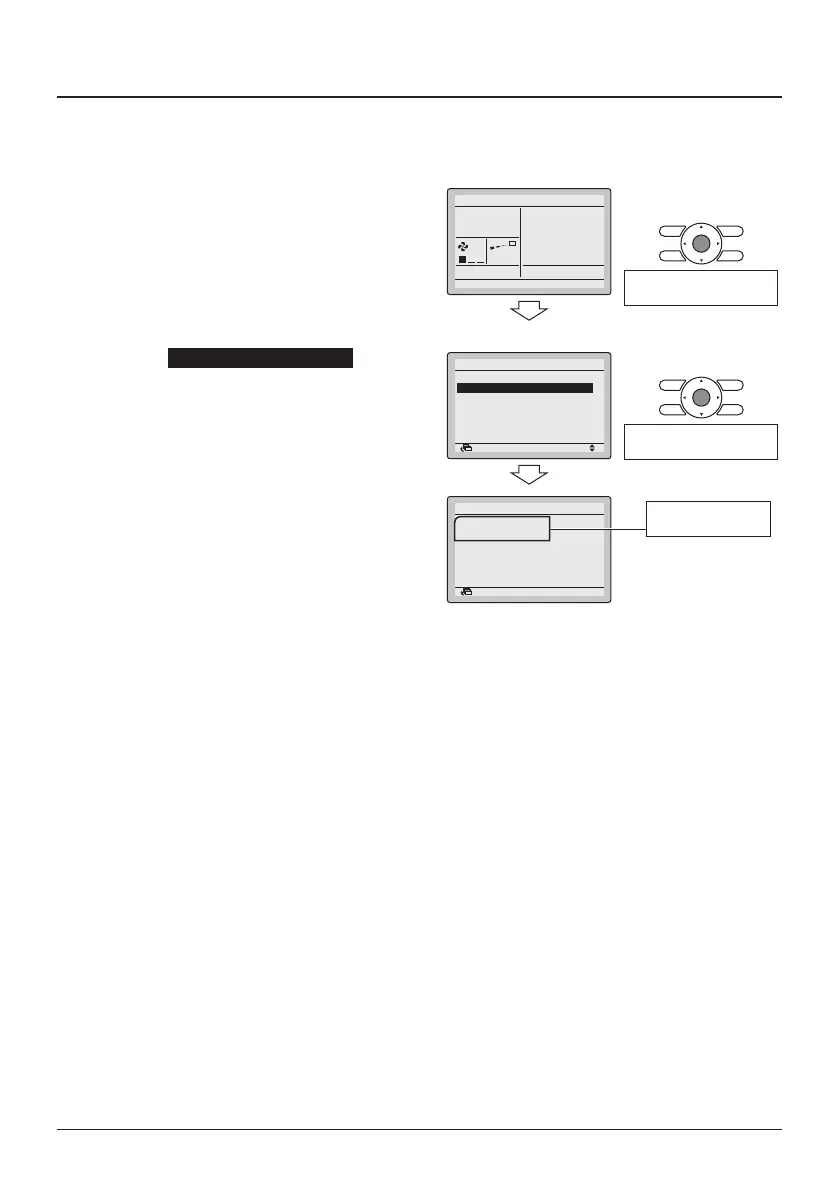
<Basic screen>
10-1 Press the Menu/Enter button in the
Basic screen. The Main menu is
displayed.
10-1
Cool
Set to
28°C
<Main menu>
Press the Menu/Enter
button.
10-2 Select Maintenance Information and
press the Menu/Enter button. The
"Maintenance Information" screen is
displayed.
10-2
SettingReturn
Filter Auto Clean
Maintenance Information
Configuration
Current Settings
Clock & Calendar
Language
2/2Main Menu
Press the Menu/Enter
button.
10-3 Conrm that the contact information
is entered correctly.
10-3
Contact Info
0123
–
4567
–
8900
Indoor Model
–––
/000
Outdoor Model
–––
/000
Maintenance Information
Return
10-4 Press the Cancel button twice.
The Basic screen returns.
The registered
details are displayed.



 To Next Page