BRC1E53 Installer reference guide
4P419250-1
–
2015.10
10
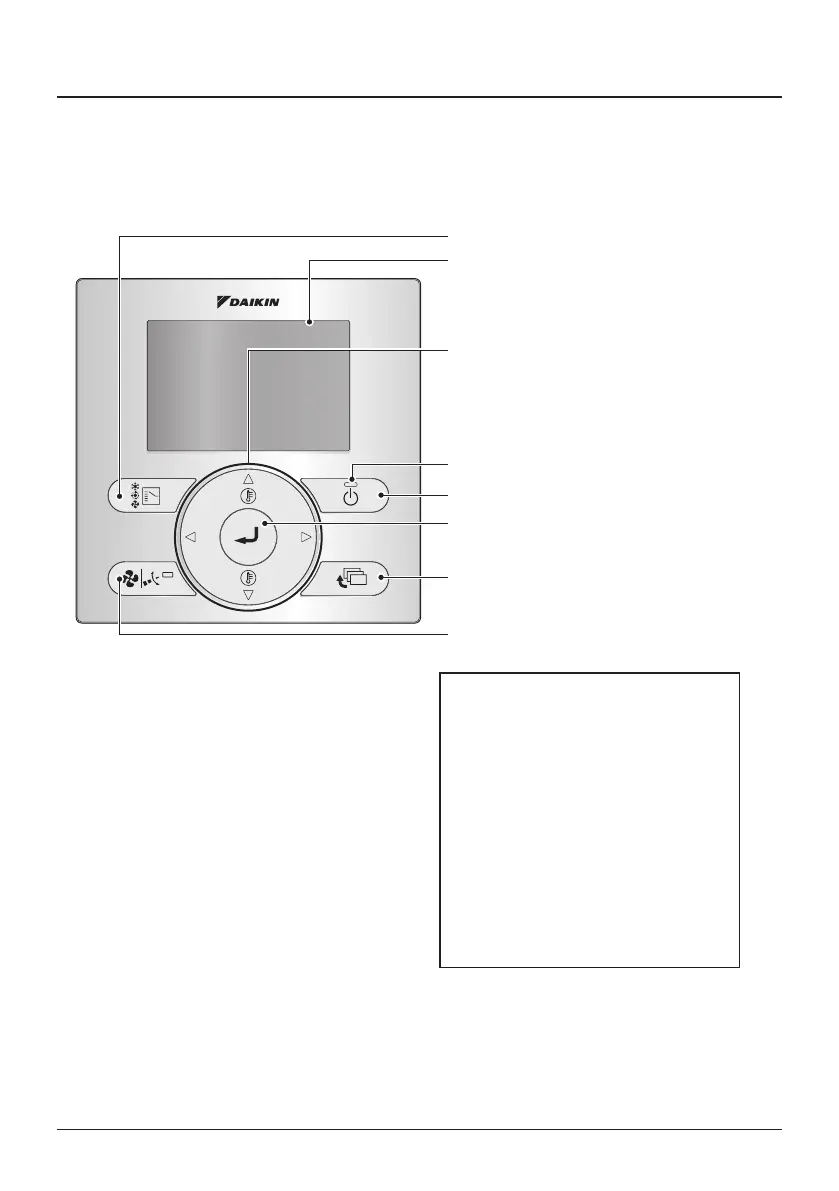
Functions and menu items of the remote controller buttons
4. Functions and menu items of the
remote controller buttons
4-1 Functions and menu items
(1) Operation Mode Selector button
(11) LCD (with backlight)
(4) Up button
(5) Down button
(6) Right button
(7) Left button
(9) Operation lamp
(8) On/Off button
(10) Cancel button
(2) Fan Speed/Airow Direction button
(3) Menu/Enter button
(1) Operation Mode Selector button
● Press this button to select the operation
mode of your preference.
● Available modes may vary with the
connected model.
(2) Fan Speed/Airow Direction button
● Used to change the fan speed and airow
direction.
● Available fan speeds may vary with the
connected model.
(3) Menu/Enter button
● Used to display the main menu or enter the
selected item. (For details on the main
menu, see the operation manual.)
Main menu*
Lock Function**
Rotation**
Airow Direction
Individual Air Direction
Quick Start
Ventilation
Energy Saving Options
Schedule
Filter Auto Clean
Maintenance Information
Conguration
Current Settings
Clock & Calendar
Language
* Available menu items are depending on the
connected model.
** Lock Function and Rotation are hidden menu
items. For instructions on how to make them
visible, refer to chapters 14, 15, 16, and 17.



 To Next Page