Installer reference guide BRC1E53
43
4P419250-1 – 2015.10
Single and Dual setpoint mode
19. Single and Dual setpoint mode
● When a centralized controller is connected, the remote controller is forced to single setpoint
mode. It is not possible to change to dual setpoint mode.
NOTE
● Switch between Single setpoint mode and Dual setpoint mode
● Single setpoint mode is set by selecting “Single SP”
● Dual setpoint mode is set by selecting “0°C” – “8°C”
<Basic screen>
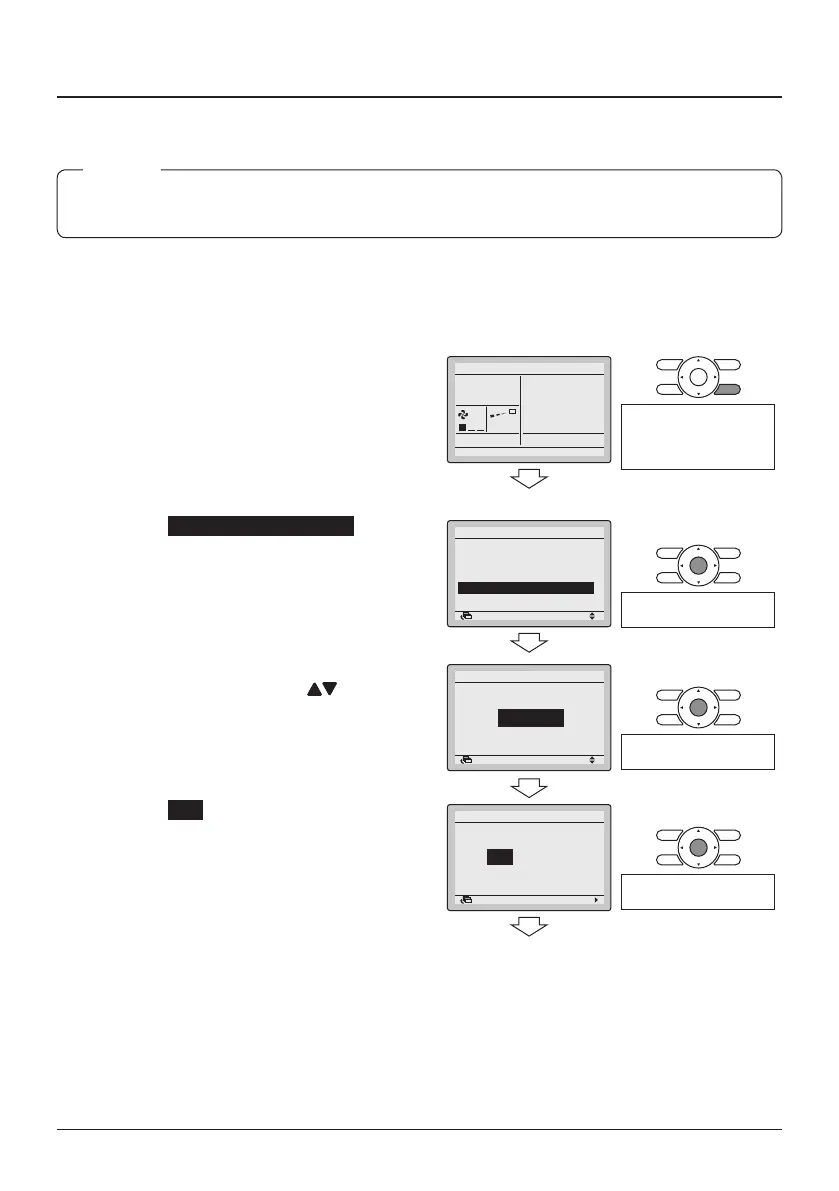
19-1 Press and hold the Cancel button for
4 seconds or longer. The Service
Settings menu is displayed.
19-1
Cool
Set to
28°C
<Service Settings>
Press and hold the Cancel
button for 4 seconds or
longer while the backlight
is lit.
19-2 Select Min Setpoints Differential
and press the Menu/Enter button.
The "Min Setpoints Differential"
screen is displayed.
19-2
SettingReturn
Test Operation
Maintenance Contact
Field Settings
Demand
Min Setpoints Differential
External Input Interlock
1/3Service Settings
Press the Menu/Enter
button.
19-3 Select “None”, “Single Sp” or
“0°C” – “8°C” by using the (Up/
Down) buttons.
19-4 Press the Menu/Enter button. The
conrmation screen is displayed.
19-3
19-4
SettingReturn
Single Sp
Min Setpoints Differential
Min Setpoints Differential
Press the Menu/Enter
button.
19-5 Select Yes and press the Menu/
Enter button. The settings are
conrmed and the Service Settings
menu returns.
19-5
SettingReturn
Save the settings?
NoYes
Min Setpoints Differential
<Service Settings>
Press the Menu/Enter
button.
19-6 Press the Cancel button once. The
remote controller restarts and the
Basic screen returns.



 To Next Page