Installer reference guide BRC1E53
35
4P419250-1 – 2015.10
Duty Rotation and Backup
<Basic screen>
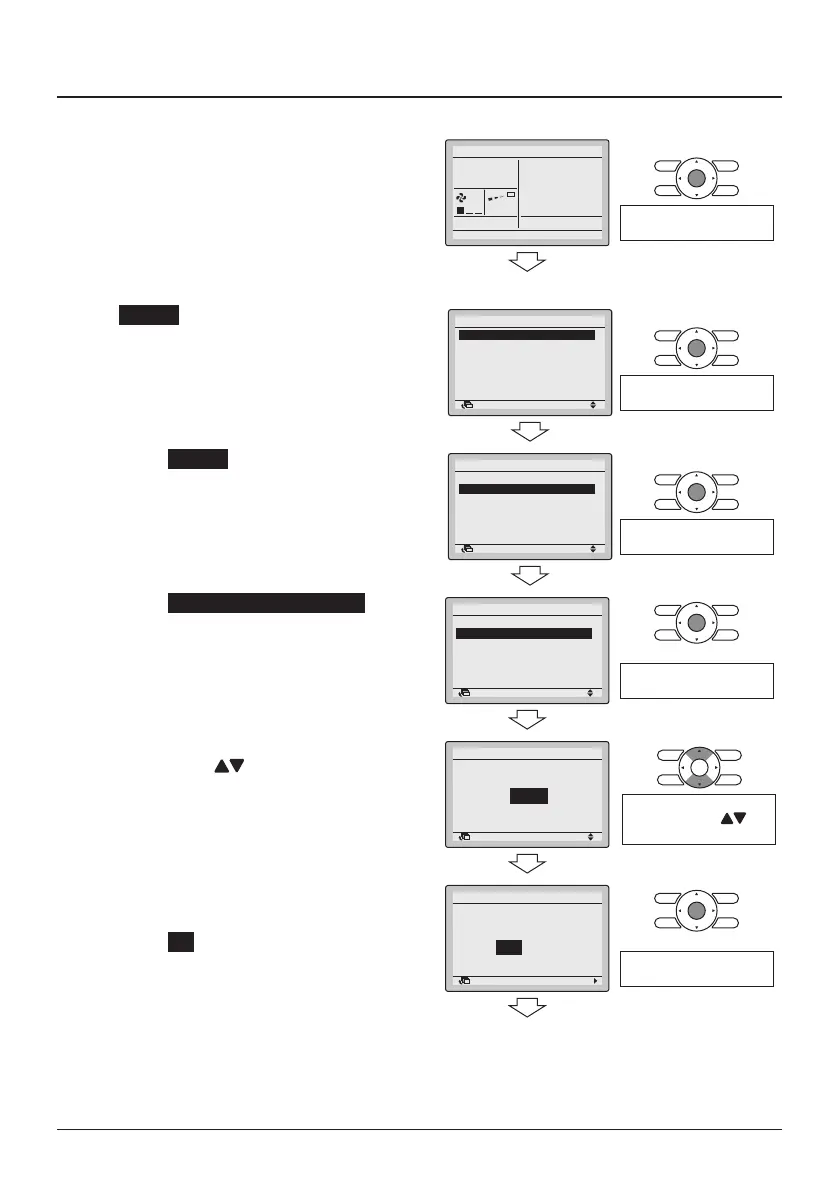
17-1 Press the Menu/Enter button in the
Basic screen. The Main menu is
displayed.
17-1
Cool
Set to
28°C
Press the Menu/Enter
button.
<Main menu>
17-2 Rotation can be made visible by
pressing the Menu/Enter button for 4
seconds.
17-2
SettingReturn
Airflow Direction
Individual Air Direction
Quick Start
Ventilation
Energy Saving Options
Schedule
1/2Main Menu
Press the Menu/Enter
button for 4 seconds.
17-3 Select Rotation and press the Menu/
Enter button. The "Rotation" menu is
displayed.
17-3
SettingReturn
Lock Function
Rotation
Airflow Direction
Individual Air Direction
Quick Start
Ventilation
1/3Main Menu
Press the Menu/Enter
button.
17-4 Select Rotation Cycle Time Setting
and press the Menu/Enter button.
The "Rotation" screen is displayed.
17-4
SettingReturn
Enable/Disable
Rotation Cycle Time Setting
Rotation
Press the Menu/Enter
button.
17-5 Select the desired rotation cycle time
by using the (Up/ Down)
buttons.
17-5
Rotation
Rotation Cycle Time Setting
SettingReturn
24 hr
Change the rotation cycle
time by using the (Up/
Down) buttons.
17-6 Press the Menu/Enter button. The
conrmation screen is displayed.
17-7 Select Yes and press the Menu/
Enter button. The settings are
entered and the Basic screen
returns.
17-6
17-7
NoYes
Rotation
Save the settings?
SettingReturn
Press the Menu/Enter
button.
<Basic screen>



 To Next Page