Installation Manual EDUS721438
68 BRC1E73
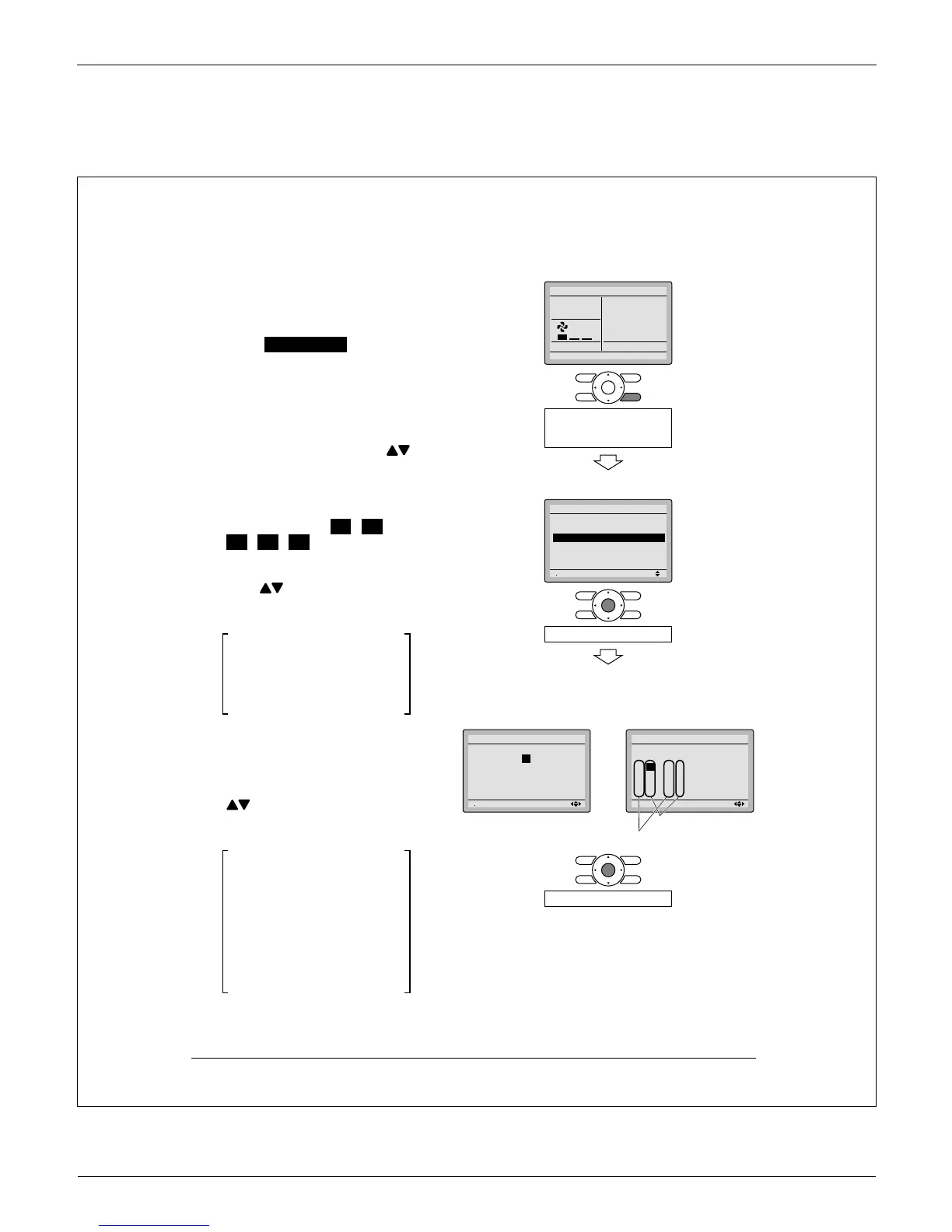
5.6 Field Settings
3P243521-7L
English 13
Field Settings6.
6-1 Press and hold Cancel button for
4 seconds or longer.
Service settings menu is
displayed.
Select 6-2 Field Settings in the
Service Settings menu, and
press Menu/OK button.
Field settings screen is dis-
played.
Highlight the mode, and select
6-3
desired “Mode No.” by using
(Up/Down) button.
In the case of setting per indoor
6-4
unit during group control (When
Mode No. such as 20 , 21 ,
22 , 23 , 25 are selected),
highlight the unit No. and select
“Indoor unit No.” to be set by
using
(Up/Down) button.
(In the case of group setting, this
operation is not needed.)
In the case of individual setting
per indoor unit, current settings
are displayed. And, SECOND
CODE NO. “ - ” means no
function.
Highlight SECOND CODE NO. of
6-5
the FIRST CODE NO. to be
changed, and select desired
“SECOND CODE NO.” by using
(Up/Down) button. Multiple
identical mode number settings
are available.
In the case of setting for all
indoor units in the remote
control group, available
SECOND CODE NO. is
displayed as “ ∗ ” which means
it can be changed.
When SECOND CODE NO. is
displayed as “ - ”, there is no
function.
<Basic screen>
16-
Set temperature
28
°C
Fan
ReturnPress the menu button
Press and hold Cancel
button for 4 seconds or
longer during backlight lit.
<Service settings menu screen>
26-
Setting
1/3
Service Settings
Test Operation
Maintenance Contact
Field Settings
Energy Saving Options
Prohibit Function
Min Setpoints Differential
Press Menu/OK button.
<Service settings screen>
In the case of individual
setting per indoor unit
In the case of group total
setting
36-
46-
56-
Unit No
0
1
–
01
5
–––
9
–––
13
–––
2
–
02
6
–––
10
–––
14
–––
3
–
01
7
–––
11
–––
15
–––
Field Settings
0
–
01
4
–––
8
–––
12
–––
Setting
Mode
20
36-
56-
Mode
10
Unit No
0
1
–
5
–––
9
–––
13
–––
2
–
6
–––
10
–––
14
–––
3
–
7
–––
11
–––
15
–––
Field Settings
0
–
01
4
–––
8
–––
12
–––
Setting
Press Menu/OK button.
FIRST CODE (SW) NO.
SECOND CODE NO.



 To Next Page