Installation Manual EDUS721438
76 BRC1E73
5.12 Language
3P243521-7L
English 21
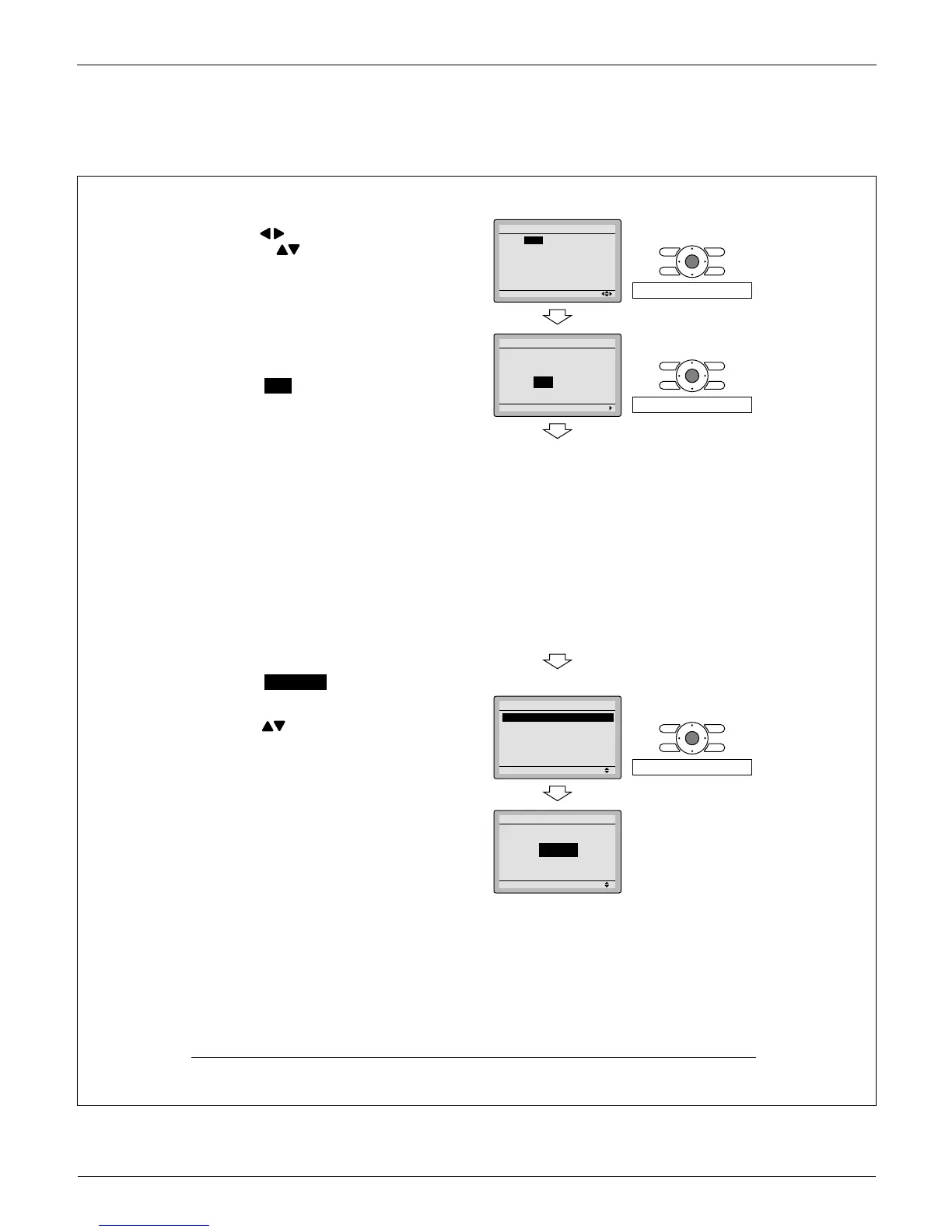
11-3 Select year, month, day and time by
using (Left/Right) button and set
by using (Up/Down) button in the
date & time screen. Press and hold the
button for continuous change of the
numeric value.
Day of the week is set automatically. ∗
Press
11-4 Menu/OK button.
Setting confi rmation screen is displayed.
Select 11-5 Yes and press Menu/OK
button.
Setting details are saved and basic
screen returns.
If power outage exceeds 48 hours, ∗
reset is needed.
Language12.
12-1 Press Menu/OK button in the basic
screen.
Main menu is displayed.
Select Language in the main menu,
press Menu/OK button.
Press
12-2 (Up/Down) buttons to select
Language on the language screen.
English/Français/Español
Press Menu/OK button.
311-
411-
Setting
Year 2015
Month 1
Day 1
Thursday
12:00
A
Date & Time
Press Menu/OK button.
511-
Setting
Save the settings?
Date & Time
Yes No
Press Menu/OK button.
<Basic screen>
<Basic screen>
<Main menu screen>
112-
Setting
Main Menu
Language
3/3
Press Menu/OK button.
212-
Setting
Language
English



 To Next Page