EDUS721438 Operation Manual
BRC1E73 29
3P243520-7N
English 25
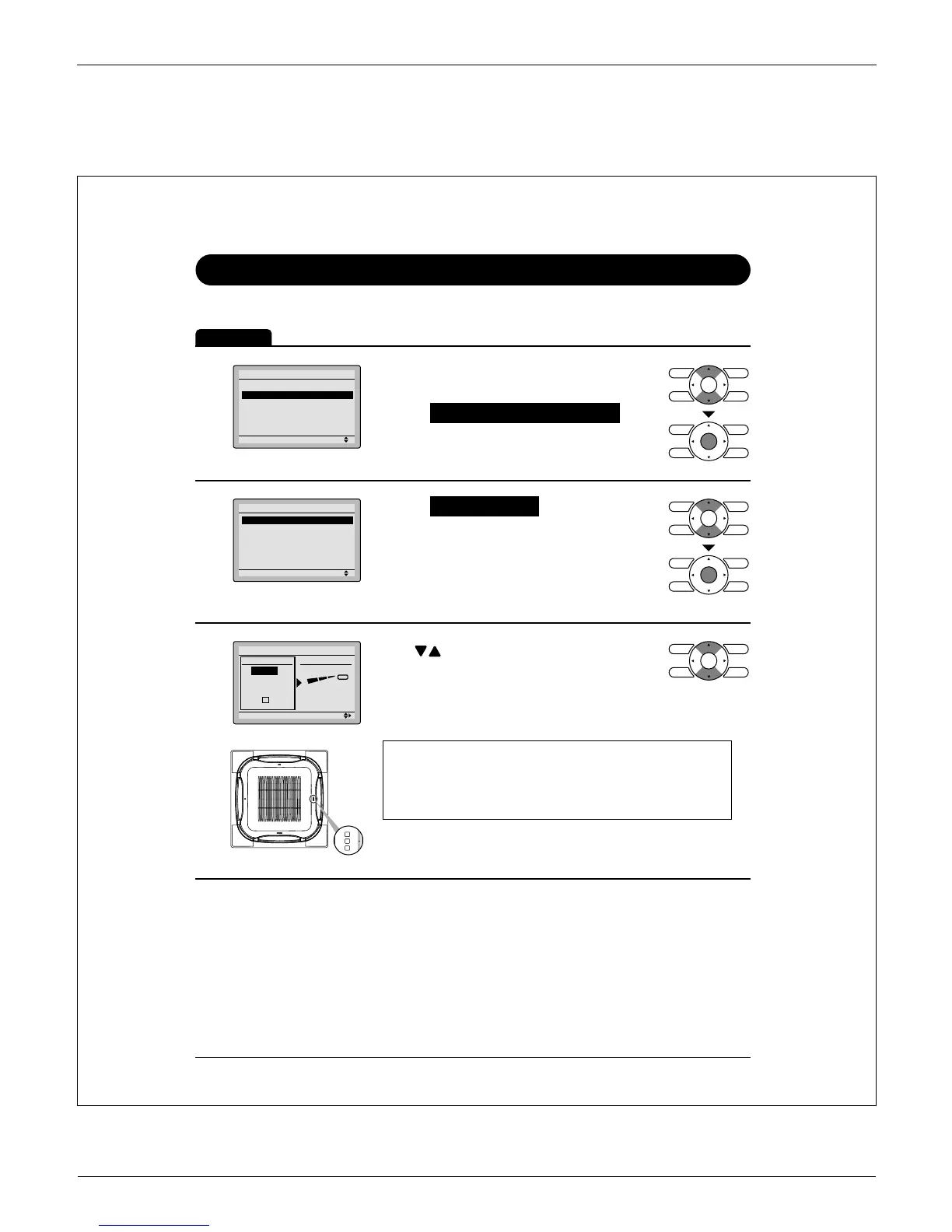
Individual Airfl ow Direction
Louver Setting
Operation
1
Setting
Main Menu
Airflow Direction
Individual Airflow Direction
Ventilation
Schedule
Off Timer
Celsius / Fahrenheit
1/3
Display the main menu screen. Ɣ
(See page 22.)
Select Ɣ Individual Airfl ow Direction and
press Menu/OK button.
2
Setting
Individual Airflow Direction
Louver Setting
Louver Setting List
Reset All Louvers Position
Select Ɣ Louver Setting and press
Menu/OK button.
3
No Ind Set
Outletmark
Unit 0
Louver Setting
Direction
Outlet
Setting
Use Ɣ buttons to select the unit and
outlet mark.
Maximum 16 units for each group (unit 0 Ɣ
till 15) can be selected.
Note
In case of four outlets (cassette type), you can control each
one of the four louvers individually (the following marks are
beside each air outlet: Ƒ, ƑƑ, ƑƑƑ, ƑƑƑƑ).



 To Next Page