11 | Configuration
Installer reference guide
47
FTXTP-M_FTXTP-N
Daikin room air conditioner
4P728168-4 – 2023.03
11 Configuration
11.1 To set a different channel of the indoor unit infrared signal receiver
In case 2 indoor units are installed in 1 room, different addresses for 2 user
interfaces can be set.
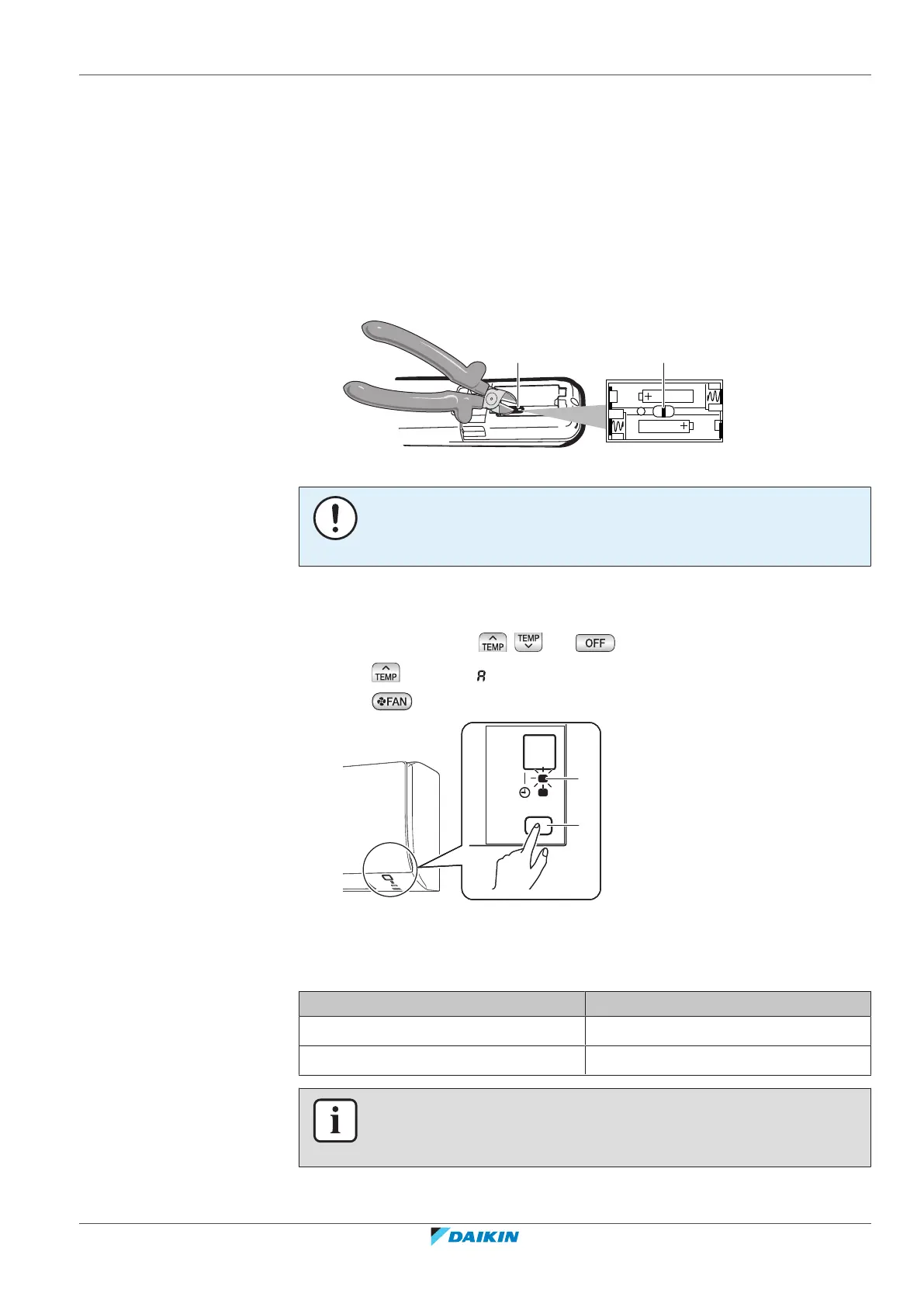
1 Remove the batteries from the user interface.
2 Cut the address jumper.
a Address jumper
NOTICE
Be careful NOT to damage any of the surrounding parts when cutting the address
jumper.
3 Turn the power supply on.
Result: The flap of the indoor unit will open and close to set the reference position.
4 Press simultaneously , and .
5 Press and select .
6 Press to confirm selection.
a Operation lamp
b Indoor unit ON/OFF switch
7 Press the indoor unit ON/OFF switch while the operation lamp is blinking.
Jumper Address
Factory set default 1
After cutting jumper 2
INFORMATION
If the setting could NOT be completed while the operation lamp was blinking, repeat
the setting process from the beginning.



 To Next Page