DHOS-CS-IM-2107004D 30
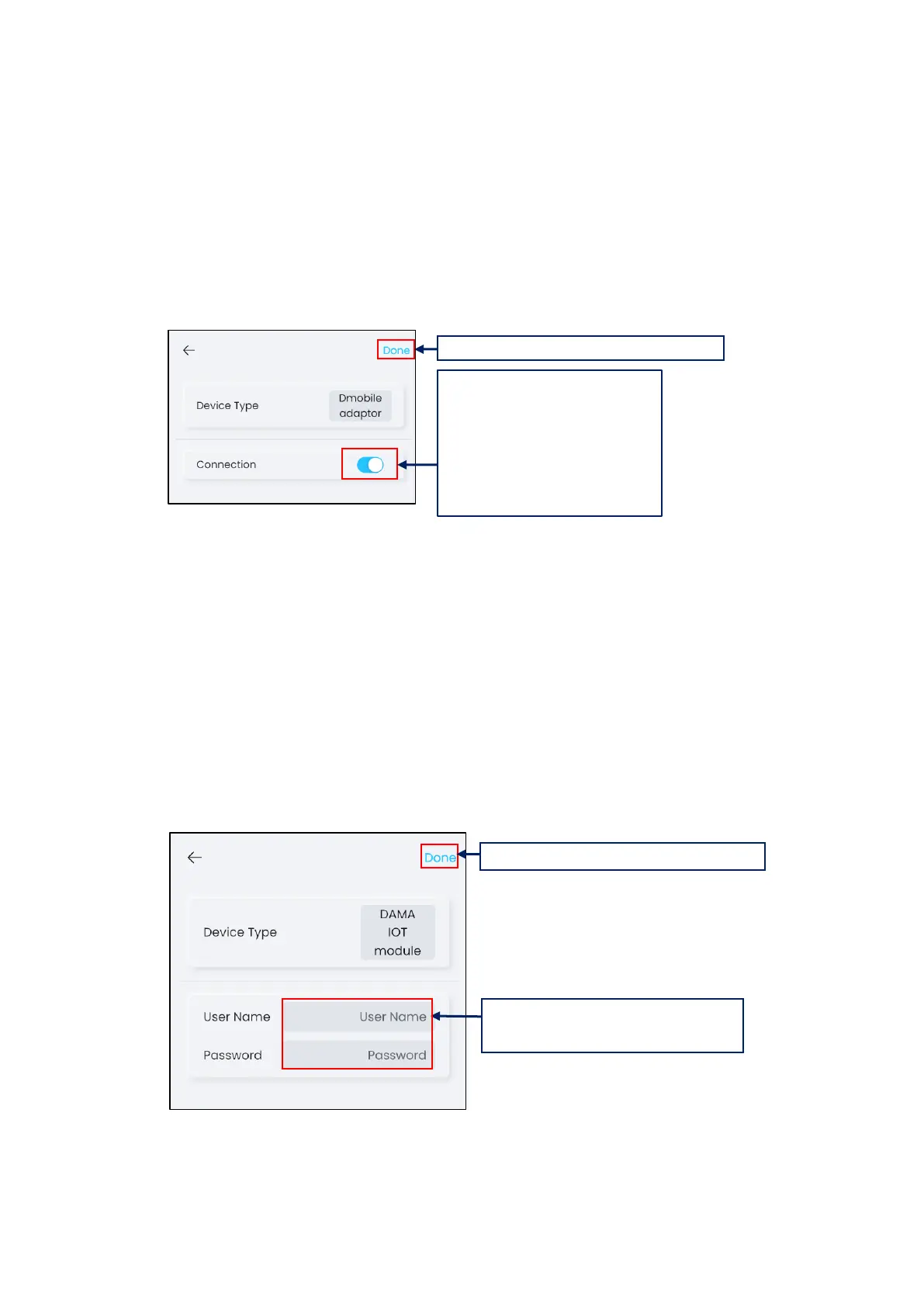
3.6.5 Configuring for D-Mobile Adaptor
D-Mobile Adaptor is the WiFi control for residential air-conditioning units.
To connect D-Mobile adaptor to Reiri for Home (Lite Version), the D-Mobile adaptor has to
be connected to the same LAN with Reiri for Home (Lite Version). If D-Mobile is set to
enable, all D-Mobile adaptor connected to the same LAN will be connected to Reiri for Home
(Lite Version) automatically.
3.6.7 Configuring for DAMA IOT Module
DAMA IOT Module is the Wi-Fi control module for residential air-conditioning units from
DAMA factory.
Refer to DAMA IOT module manual to setup the module.
Confirm the DAMA cloud login account and password after registration. Reiri for Home (Lite
Version) will connect to the DAMA modules linked with the account.
*NOTE: Internet access MUST be available when DAMA IOT Module is used.
1. Tap to enable (slider point on
the right side) to enable D-Mobile
once the adaptors are connected
to the network.
Tap again to disable (Slider point
on the left side).



 To Next Page