EasyManua.ls Logo

Daikin DCPH02 - Clear Account

Daikin DCPH02
44 pages
Print Icon
To Next Page IconTo Next Page
To Previous Page IconTo Previous Page
Loading...
DHOS-CS-IM-2107004D 38
3.9 Clear Account
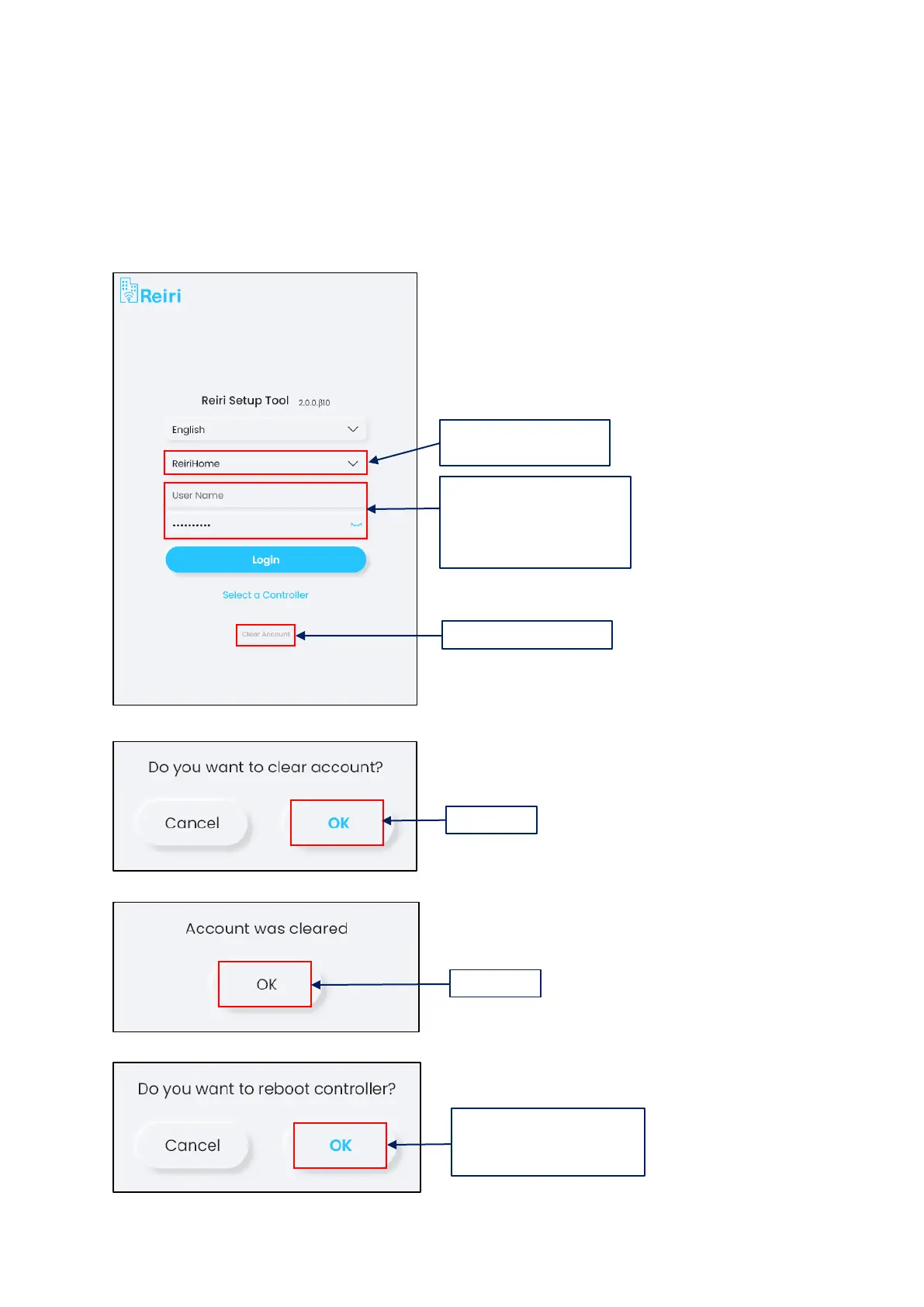
Clear Account function is used for clearing all accounts created by the user. This is to be used in a
scenario where user forgets all the account usernames and passwords. This tool can be found on the
main page of the setup tool when you open the software (refer to the picture below).
Note: this function only available on the Windows version.
1. Select controller to
remove account.
2. Leave blank in the
username and type the clear
account password (which
will be given separately).
3. Tap “Clear Account.
4. Tap “OK.
5. Tap “OK.
6. The account has been
cleared. To load completely,
tap “OK” to reboot.

Related product manuals