DHOS-CS-IM-2107004D 4
1.4.2 Environmental conditions
Make sure that the installation environment meets the following conditions:
• The ambient temperature must be 0 to 40°C.
• The ambient humidity must be 85% RH or less (without condensation).
• There must be no electromagnetic disturbance.
2. Connection
2.1 Connecting to DCPA01 through RS485
2.1.1 Terminals Location and Conceptual Diagram
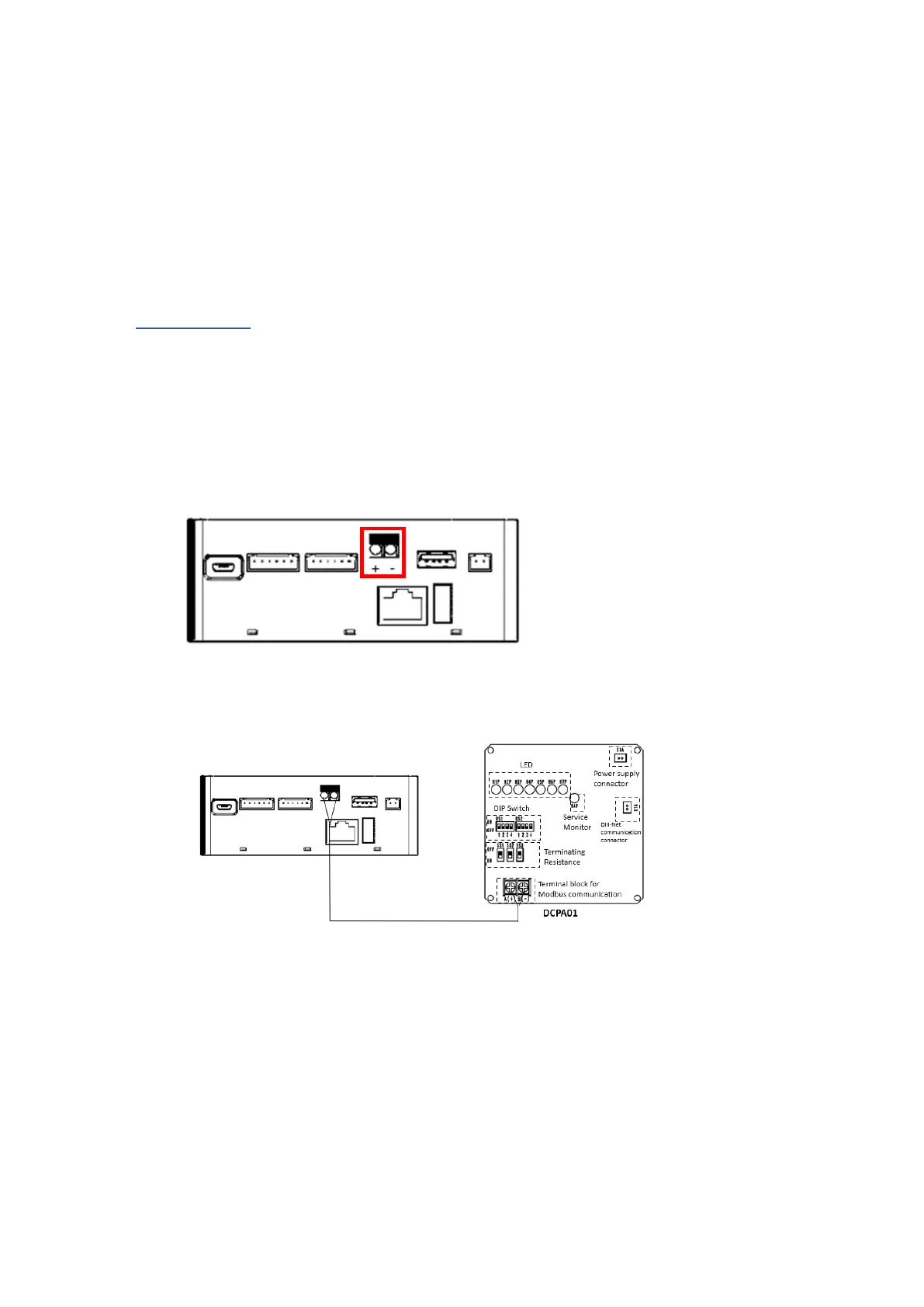
Connect DCPA01 to Reiri for Home (Lite Version) via the RS485 port. Take note of the
polarity of the ports as shown in the picture below.
Connect a pair of RS485 cable from the port to DCPA01 (Adaptor for Reiri).
For more detailed description on DCPA01, please refer to “Chapter 4. DCPA01 Installation (to
ODU/IDU).”
2.1.2 Requirements that must be met
Cable type: Twisted pair cables
• Core thickness: AWG 24 (0.25 mm
2
) to AWG 18 (0.75mm
2
)
• When using a shielded cable, connect only one end of each shield wire to the ground
• The maximum wire distance must be kept to 200m



 To Next Page