DHOS-CS-IM-2107004D 6
Part 2 – Reiri Controller Setup
3. Reiri Controller Setup
Reiri controller will need to be activated and configured before user can utilize the application. The
controller setup will be performed in the following steps.
1) Hardware preparation for the controller – Chapter 3.1
2) Set up and activate controller using Reiri Setup Tool app – Chapter 3.2
3) Connection settings for compatible devices. – Chapter 3.3
Perform hardware settings on devices and settings to connect the devices to Reiri controller.
4) Customise the point attributes for the projects. – Chapter 3.4
Please ensure that the following ports are opened before setting up Reiri controller: 80 / 52000 /
52001 / 52010 / 123.
3.1 Hardware Preparation
Reiri controller will require connection to router with internet access for activation.
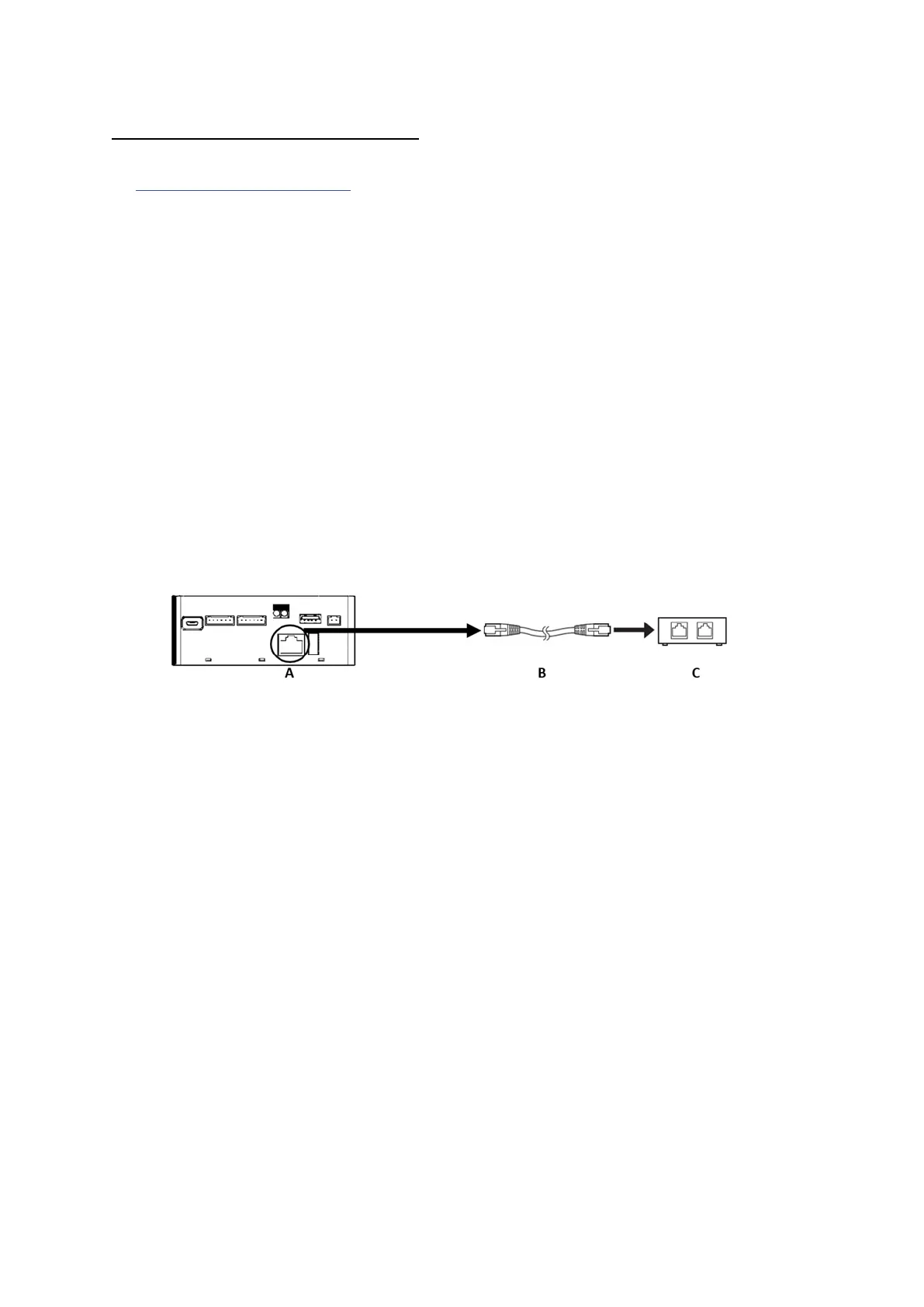
Connect Reiri controller to router as shown below:
Connect the one end of LAN cable to LAN port, the other end to the router.
A - RJ45 LAN Port
B - CAT 5/5e/6 LAN cable
C – Router (connecting to the internet)
Connect the provided USB A to the Micro USB power cable to the power adaptor and switch
on the power.



 To Next Page