Si04-960 Removal of Fan Rotor / Fan Motor
Removal Procedure 17
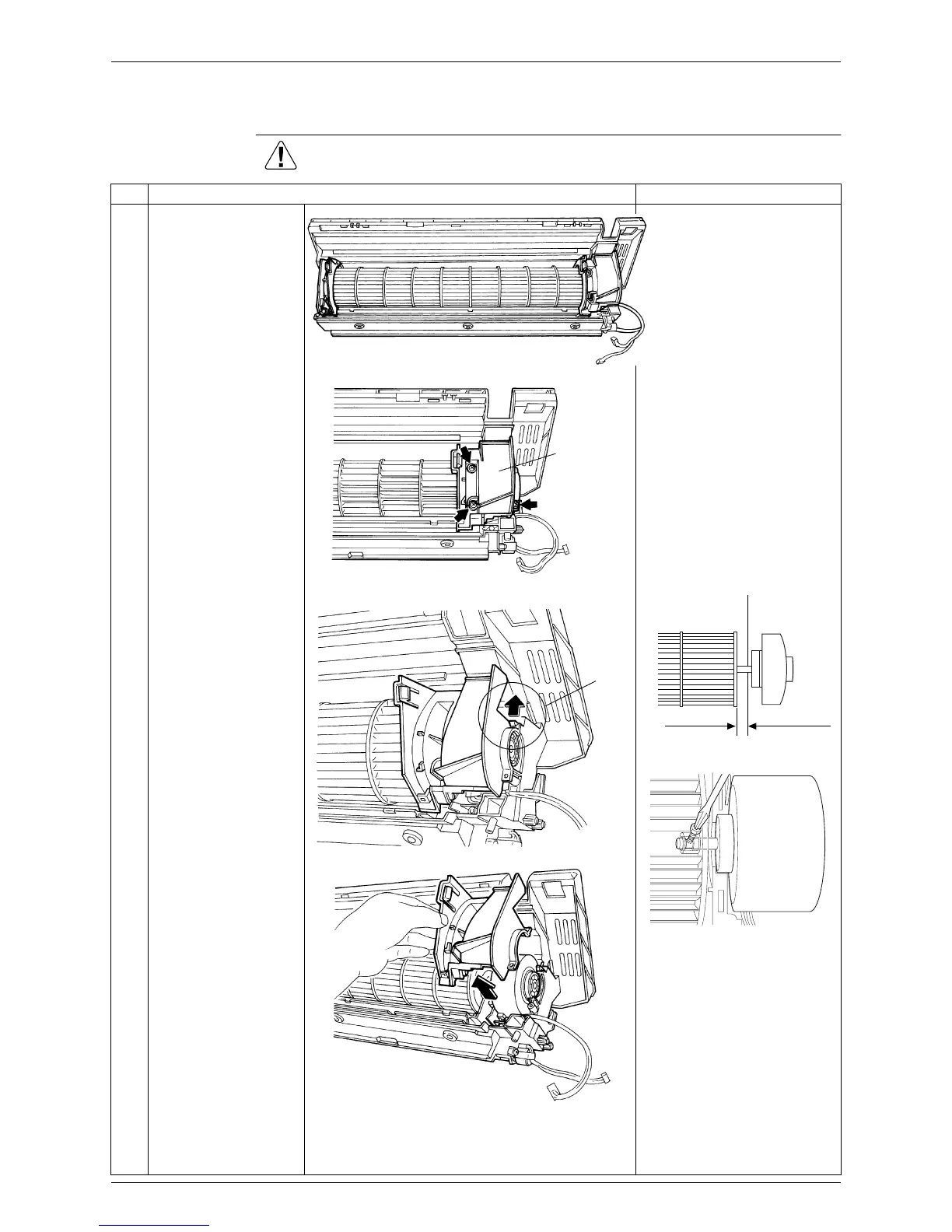
7. Removal of Fan Rotor / Fan Motor
Procedure Warning Be sure to wait 10 minutes or more after turning off all power supplies
before disassembling work.
Step Procedure Points
1
To remove right side
panel, remove the 3
screws.
When reassembling the fan
motor, provide as much as
5mm of play between the
side face of the rotor and the
bottom frame.
Insert the fan motor approx.
5mm
Tighten the screw until it
stops. Then give the screw
one more turn.
Rotate the fan rotor and
confirm the fan motor and
the fan rotor are installed
appropriately.
Tighten the screw
completely if appropriate.
If not appropriate, go back to
.
2
Disengage the hook
and remove the right
side panel.
(R2556)
(R2557)
Right side
panel
5mm
Side face of rotor
(R2808)
Side face of
bottom frame
(R9582)
Hook
(R2558)
(R2559)


 To Next Page